

TYPO3 _assets: How to Migrate typo3conf/ext Assets in Composer
Development


Step-by-step guide to TYPO3 site configuration: config.yaml, languages, base variants, error handling, static routes, site settings and Site Sets in TYPO3 v13.4 and v14.
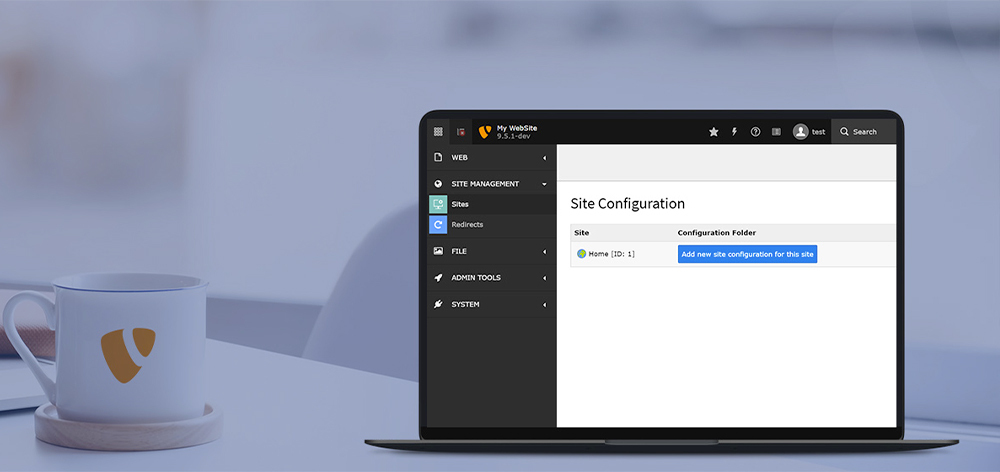
Since TYPO3 v9, every site in a TYPO3 installation has its own site configuration with a dedicated backend module. This step-by-step guide (for beginners to advanced level) covers TYPO3 site config from its start in TYPO3 v9 and v10 up to the current LTS versions TYPO3 v13.4 and v14.
TYPO3 Site Management provides a modern way to manage single or multi-site installations. Available since TYPO3 v9, site configuration defines each site’s entry point, languages, routing, error handling, and other essential settings. For projects that also use AI, the AI Foundation for TYPO3 adds a central backend layer for configuring providers, contexts, permissions, budgets, and AI workflows.
IMHO, TYPO3 site configuration is one of the late but great decisions by the TYPO3 community.
TYPO3 has already had multi-site and multi-language features for 20+ years, but with lots of complicated and unstructured tons of TypoScript, RealURL configuration, Domain records, etc.
But now, using the TYPO3 site backend module, we have structured and easy-to-use management of the TYPO3 sites.
Are you a beginner or intermediate level at TYPO3 site configuration? Then, get ready to gain in-depth knowledge about TYPO3 site management.
Short answer: TYPO3 site configuration is a YAML file, config/sites/<identifier>/config.yaml, that defines each site’s root page, base URL, languages, error pages, static routes and route enhancers. You edit it in the backend under Site Management > Sites (TYPO3 v13) or Sites > Setup (TYPO3 v14), or directly in the file under version control.
Key takeaways
rootPageId), a base and at least one language with languageId: 0.settings.yaml. A settings block in config.yaml is ignored once that file exists.dependencies; since TYPO3 v14.1 sets can also provide route enhancers.typo3Language, iso-639-1 and direction are deprecated since TYPO3 v12.3. TYPO3 derives them from locale.Tested with / valid for: TYPO3 v13.4 LTS and v14 (14.3 LTS), checked against TYPO3 Explained: Site handling.
Updated: November 2026
The classic way configured domains, languages and error pages with TypoScript, domain records and the RealURL extension. The modern way, available since TYPO3 v9, keeps all of this in one site configuration per site.
For the beginners, It’s important to understand what’s a major difference, how do you manage TYPO3 sites in past and current TYPO3 versions.
In older version of TYPO3, to manage TYPO3 site, you did manage configuration like
// Domain-wise condition to setup each site’s URL
config.baseURL = https://yoursite.com/

// Add languages from the Backend
Web > List > Languages & Domains

// Third-party RealURL TYPO3 extension configuration for each Language & Domains
EXT:realurl

// Add Custom Configuration for Error-handling into RealURL
404 handling

// And so many other tasks
Manually or using third-party TYPO3 extensions for Robots, Google XML Sitemap, etc.But, don’t worry about TYPO3 v9, TYPO3 now has an all-in-one centralized solution to manage everything ;)
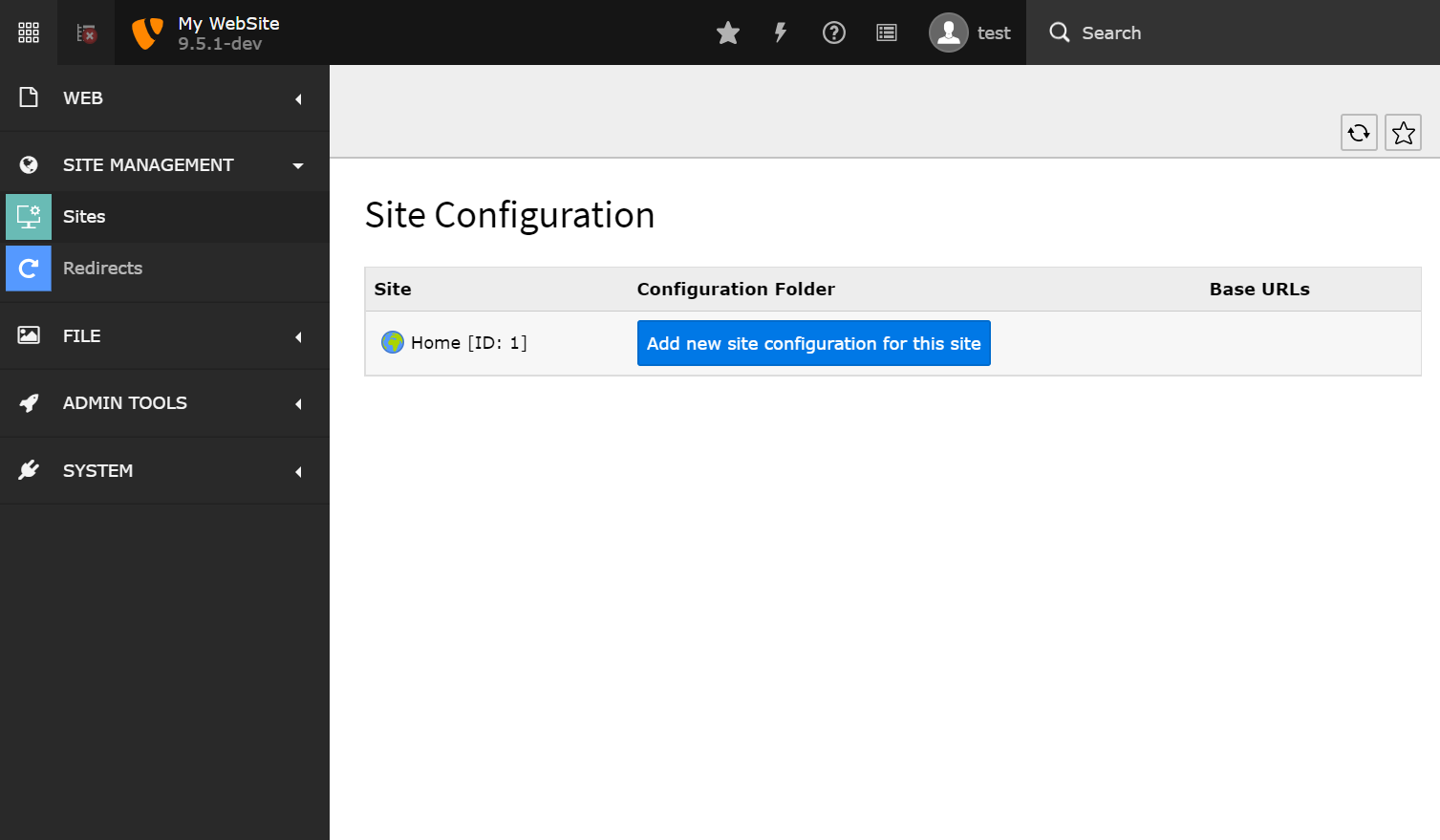
Go to Site Management > Sites (TYPO3 v14: Sites > Setup) > And just click-n-go configuration
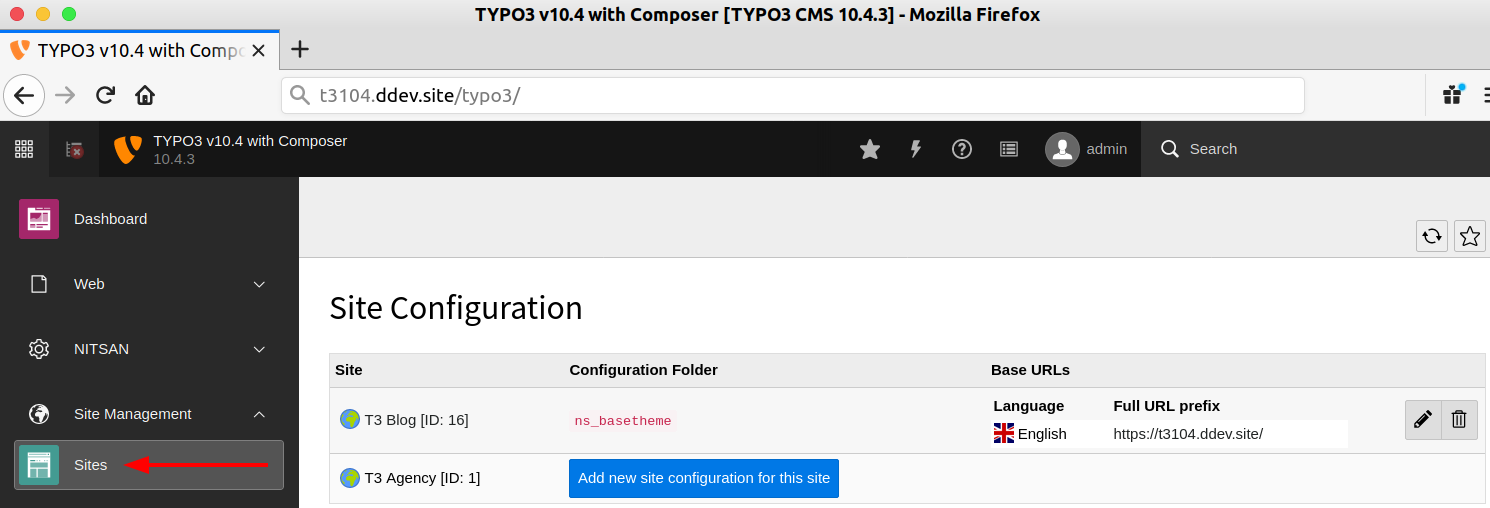
TYPO3 v13 added Site Sets and a site settings editor, and TYPO3 v14 renamed the backend modules and merged site settings into the site setup. The core keys of config.yaml (base, rootPageId, languages, errorHandling, routes, routeEnhancers) are documented the same way for both versions.
Configuration/Sets/<Name>/ of an extension or site package. Read more in What are Site Sets in TYPO3 v13?| Method | Works in versions | Best for | Caveat |
Site configuration (config.yaml) | v9 and later, incl. v13.4 and v14 | Base URL, languages, error pages, static routes, route enhancers | Stored in the file system, not the database; keep it in version control |
Site settings (settings.yaml) | v12.1 and later; typed definitions v13.1 and later | Per-site values for PHP, TypoScript, page TSconfig and Fluid | Saving in the settings editor rewrites the file and removes imports |
Site Sets (dependencies) | v13.1 and later; route enhancers v14.1 and later | Reusable TypoScript, page TSconfig and settings for several sites | With an extra sys_template record, disable its Clear flags or the set TypoScript is cleared |
| sys_template record with TypoScript constants | All versions; optional since v13.1 | Legacy projects and overrides in a page tree | Applied after site and set TypoScript, so it can override them |
| Domain records, RealURL, TypoScript conditions | Projects before TYPO3 v9 | Reading and migrating old projects | Site handling makes sys_domain records unnecessary |
Whether your project starts from one of our TYPO3 templates or from a custom site package, the site configuration is where base URL, languages and Site Sets come together. Sources: Site sets (v13.4), Site settings (v12.4).
This file defines one site with English as default language and German under /de/. Save it as config/sites/main/config.yaml (Composer mode) and adjust rootPageId and base. The keys typo3Language, iso-639-1 and direction are not needed, TYPO3 derives them from locale.
rootPageId: 12
base: 'https://example.org/'
websiteTitle: Example
languages:
  - title: English
    enabled: true
    languageId: 0
    base: /
    locale: en_US.UTF-8
    navigationTitle: English
    flag: gb
  - title: Deutsch
    enabled: true
    languageId: 1
    base: /de/
    locale: de_DE.UTF-8
    navigationTitle: Deutsch
    flag: de
    fallbackType: strict
Source: Site handling basics (structure checked against the main and 12.4 docs).
As a TYPO3 administrator, you should have basic knowledge of how TYPO3’s site management works. Eg., Whenever you migrate TYPO3, you may require to eg., Change the domain.
Step 1. Login to TYPO3 Backend.
Step 2. Go to Site Management > Sites in TYPO3 v13 or Sites > Setup in TYPO3 v14 (see above screenshot)
Step 3. Edit a particular “TYPO3 Site” for each root page tree.
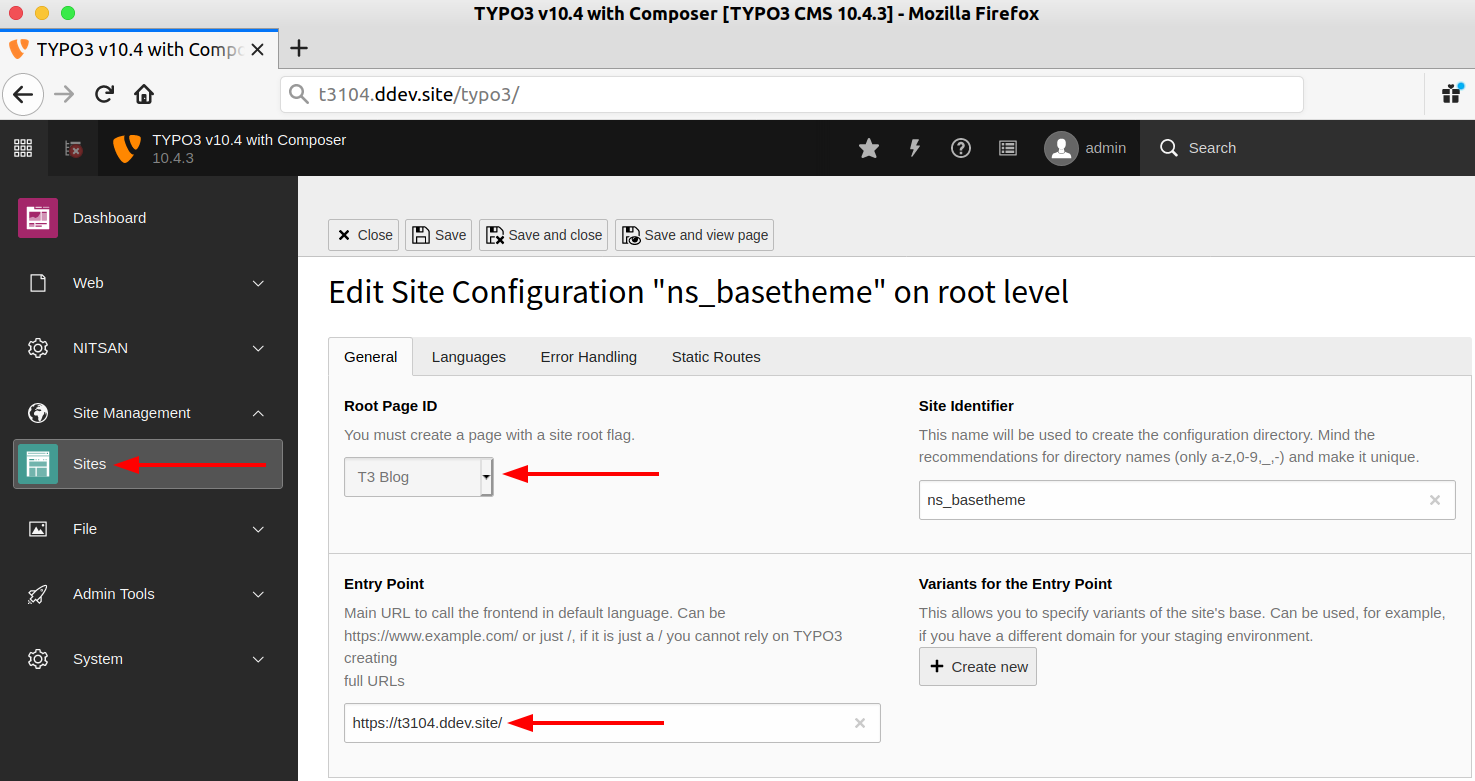
Step 4. You can change the Domain-URL into the “Entry Point” field.
That’s it! The whole site’s URL routing will work awesome ;)
One thing, I would like to say “Heartily Thanks to Dmitry Dulepov” for his dedicated work and support for the RealURL TYPO3 extension for a year. EXT:realurl was one of the great TYPO3 extensions and helped all past TYPO3 sites for URL Routing.
TYPO3 stores each site as a YAML file, config/sites/<identifier>/config.yaml in Composer-based installations or typo3conf/sites/<identifier>/config.yaml in Classic mode, and not in database tables. Add this folder to version control.
Good thing is that TYPO3 is one of the fastly accepting modern technologies, Thank God to ignore TypoScript, PHP, etc. For each TYPO3 site configuration, It’s used the most widely used YAML file structure.
About the location of the YAML file, Well depends!
// For TYPO3 Composer-Based
<project-root>/config/sites/<identifier>/

// For TYPO3 Non-Composer Project
<project-root>/typo3conf/sites/<identifier>/Here is the basic tutorial of TYPO3 config.yaml which is very self-explanatory and easy to understand ;) This minimal example only uses keys documented for TYPO3 v13.4 and v14.
# Composer: config/sites/main/config.yaml
# Classic mode: typo3conf/sites/main/config.yaml
# Keys documented for TYPO3 v13.4 LTS and v14
rootPageId: 1
base: 'https://example.org/'
websiteTitle: 'My TYPO3 Website'
dependencies:
  - typo3/fluid-styled-content
languages:
  - languageId: 0
    title: English
    enabled: true
    locale: en_US.UTF-8
    base: /
    navigationTitle: English
    hreflang: en-US
    flag: gb
  - languageId: 1
    title: Deutsch
    enabled: true
    locale: de_DE.UTF-8
    base: /de/
    navigationTitle: Deutsch
    hreflang: de-DE
    fallbackType: fallback
    fallbacks: '0'
    flag: de
errorHandling:
  - errorCode: '404'
    errorHandler: Page
    errorContentSource: 't3://page?uid=6'
routes:
  - route: robots.txt
    type: staticText
    content: |
      User-agent: *
      Disallow: /typo3/
      Sitemap: https://example.org/sitemap.xml
# Readable sitemap URL, requires the system extension EXT:seo
routeEnhancers:
  PageTypeSuffix:
    type: PageType
    map:
      /: 0
sitemap.xml: 1533906435It’s very easy, Either you can directly create a config.yaml OR you can quickly do it with click-n-go from TYPO3 backend.
Step 1. Go to Site Management > Sites (TYPO3 v14: Sites > Setup) > Click on “Add new site configuration for this site” button.
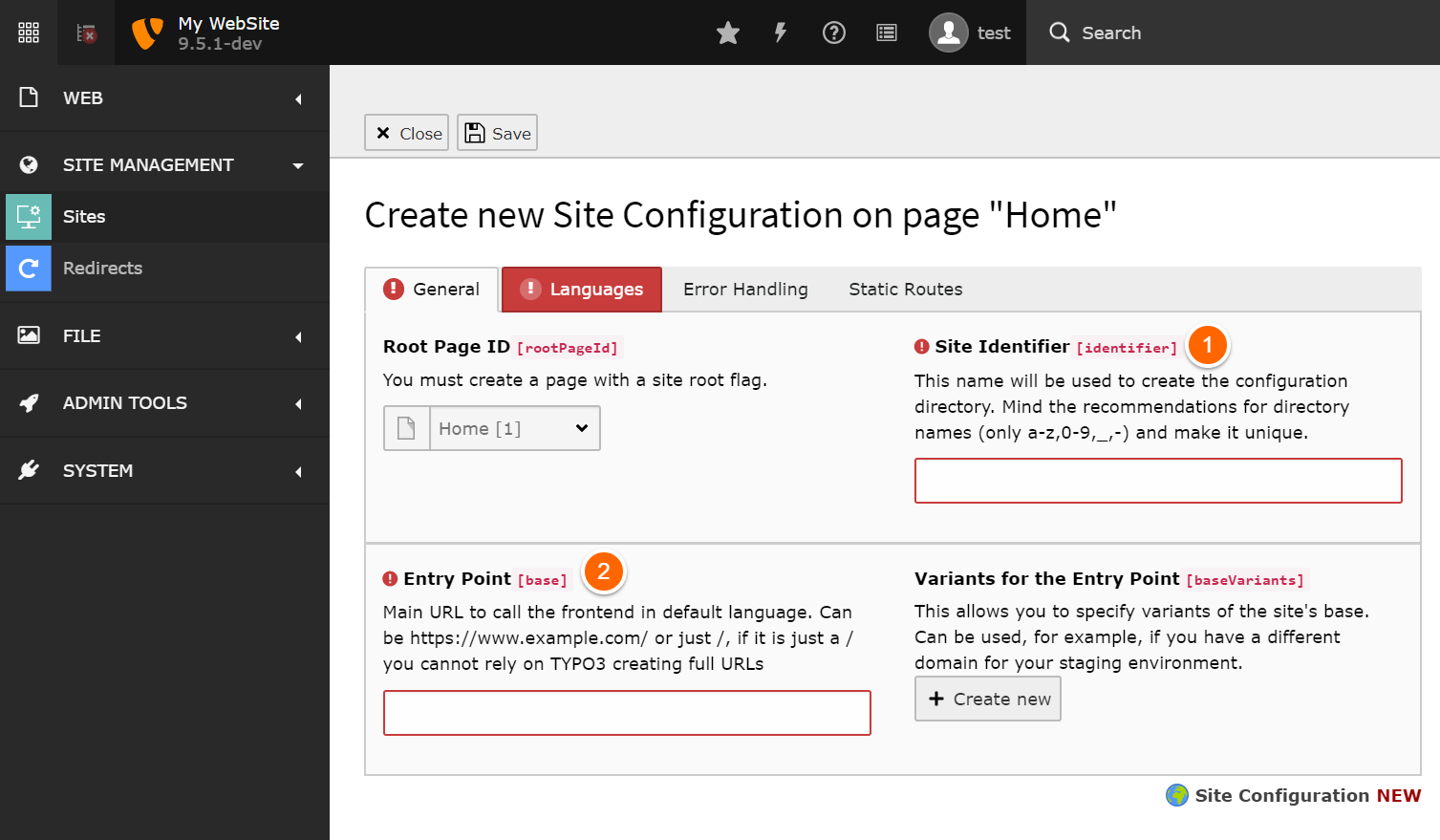
Step 2. Configure “Site Identifier” (just give any name) and “Entry Point” (your domain URL).
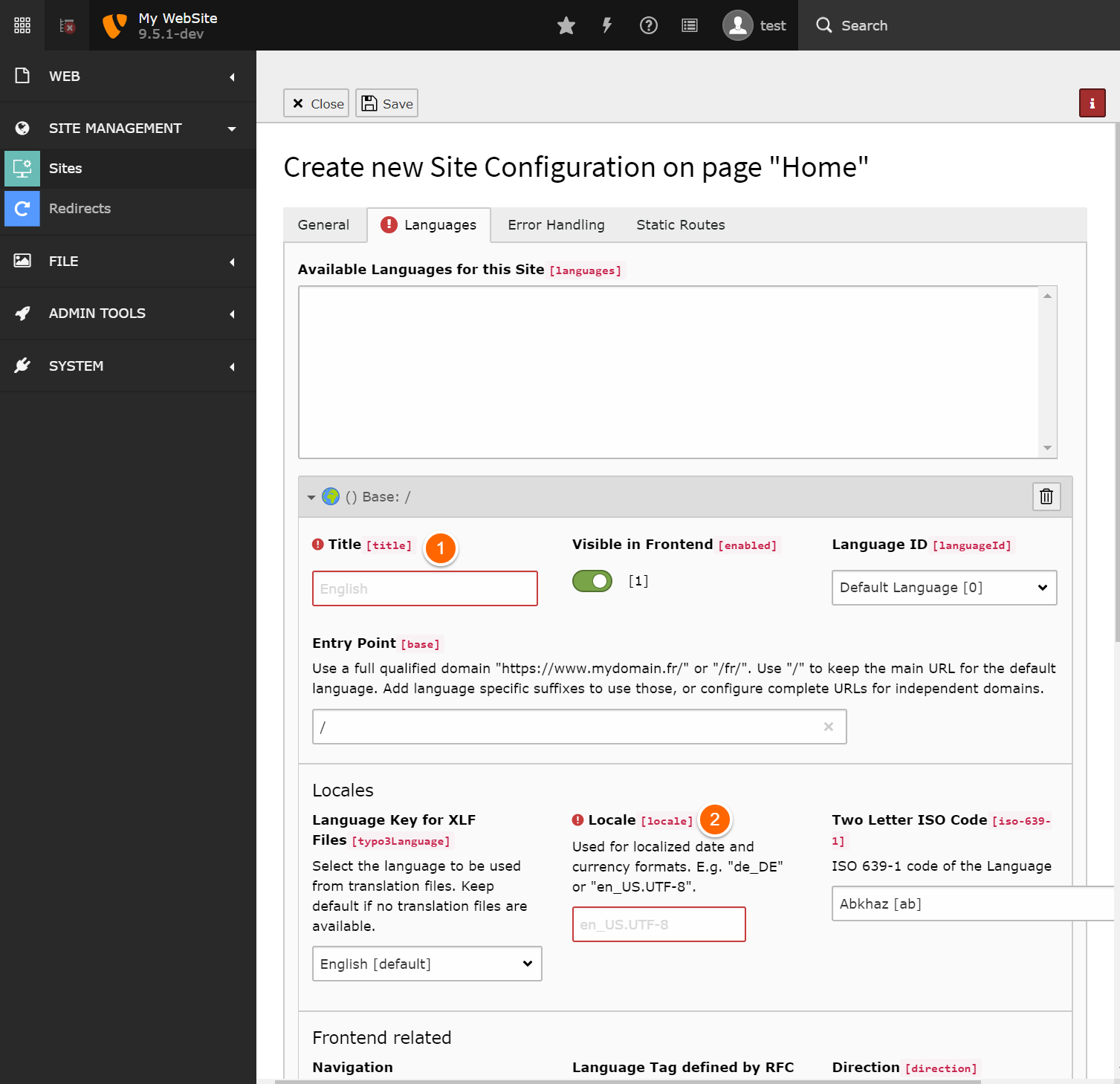
Step 3. Go to Languages Tab > At Least add one language with the “Title and Locale” field.
To manage multi-domain websites, You just need to add multiple sites for your every domain.
Also, the TYPO3 site configuration has an interesting field called “Base Variants” most important for different TYPO3 Context Environment.
Modern TYPO3 developers always set up different TYPO3 environments eg., Local server, Staging server, Production server. So, of course, every TYPO3 context has different URLs. You can easily configure it through baseVariants.
// config.yaml
rootPageId: 1
base: 'https://yourdomain.com/'
baseVariants:
  -
    base: 'https://yourdomain.local/'
    condition: 'applicationContext == "Development"'
  -
    base: 'https://staging.yourdomain.com/'
    condition: 'applicationContext == "Staging"'
  -
    base: 'https://testing.yourdomain.com/'
    condition: 'applicationContext == "Testing"'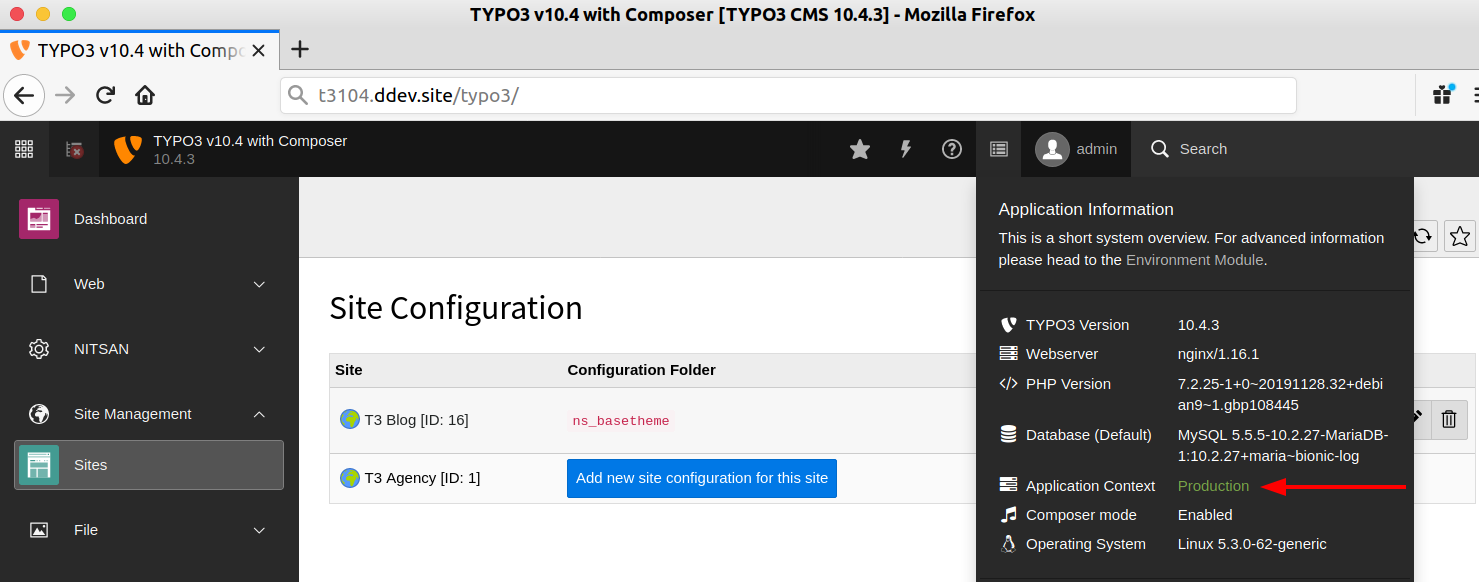
Let’s try to in-depth insight for each configuration and properties of config.yaml
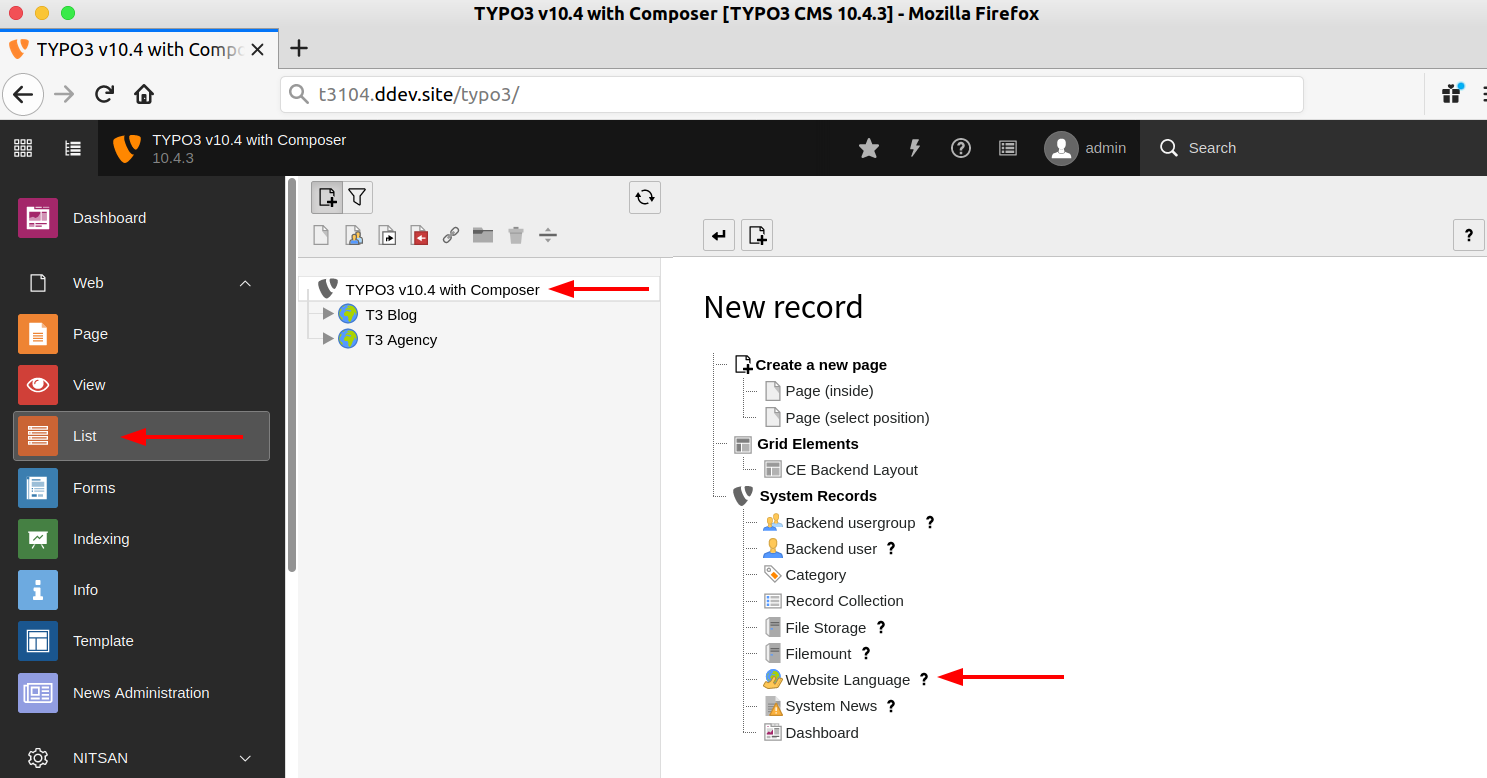
Step 1. Go to Web > List > Website Language. This step is only needed in old versions: since TYPO3 v11.3 the sys_language table is deprecated, and you create a language directly in the site configuration with “Create new language” or a preset.
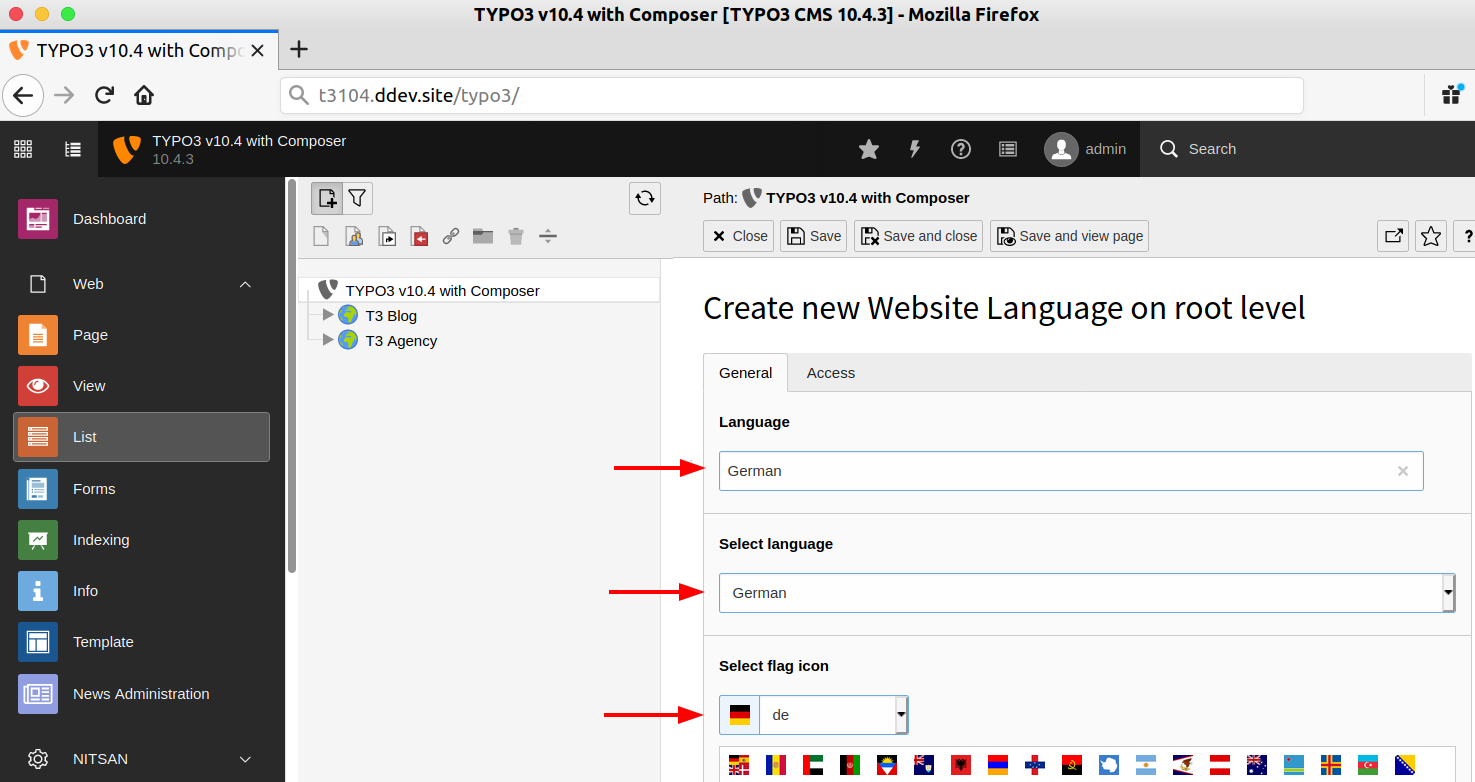
Step 2. Add your language with Language title, Choose a language, and language Flag. And of course, Click on the “Save” button ;)
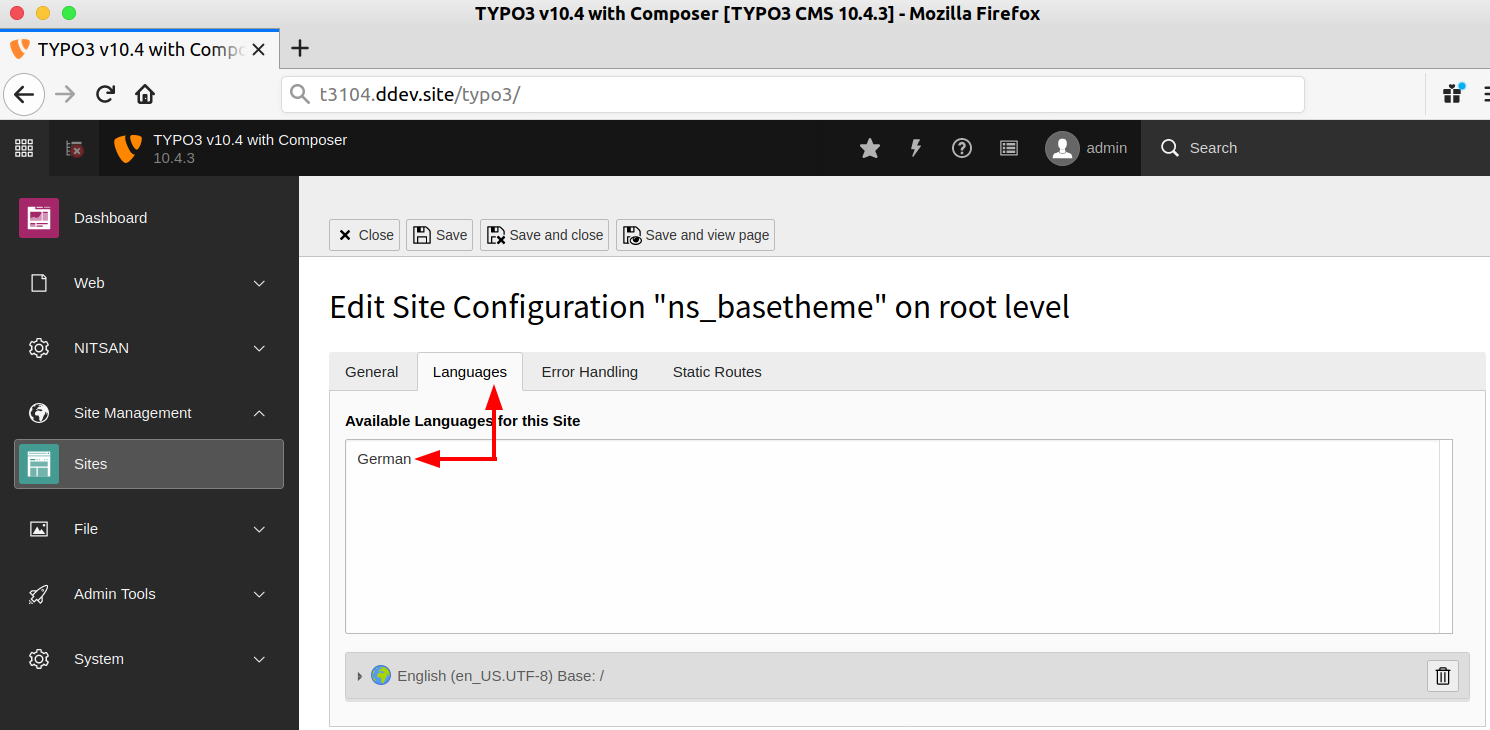
Step 3. Now, Go to Site Management > Sites > Edit your site configuration > Click on the “Languages” tab.
Step 4. Choose your added “Language”, and configure Language available options
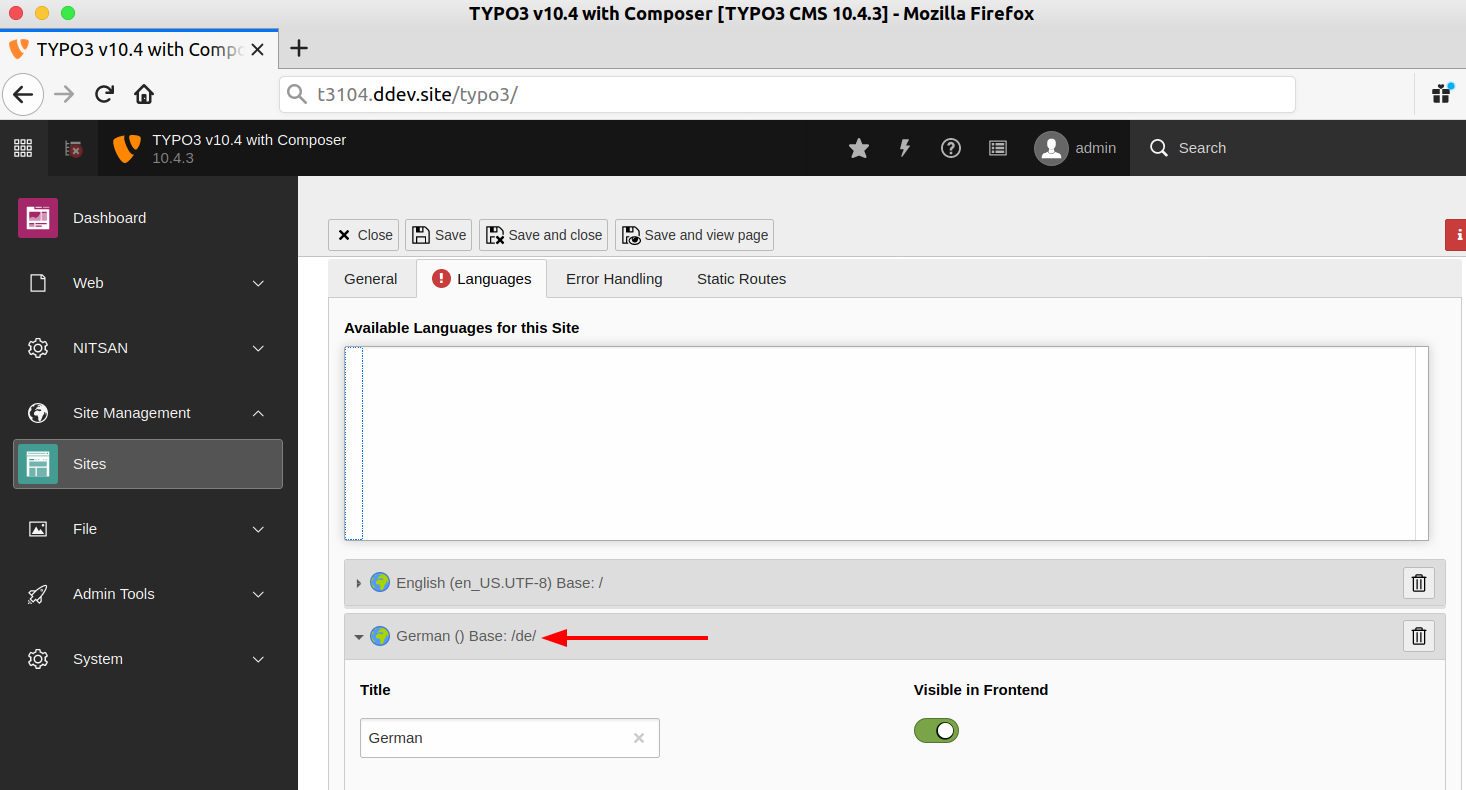
Take a look at your TYPO3 site config file, You will get another language too.
Of course, for every change you do not require to manually go to the TYPO3 backend site management module, You can simply make changes at config.yaml too.
# config.yaml (excerpt)
# typo3Language, iso-639-1 and direction are deprecated since TYPO3 v12.3
# and derived from locale, so they are not needed any more
base: 'https://t3104.ddev.site/'
rootPageId: 16
languages:
  - languageId: 0
    title: English
    enabled: true
    locale: en_US.UTF-8
    base: /
    navigationTitle: English
    hreflang: en-US
    flag: gb
  - languageId: 1
    title: German
    enabled: true
    locale: de_DE.UTF-8
    base: /de/
    navigationTitle: German
    hreflang: de-DE
    fallbackType: strict
flag: dePlan, translate and keep the languages of your TYPO3 site in sync, with an 18-page PDF guide and an Excel language sheet.
Do you want to configure TYPO3 error handling eg., 404 error, 403 error, etc?
Step 1. Go to Site Management > Sites > Choose your configuration.
Step 2. At the “Error Handling” tab, and click on the “Create new” button.
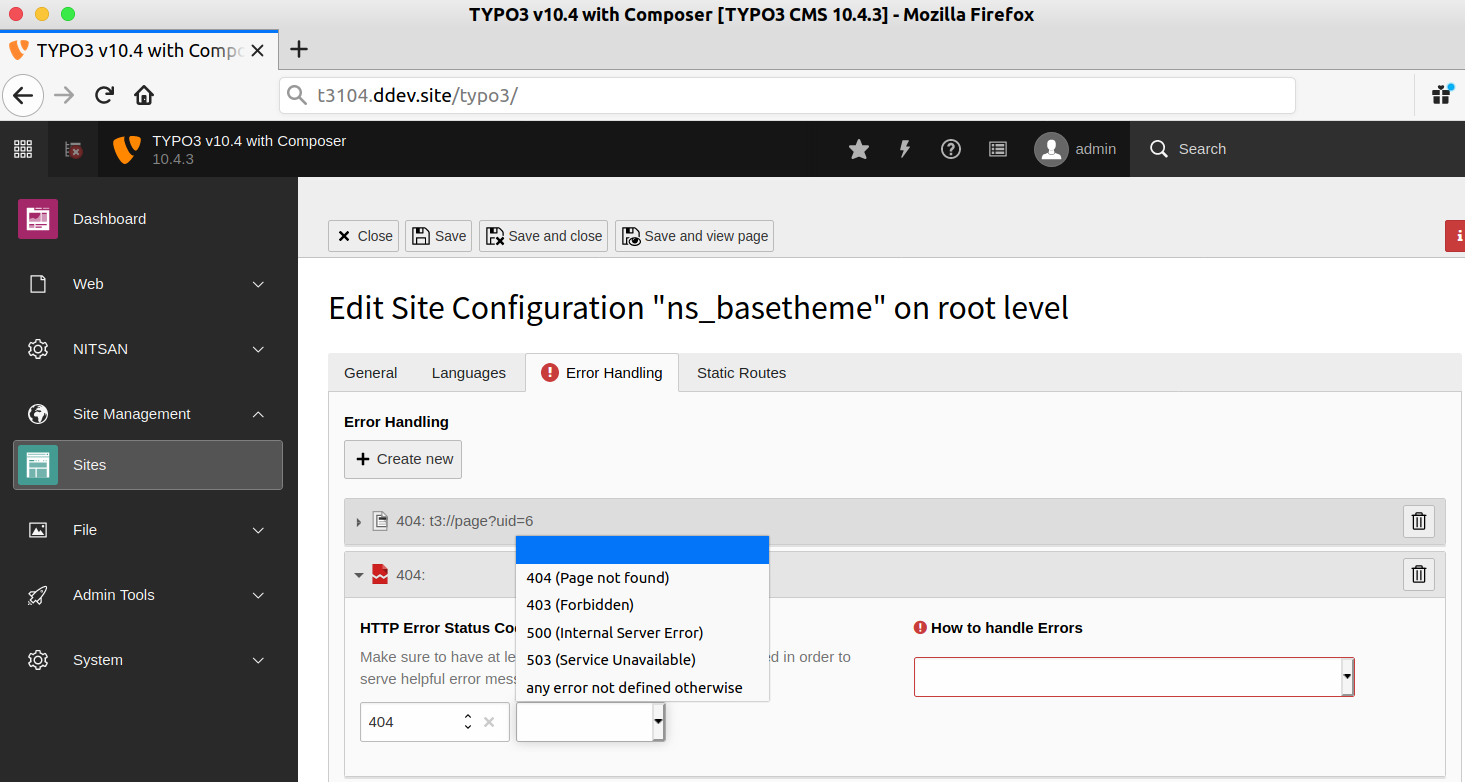
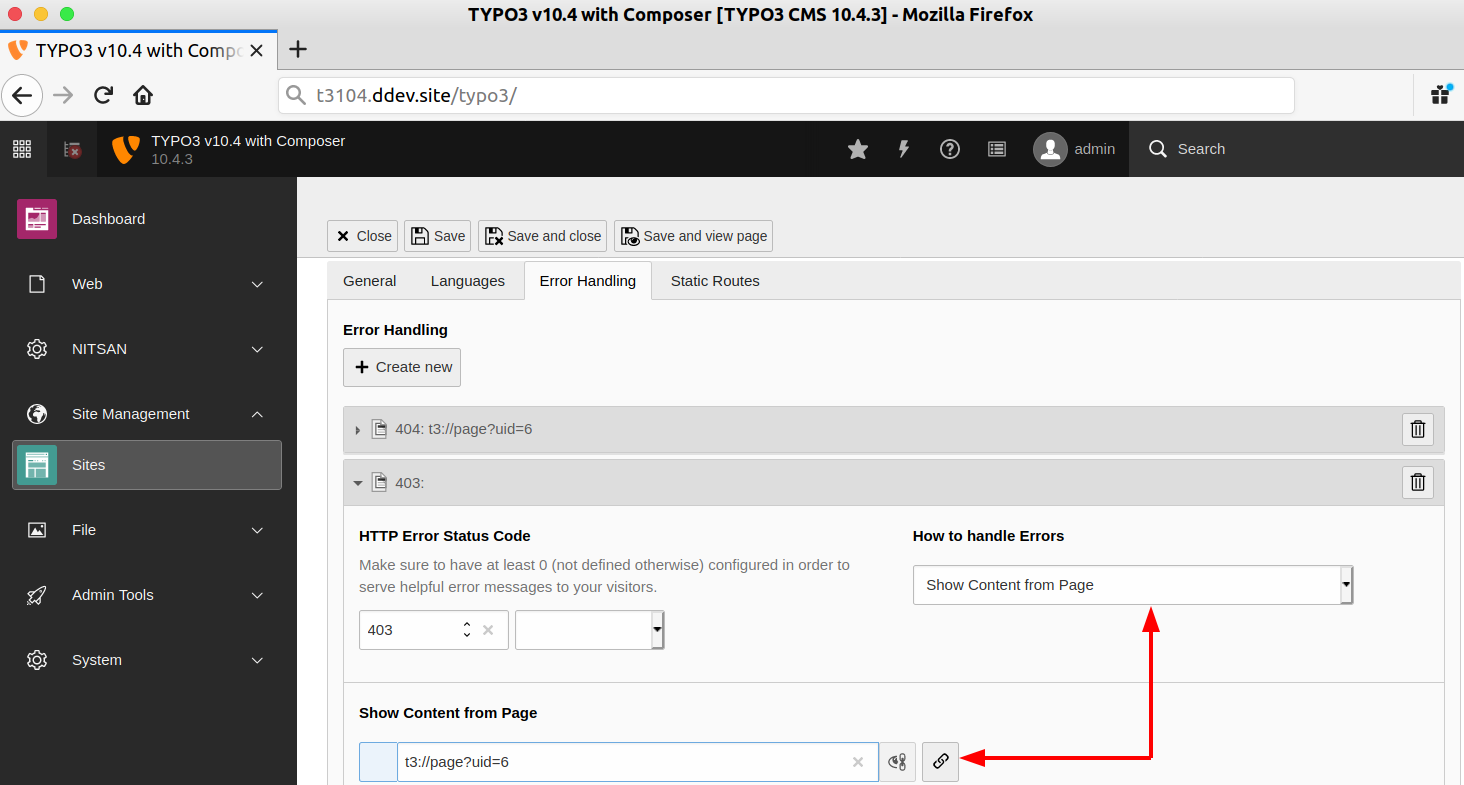
Step 3. Choose “HTTP Error Status Code” like “403”. And from choosing “Show content from page” from “How to handle Error” dropdown. Good thing is that you can also configure it through your Fluid templates as well as custom PHP class handler too.
Step 4. Select your 403-page error page from “Show Content from Page” (and, Save your config)
// config.yaml
base: 'https://t3104.ddev.site/'
errorHandling:
 -
   errorCode: '404'
   errorHandler: Page
   errorContentSource: 't3://page?uid=18'
 -
   errorCode: '403'
   errorHandler: Page
   errorContentSource: 't3://page?uid=6'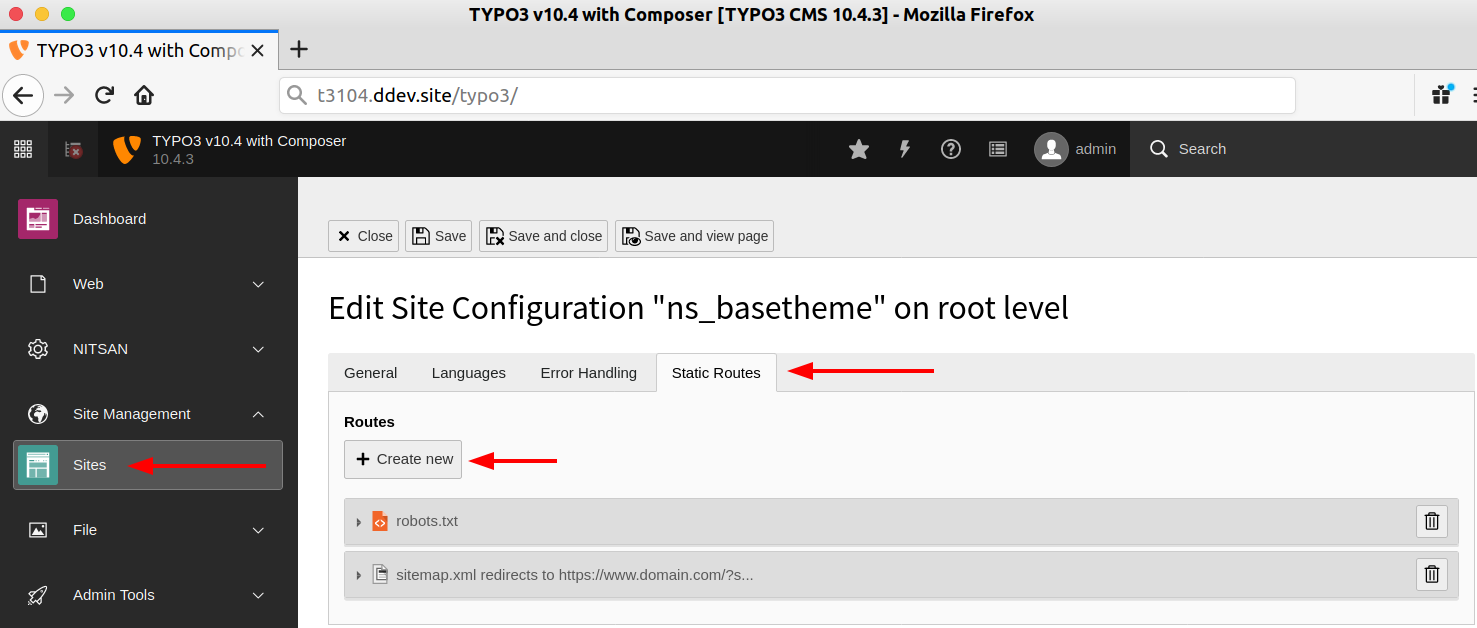
As just like Languages and Error-handling, You can easily configure TYPO3 Static routes like robots.txt, sitemap.xml, etc as below.
# config.yaml
base: 'https://t3104.ddev.site/'
routes:
  - route: robots.txt
    type: staticText
    content: |
      User-agent: *
      Disallow: /typo3/
      Sitemap: https://t3104.ddev.site/sitemap.xml
  # XML sitemap of EXT:seo (page type 1533906435)
  - route: sitemap.xml
    type: uri
    source: 't3://page?uid=1&type=1533906435'
  - route: favicon.ico
    type: uri
source: 't3://file?uid=77'Route enhancers in the routeEnhancers section of config.yaml turn extension parameters into readable URLs. Since TYPO3 v14.1, a Site Set can also ship them in route-enhancers.yaml; the site configuration still takes precedence (TYPO3 Explained: Site sets).
TYPO3 Route Enhancer - https://news.typo3.com/article/how-to-route-enhancer-for-news
To make better TYPO3 site management, I would like to share a few tips and tricks ;)
From your favorite Terminal command-line tools, For now, you can list and see insight details of each configured TYPO3 site
# Composer-based installation
vendor/bin/typo3 site:list

# Classic mode installation (without Composer)
typo3/sysext/core/bin/typo3 site:list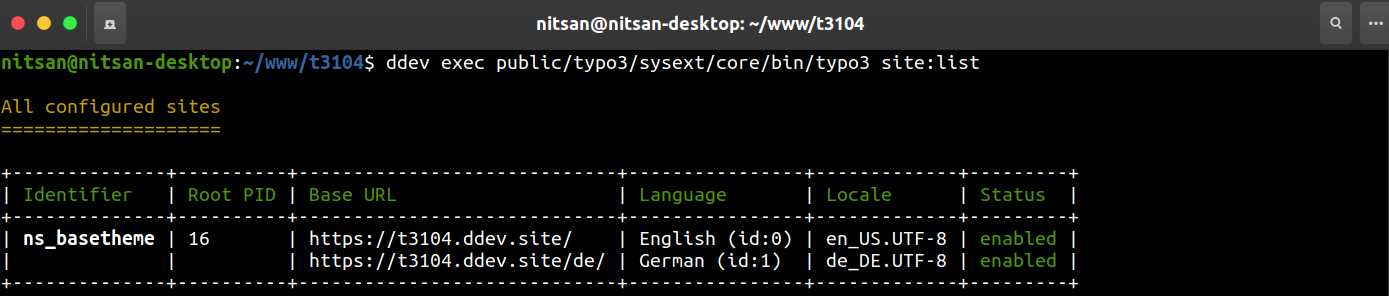
# Syntax: site:show <identifier>
# Composer-based installation
vendor/bin/typo3 site:show youridentifier

# Classic mode installation (without Composer)
typo3/sysext/core/bin/typo3 site:show youridentifier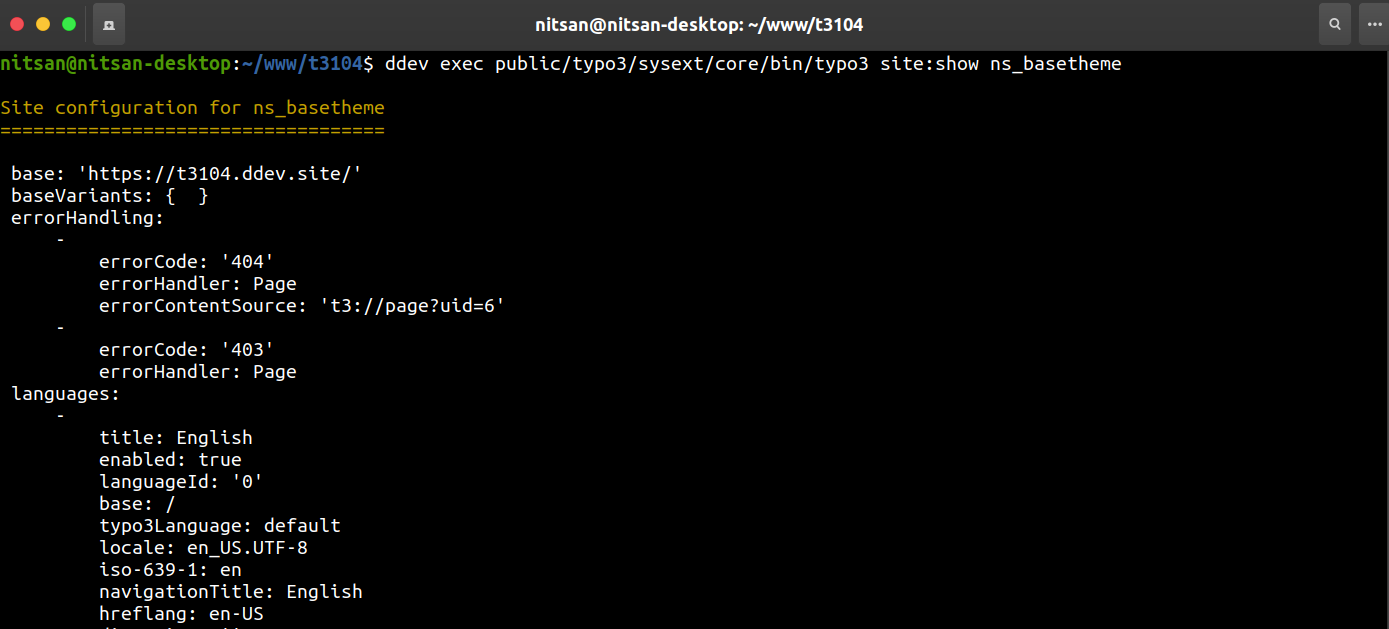
You can easily access each configuration of your TYPO3 site to our awesome TypoScript ;) Here are some examples;
// TypoScript Setup Examples

// Get Site URL
page.10 = TEXT
page.10.data = site:base
page.10.wrap = My Site’s URL: |

// Get Custom Configuration
page.20 = TEXT
page.20.data = site:customConfigKey.nested.value
page.20.wrap = My Custom Configuration: |

// Get Title
page.30 = TEXT
page.30.data = siteLanguage:navigationTitle
page.30.wrap = Title of Current Page: |

// Get Direction Properties of Site
page.40 = TEXT
page.40.dataWrap = The language direction is {siteLanguage:direction}We can also easily get TYPO3 sites each configuration at your Fluid Templates using “SiteProcessor” Data Processing.
// TypoScript Setup
tt_content.mycontent.20 = FLUIDTEMPLATE
tt_content.mycontent.20 {
    file = EXT:myextension/Resources/Private/Templates/ContentObjects/MyContent.html

    dataProcessing.10 = TYPO3\CMS\Frontend\DataProcessing\SiteProcessor
    dataProcessing.10 {
        as = site
    }
}

// Call Properties at your Fluid-Template
<p>{site.rootPageId}</p>
<p>{site.configuration.someCustomConfiguration}</p>For TYPO3 site configuration, TYPO3 provides a special function to check as TypoScript condition, Let’s see how with a practical example;
// TypoScript Setup
[site("identifier") == "someIdentifier"]
    page.30.value = foo
[global]

[siteLanguage("locale") == "de_CH.UTF-8"]
    page.40.value = bar
[global]Do you want to call TYPO3 site configuration properties to your Extbase/Fluid TYPO3 Extension? Here are some of the examples to get TYPO3 configuration properties to Extbase PHP.
<?php
// Valid for TYPO3 v13.4 LTS and v14
use Psr\Http\Message\ServerRequestInterface;
use TYPO3\CMS\Core\Site\SiteFinder;

final class MySiteService
{
    public function __construct(
        private readonly SiteFinder $siteFinder,
    ) {}

    public function example(ServerRequestInterface $request): void
    {
        // Current site and site language of the request
        $site = $request->getAttribute('site');
        $siteLanguage = $request->getAttribute('language');

        // Find sites independent of the current request
        $siteByIdentifier = $this->siteFinder->getSiteByIdentifier('main');
        $siteByPageId = $this->siteFinder->getSiteByPageId(42);
        $allSites = $this->siteFinder->getAllSites();

        // Read values from the Site object
        $rootPageId = $site->getRootPageId();
        $configuration = $site->getConfiguration();
        $setting = $site->getSettings()->get('myExtension.backgroundColor');
        $errorHandler = $site->getErrorHandler(404);
        $german = $site->getLanguageById(1);
    }
}Environment Variables in site configuration allows setting placeholders for configuration options that get replaced by environment variables specific to the current environment.
// config.yaml
base: 'https://%env(BASE_DOMAIN)%/'

// Import file of ENV-based configuration
resource: 'MyFile_%env("foo")%.yaml'Yep, you can easily import your custom extension’s YAML configuration to TYPO3 site config, using “import”.
// config.yaml
base: 'https://t3104.ddev.site/'
rootPageId: 16
imports:
    - { resource: 'EXT:youextensionkey/Configuration/Sites/yourextension.yaml' }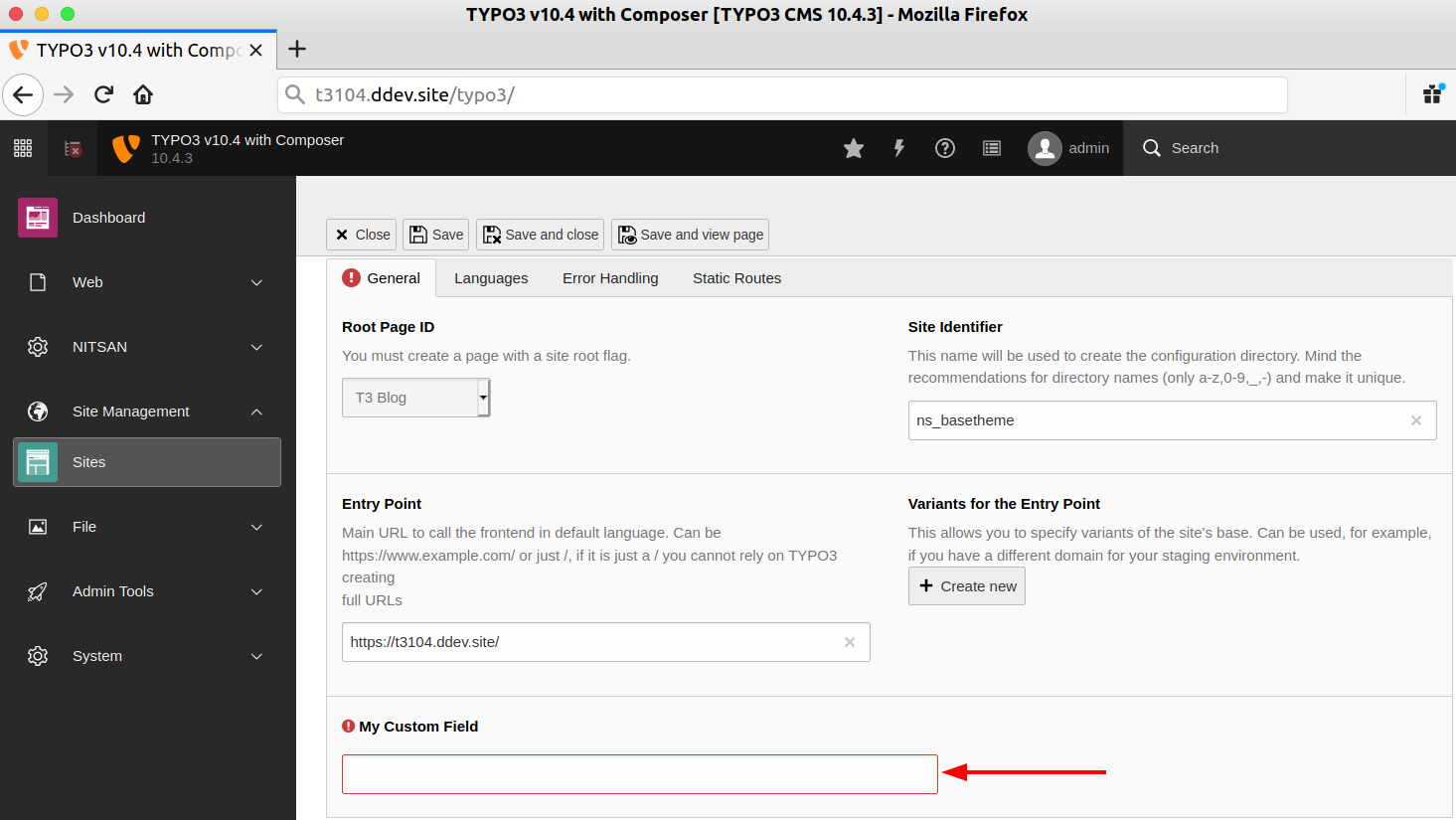
Sure, you can easily extend site configuration with your custom TYPO3 extension. Eg., If I can add a custom field, configure custom options to backend the TYPO3 site management module, etc.
Note: TYPO3 Explained marks extending the site configuration form as experimental. Only simple fields such as input are supported (Extending site configuration).
// config.yaml
rootPageId: 1
base: https://yoursite.com
myProject:
    recordStorage: 12

// Access it via the API:
$site->getConfiguration()['myProject']['recordStorage']
// Create: Configuration/SiteConfiguration/Overrides/sites.php
<?php
// Configure a new simple required input field to the site
$GLOBALS['SiteConfiguration']['site']['columns']['myCustomField'] = [
'label' => 'My Custom New Field',
'config' => [
'type' => 'input',
'eval' => 'required',
],
];
// And add it to showitem
$GLOBALS['SiteConfiguration']['site']['types']['0']['showitem'] = str_replace(
'base,',
'base, myCustomField, ',
$GLOBALS['SiteConfiguration']['site']['types']['0']['showitem']
);These extensions were written for earlier TYPO3 versions, so check the TER or Packagist entry for TYPO3 v13 and v14 support before you install one. The TYPO3 community offers only a few TYPO3 extensions, but let me list down some of the useful TYPO3 extensions for the TYPO3 site configuration.
One and only Helmut - A great contributor to the TYPO3 community developed a cool TYPO3 solution to make next-level TYPO3 context environment configuration.
Features
Step 1. Install TYPO3-config-handling Package
// CLI Composer Install
composer req helhum/typo3-config-handlingStep 2. Composer.json
{
    "extra": {
        "helhum/typo3-config-handling": {
            "settings": "config/settings.yaml",
            "dev-settings": "config/dev.settings.yaml",
            "override-settings": "config/override.settings.yaml",
            "install-steps": "config/setup/install.steps.yaml"
        }
    }
}Step 3. Update Composer
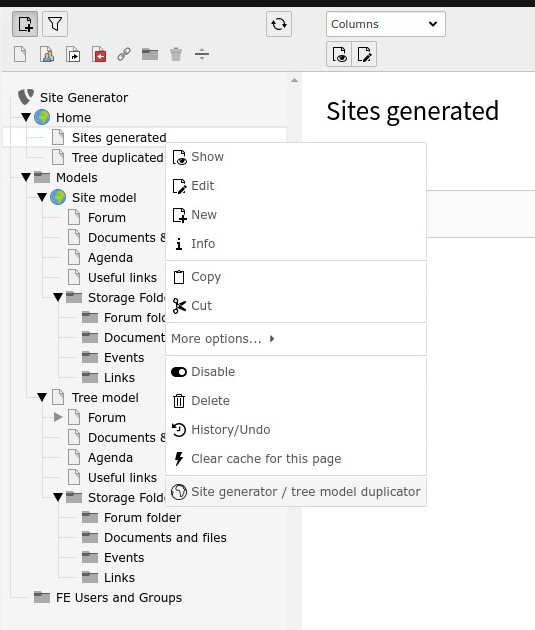
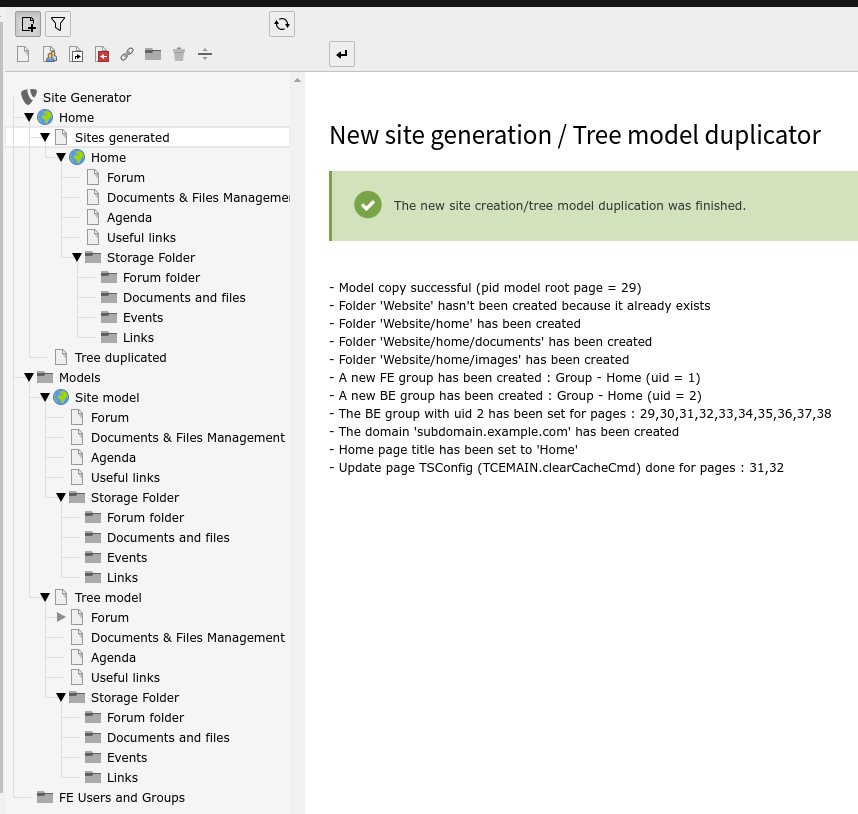
Florian Rival developed EXT:site_generator. Site generator wizard used to generate mini-website or duplicate tree model, it will automatically create associated BE/FE groups, create directories with associated files mount, add a domain name, update Typoscript configuration (folders/pages ID and TCEMAIN.clearCacheCmd), update slugs.
Daniel Abplanalp developed EXT:ig_language_detection - Moder way to language detection. Language detection in PSR-15 middleware stack on uri=/. Based on the Accept-Language Header the corresponding site config is chosen. Additional configuration in YAML site configuration is available like aliases and more.
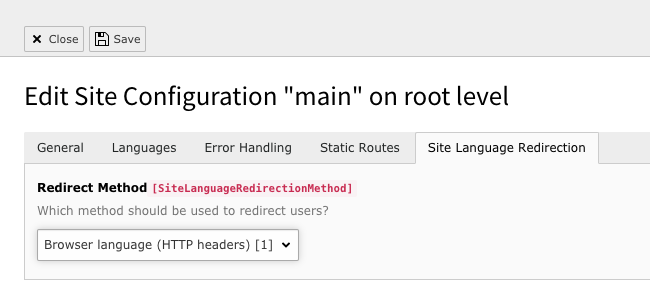
Harald Atteneder developed EXT:site_language_redirection. PSR-15 middleware to redirect the user to correct site language via HTTP headers (Accept-Language) and IP address.
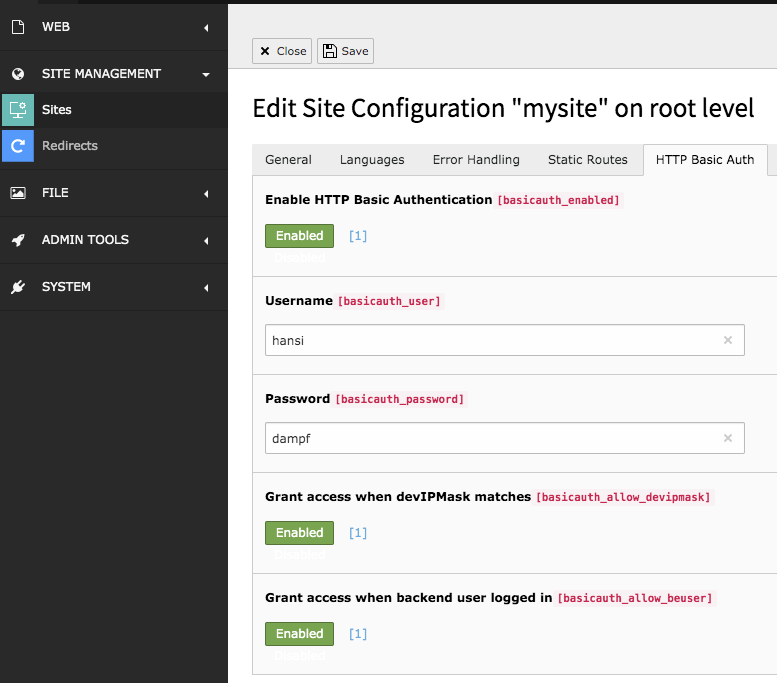
Christoph Lehmann developed EXT:httpbasicauth. HTTP Basic Auth via Site Configuration
Most site configuration problems come from a base that does not match the requested URL, a language that is disabled or not translated, or a base variant that is active in the wrong context. Check these points first.
example.org, instead of / or a bare domain.rootPageId in two site configurations. TYPO3 then uses the last defined site.config.yaml by hand, run vendor/bin/typo3 cache:flush and compare the result with vendor/bin/typo3 site:show <identifier>.enabled: true. A disabled language stays available to editors in the backend but is hidden in the frontend.fallbackType: strict, records without a translation are not rendered. Use fallbackType: fallback with fallbacks: '0' if the default language should fill the gaps (Language configuration).applicationContext == "Development" depend on the application context of the server, usually set with the environment variable TYPO3_CONTEXT.ip() fail in base variant conditions with exception #1686745105. Use applicationContext or getenv() instead (Base variants).No, it is optional since TYPO3 v13.1. A site can load setup.typoscript and constants.typoscript placed next to its config.yaml, plus the TypoScript of the Site Sets in its dependencies. A sys_template record is applied after that. If you keep one, disable its Clear flags, otherwise the TypoScript from the sets is cleared (TYPO3 changelog #103439).
Site settings are defined per site in settings.yaml and can be read in PHP with $site->getSettings(), in TypoScript and page TSconfig as constants, and in Fluid via the SiteProcessor. Constants in a sys_template record only exist in TypoScript. Since TYPO3 v13.1, settings can have types and defaults in settings.definitions.yaml.
Add static routes in the routes section of config.yaml. Use type: staticText for robots.txt and type: uri with t3://page?uid=1&type=1533906435 for the XML sitemap of the system extension EXT:seo. Alternatively, map sitemap.xml to that page type with a PageType route enhancer.
Thanks for reading the long TYPO3 article :)
I hope you learn and explore to improve your knowledge in the cool TYPO3 site configuration. Let’s quickly wrap up as below.
Did you get any issues while configuring TYPO3 site management? I’ll be very happy to answer any questions in the comment box.
And if you’d like to see how TYPO3 and AI are shaping the future together, visit the TYPO3 AI Universe for ideas, tools, and inspiration.
Take your site management to the next level with TYPO3 AI automating configurations and optimizing your workflow!
Have a Happy TYPO3 Site Handling :)
Plan your next upgrade, relaunch or multilingual rollout with free PDF playbooks, each with a matching Excel sheet.
Wolfgang Weber
Brand & Communication LeadWolfgang Weber shapes TYPO3 with passion and expertise. As a TYPO3 enthusiast at T3Planet Shop, he has contributed to TYPO3 projects that make websites faster and more secure. Outside of TYPO3, you’ll probably find him exploring local cafés and enjoying football.
More From Author