

Very courteous and competent team. Very courteous and competent team. All my problems were solved with confidence. Very courteous and competent team. Very courteous and competent team. All my problems were solved with confidence.
Overview
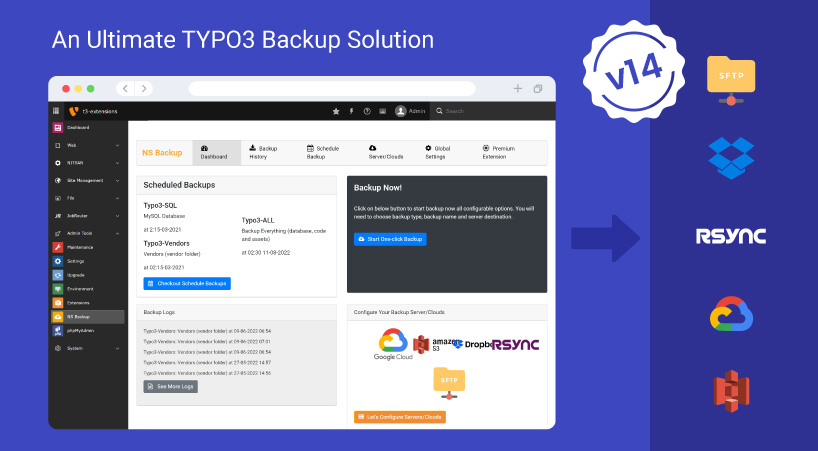
Protect your TYPO3 installation with a complete and reliable backup system designed specifically for TYPO3 environments. Backup Plus enables you to securely back up your TYPO3 codebase, file assets, and database in just a few clicks, without complex configuration or manual scripting.
Connect directly to Google Cloud, Amazon S3, Dropbox, SFTP, or Rsync for safe off-site storage. Create instant manual backups or schedule automated backups using TYPO3 Scheduler and Symfony console, fully compatible with TYPO3 v14 and supported LTS versions.
Download free. No card Required.
Just see if it works for you - in your real TYPO3 project, not a demo.
Enterprise Backup & Recovery Capabilities
Brands That Trust Us












Backup Workflow in 3 Simple Steps
Designed for Efficient TYPO3 Workflows
GDPR-Aware Backup Architecture
Backup Plus is designed to support GDPR-conscious TYPO3 projects by giving you full control over where and how backups are stored. With configurable storage destinations and on-premise or cloud options, you can align your backup strategy with your organization’s data protection and compliance policies.

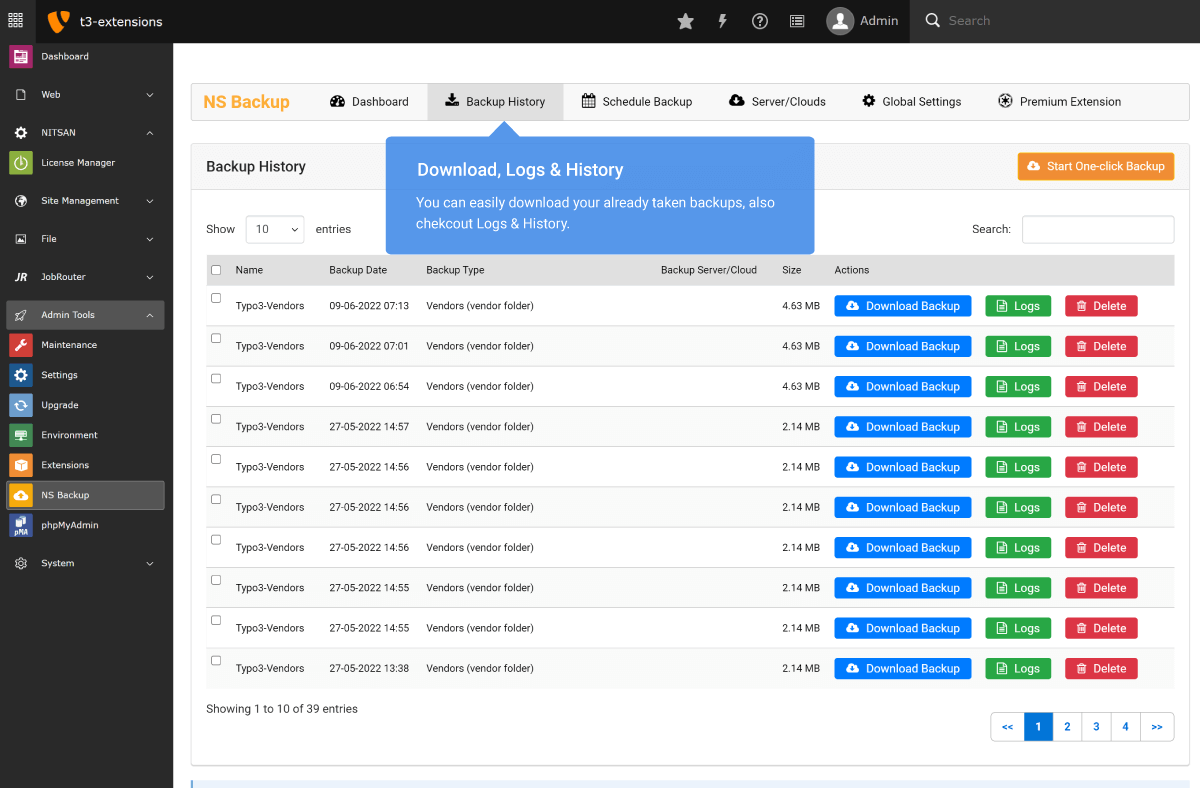
TYPO3 Backend Screens




What Our Customers Say
Reviews from Google, Trustpilot and Community
As a TYPO3 developer, I am always looking for interesting extensions and templates. T3Planet offers very engaging and... As a TYPO3 developer, I am always looking for interesting extensions and templates. T3Planet offers very engaging and illustrative products and very useful extensions. Do check their website out and you won't regret it.
A trustworthy and fairly priced marketplace with well-thought-out TYPO3 solutions. The customer service is always very... A trustworthy and fairly priced marketplace with well-thought-out TYPO3 solutions. The customer service is always very friendly and responds quickly.
Transparent Pricing
All inclusive. No extra costs.
Simple, honest pricing. No credit card, no auto-charge. Buy when you're ready. Choose what works for you
Free Download Free Trial
Try Free for 30 Days
Full access to all features. Test on live, staging, or local. Stops after 30 days - no charges, no auto-subscription.
- Every feature fully unlocked
- Works on live, staging and local domains
- Email support during trial period
- No credit card required
- No auto-conversion to paid plan
€0
Start Free Trial Try for FreeNo credit card · No auto-charge · Simply stops after 30 days Secure checkout · Instant license delivery · 30-day money-back guarantee
Buy Now Buy now
Annual License
Production domains
Purchased product never stops working. Pay annually only for updates & support - not to keep the product running.
- Staging & local installations always free.
- Once installed, your copy keeps running.
- 12 months of updates and support included.
- Dedicated support manager.
- Instant license delivery to inbox.
€199/year Custom quote
Secure checkout · Instant license delivery · 30-day money-back guarantee
All prices EUR, annual licence. Production domains only. Staging and local installations are free and do not count towards your limit. 30-day money-back guarantee.
Running a different number, like 2 or 7? Tell us how many and we will send a custom order priced for your count, not rounded up to the next tier. Same for 11 domains or more. Tell us your number →
Free Vs Pro Features
KEY FEATURE LIST | FREE | Premium |
|---|---|---|
| Dashboard Dedicated backup dashboard for centralized management and monitoring. | ||
| Start One-click Manual Backup Run an instant manual backup directly from the TYPO3 backend. | ||
| Global Settings Configure all backup preferences from a unified global configuration panel. | ||
| Database Backup Create secure backups of your TYPO3 database. | ||
| TYPO3 Code Backup (Core, Extensions, Vendors) Back up TYPO3 core files, installed extensions, and vendor packages. | ||
| Compress backups (bzip2, gzip, xz, zip) Generate compressed backup archives in multiple supported formats. | ||
| Backup Logs & History Access detailed execution logs and download previously generated backups. | ||
| Connect & Configure Servers and Cloud Storage Integrate and configure external storage destinations for backup transfer. | ||
| Google Cloud / Google Drive Store backups securely in Google Cloud or Drive. | ||
| Amazon S3 Cloud Send backups directly to Amazon S3 storage. | ||
| Dropbox Cloud Save backup archives to your Dropbox account. | ||
| Rsync Server Transfer backups to a remote server using Rsync. | ||
| SFTP Server Securely upload backups via SFTP connection. | ||
| All-in-one Backup (Code, Database, Assets) Create a complete backup of codebase, database, and file assets in one process. | ||
| Assets Backup (Fileadmin, Uploads) Back up fileadmin and upload directories separately when needed. | ||
| Schedule Backups Automate recurring backups using configurable scheduling options. | ||
| Automatic Cleanup of Local Backups Remove outdated local backups automatically to optimize storage usage. | ||
| Integration with TYPO3 Core Scheduler Fully compatible with TYPO3’s built-in Scheduler system. | ||
| TYPO3 CLI with Symfony Console Command Execute and manage backups using TYPO3-CLI and Symfony Console integration. |
Compatibility Data
Change Log
Frequently Asked Questions
More FAQs
Yes. T3Planet extensions are maintained to ensure compatibility with supported TYPO3 LTS versions.
Yes. T3Planet extensions can be installed via Composer as well as through the TYPO3 Extension Manager.
T3Planet extensions follow TYPO3 core standards and are designed to work with most standard templates and commonly used extensions.
Each license is valid per domain. For multiple websites, separate licenses are required unless otherwise specified.
Yes. You can activate the extension on a staging environment before transferring it to your production domain.
Enter your license key in the extension settings within the TYPO3 backend to activate the extension.
Updates can be applied via Composer or the TYPO3 Extension Manager, depending on your installation method.
Active license holders receive updates and support according to the selected license plan.
Yes. Detailed documentation is available to guide you through installation, configuration, and usage.
Installation assistance can be requested and may be included depending on the selected support or license plan.