

EU AI Act: know which AI content on your TYPO3 site needs a label
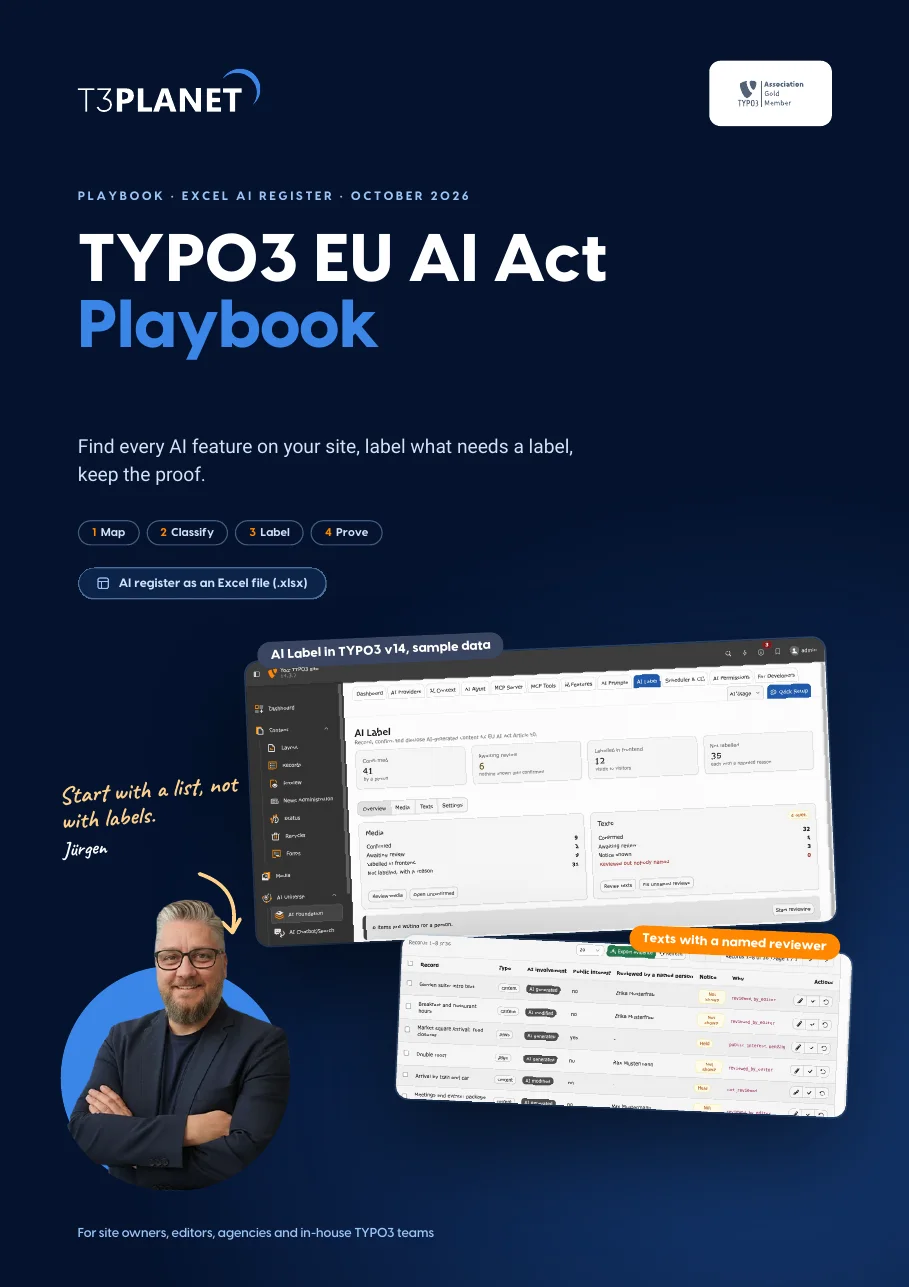
Find every AI feature on your site, label what needs a label, keep the proof. Four phases with real TYPO3 v14 screens and a fictional hotel as the running example.
- Map every AI feature, in TYPO3 and around it, in one Excel register
- Decide per output what Article 50 asks, and what it does not
- Label where the content is made, with the free AI Foundation, and keep the evidence
Which AI features does your site use?
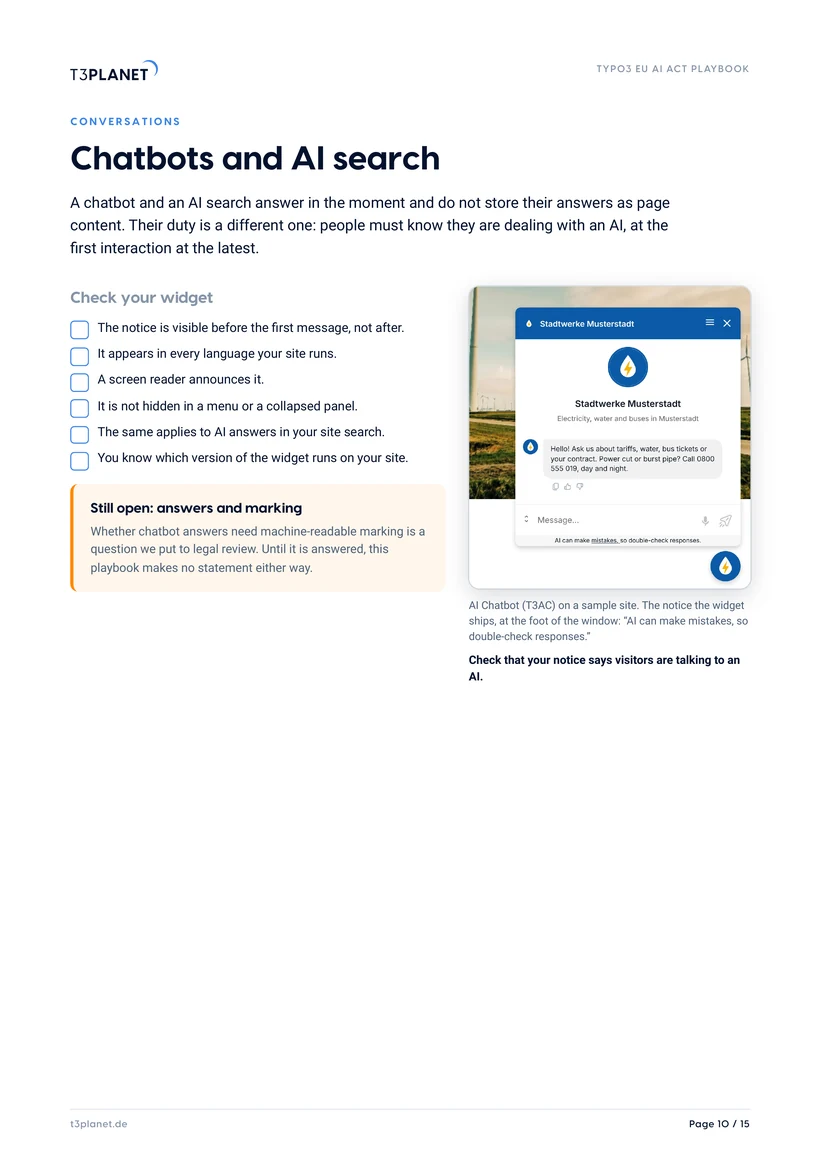
Visitors must know they are talking to an AI, at the first interaction at the latest. Check the notice in every language your site runs. Playbook page 10.
AI answers in your site search need the same notice as a chatbot, right where the answer appears. Playbook page 10.
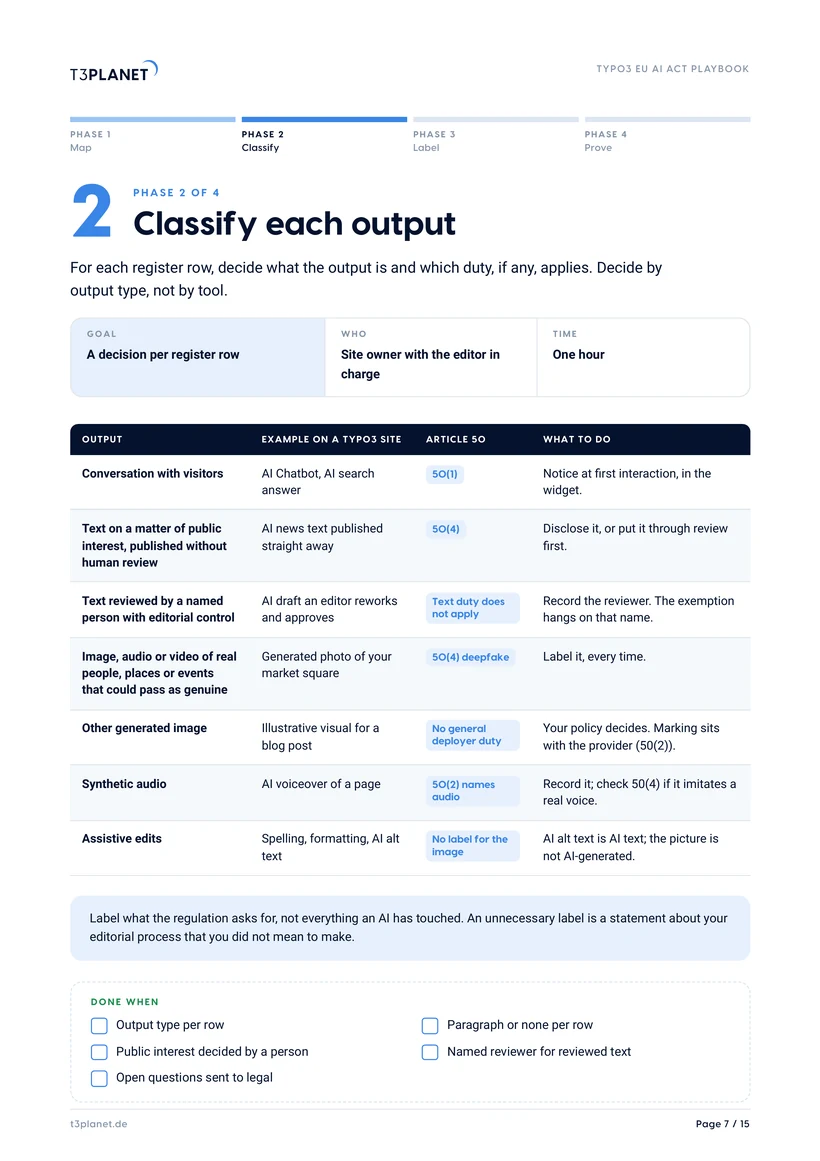
Unreviewed AI text on matters of public interest needs a label. Text that a named person reviewed and approved does not. Playbook page 7.
Images of real people, places or events that could pass as genuine need a label. For other generated images, your policy decides. Playbook page 7.
Translated text follows the text rule: a named person reviews it and the review is recorded. Unsure cases go to legal. Playbook page 7.
AI alt text is AI-generated text. The picture it describes is not AI-generated, so the image needs no label. Playbook page 7.
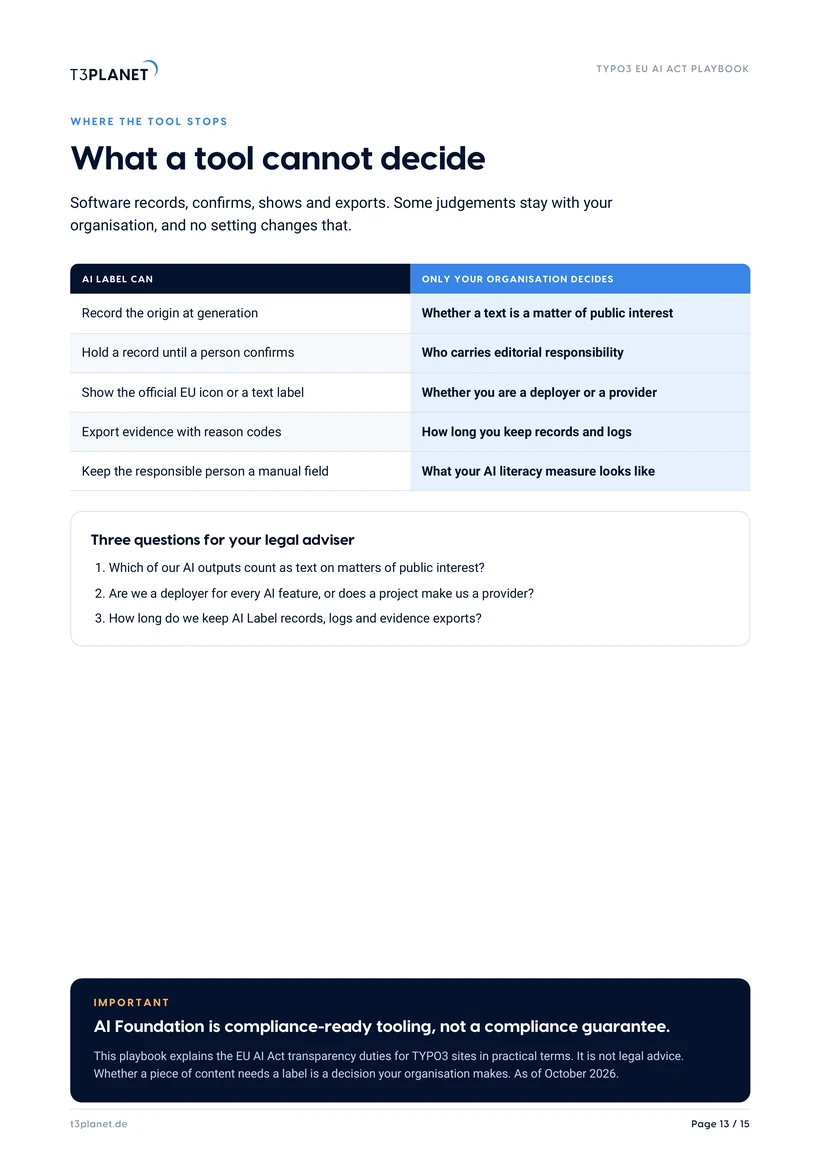
A first orientation, not legal advice. AI Foundation is compliance-ready tooling, not a compliance guarantee.
Get the playbook and AI register, free
PDF and Excel file, instant download. We only email you about this guide.
How we use your details: Privacy Policy.

Questions before you download? Jürgen answers personally. juergen@t3planet.de

What does the EU AI Act mean for AI content on a TYPO3 site?
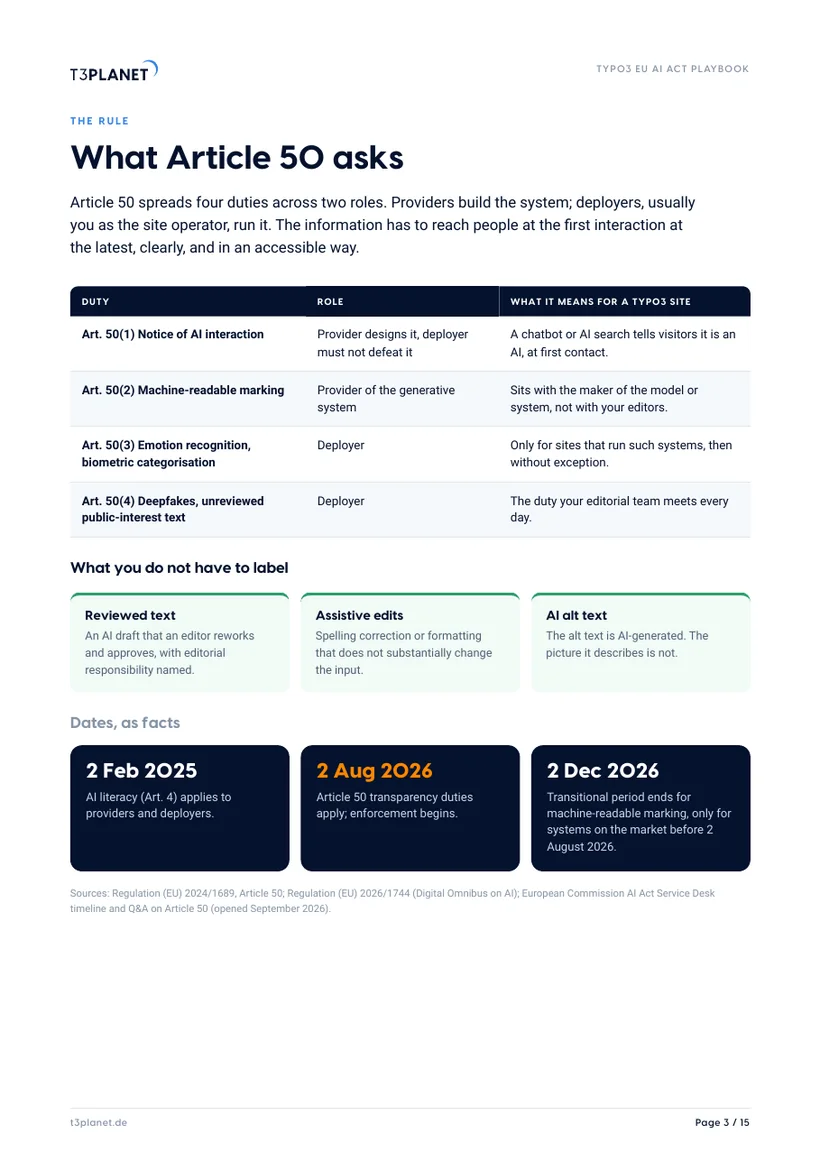
- Article 50 of the EU AI Act sets transparency duties for AI content, and they have applied since 2 August 2026.
- A chatbot or an AI answer in site search must tell visitors that they are dealing with an AI, at the first interaction at the latest.
- Unreviewed AI text on matters of public interest needs a label, while text that a named person reviewed and approved does not.
- AI images of real people, places or events that could pass as genuine are deepfakes and always need a label.
- Keep the proof: an AI register lists every AI feature with a named owner, and AI Label in the free and open-source AI Foundation records the origin of each output and exports the evidence.
A first orientation, not legal advice. AI Foundation is compliance-ready tooling, not a compliance guarantee.
Three cases from the editorial day
Turn a card to see the answer. The full decision table is on page 7.
An editor reworks an AI draft of your news post and approves it under her own name.
An AI-generated photo of your market square in snow, for the winter page.
AI writes the alt text for 300 product photos.
Source: European Commission AI Act Service Desk timeline; Regulation (EU) 2026/1744.
Labelling breaks where nobody owns it
Five layers, five owners. Pick a layer to see what it covers.
TYPO3 core
- Owner
- Your integrator
- Covers
- Workspaces as the review gate, backend groups and permissions, the publish step.
- Playbook
- Phase 3
The AI register has an owner column for every row. Put a real name in it, not a role.
AI Foundation
- Owner
- Site owner
- Covers
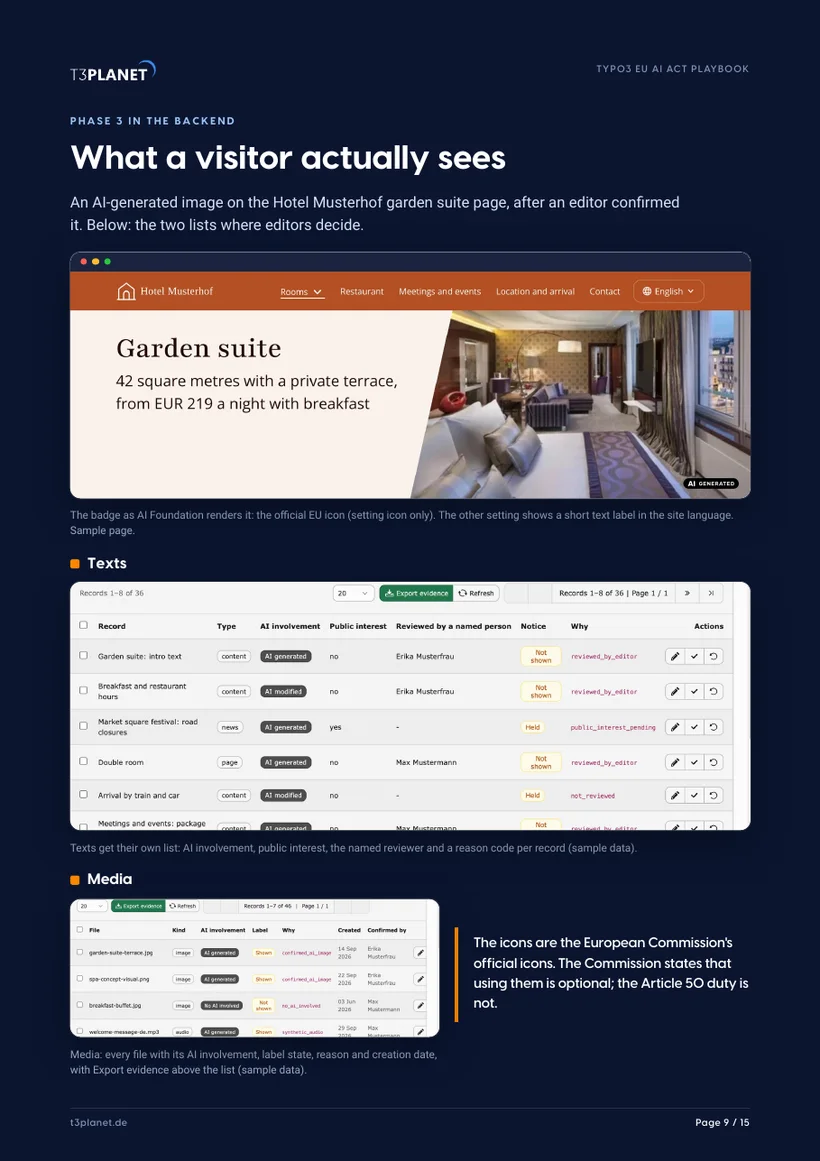
- Records the origin at generation, holds it for a person, shows the notice by rule, exports evidence. Free and open source.
- Playbook
- Phases 3 and 4
The AI register has an owner column for every row. Put a real name in it, not a role.
Editors
- Owner
- Editor in charge
- Covers
- Review AI drafts, name themselves as reviewer, decide public interest with the site owner.
- Playbook
- Phases 2 and 3
The AI register has an owner column for every row. Put a real name in it, not a role.
Agency
- Owner
- Project lead
- Covers
- Sets up the rules, settles the deployer or provider role in the statement of work.
- Playbook
- Page 4
The AI register has an owner column for every row. Put a real name in it, not a role.
Legal
- Owner
- Your legal adviser
- Covers
- Which outputs count as public interest, your role, how long you keep records.
- Playbook
- Page 13
The AI register has an owner column for every row. Put a real name in it, not a role.
Fifteen pages, four phases, one register
A word up front
Jürgen's letter and the whole playbook on one page.
The rule and your role
Four duties across two roles, what you do not have to label, and provider or deployer.
Phase 1: Map
Every AI feature inside TYPO3 and outside it, with AI Features and AI Providers in the backend.
Phase 2: Classify
A decision table by output type: chat, text, images, audio, alt text.
Phase 3: Label
Record, confirm, rule, badge. What a visitor sees, and chatbots and AI search.
Phase 4: Prove
Evidence export, AI Logs, AI literacy, the editor habit sheet, and 20 minutes with Jürgen.
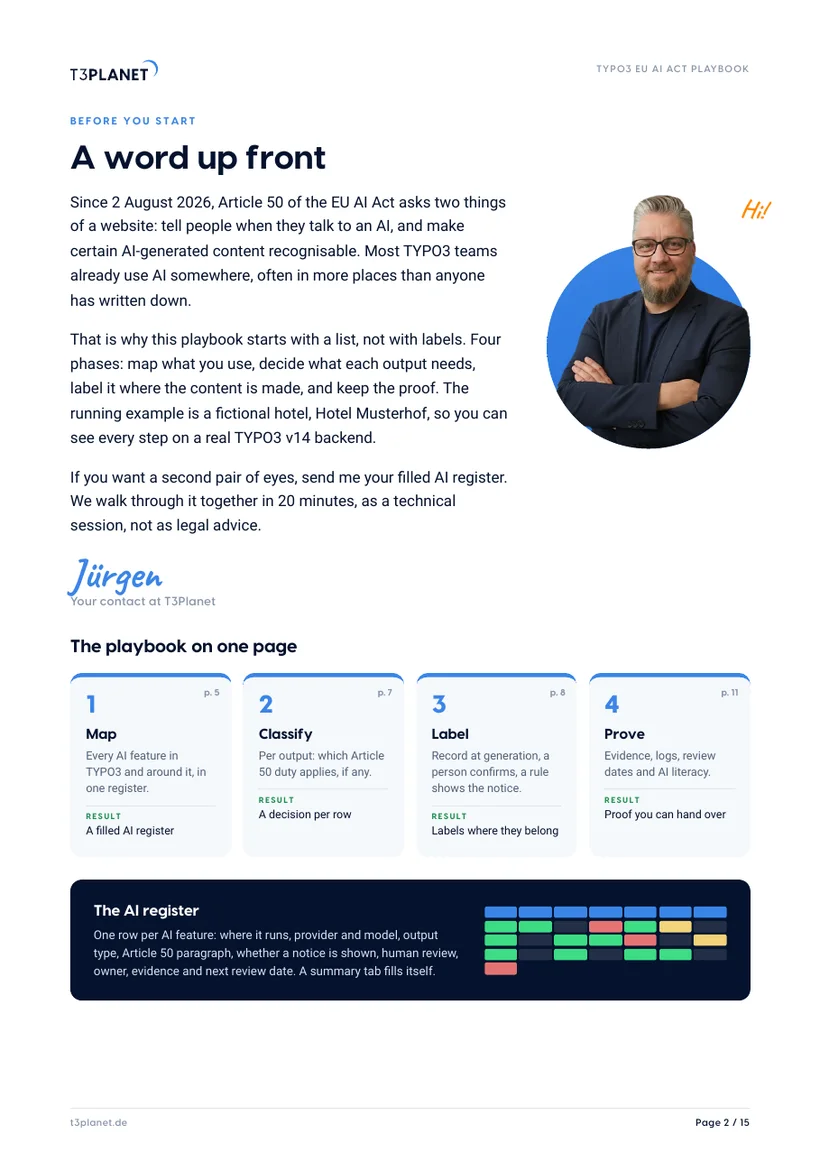
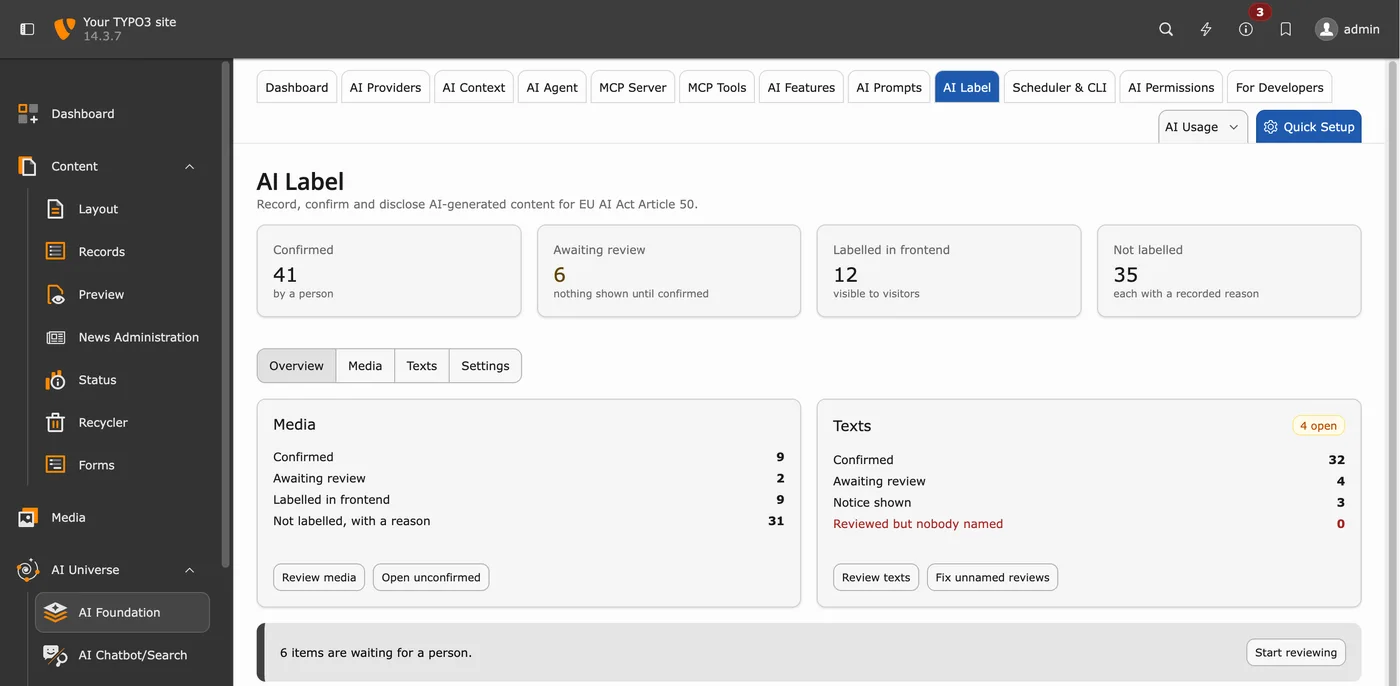
AI Label ships in AI Foundation (ns_t3af) 1.2.0 of 26 August 2026 and in AI Assistant (ns_t3ai) 14.3.0 of 25 August 2026. AI Universe supports TYPO3 v12 to v14 with PHP 8.2 or newer.
Five steps, from first list to evidence
Map
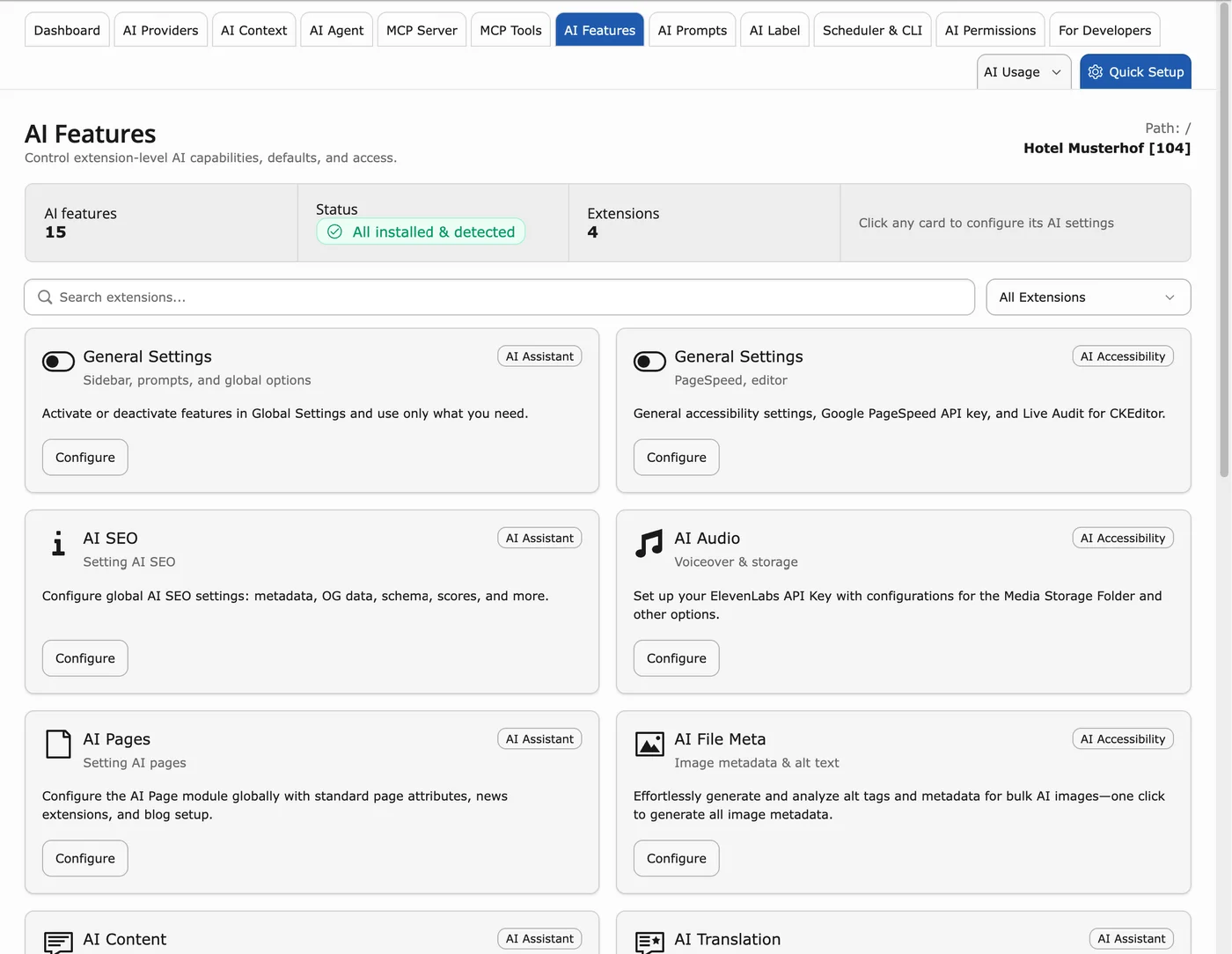
List every AI feature, inside TYPO3 and around it.
- AI Features lists the AI capabilities of every installed extension
- AI Providers shows where the requests go
- Ask about pasted chat-tool text and image generators
Classify
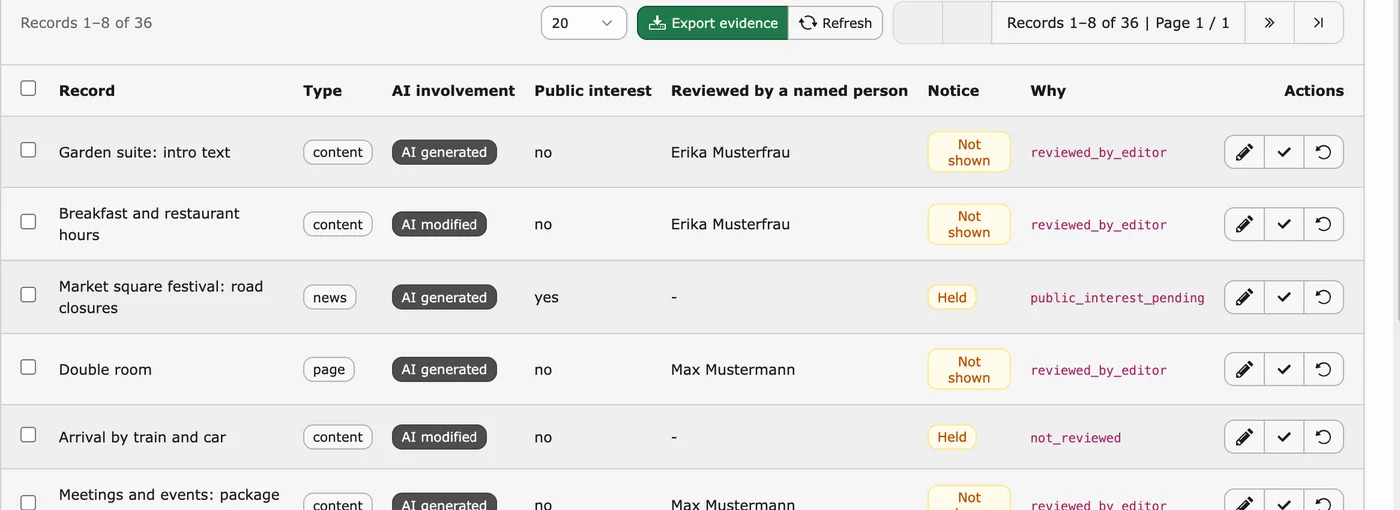
Decide per output which duty applies, if any.
- Decide by output type, not by tool
- Public interest is decided by a person
- Record the named reviewer
Label
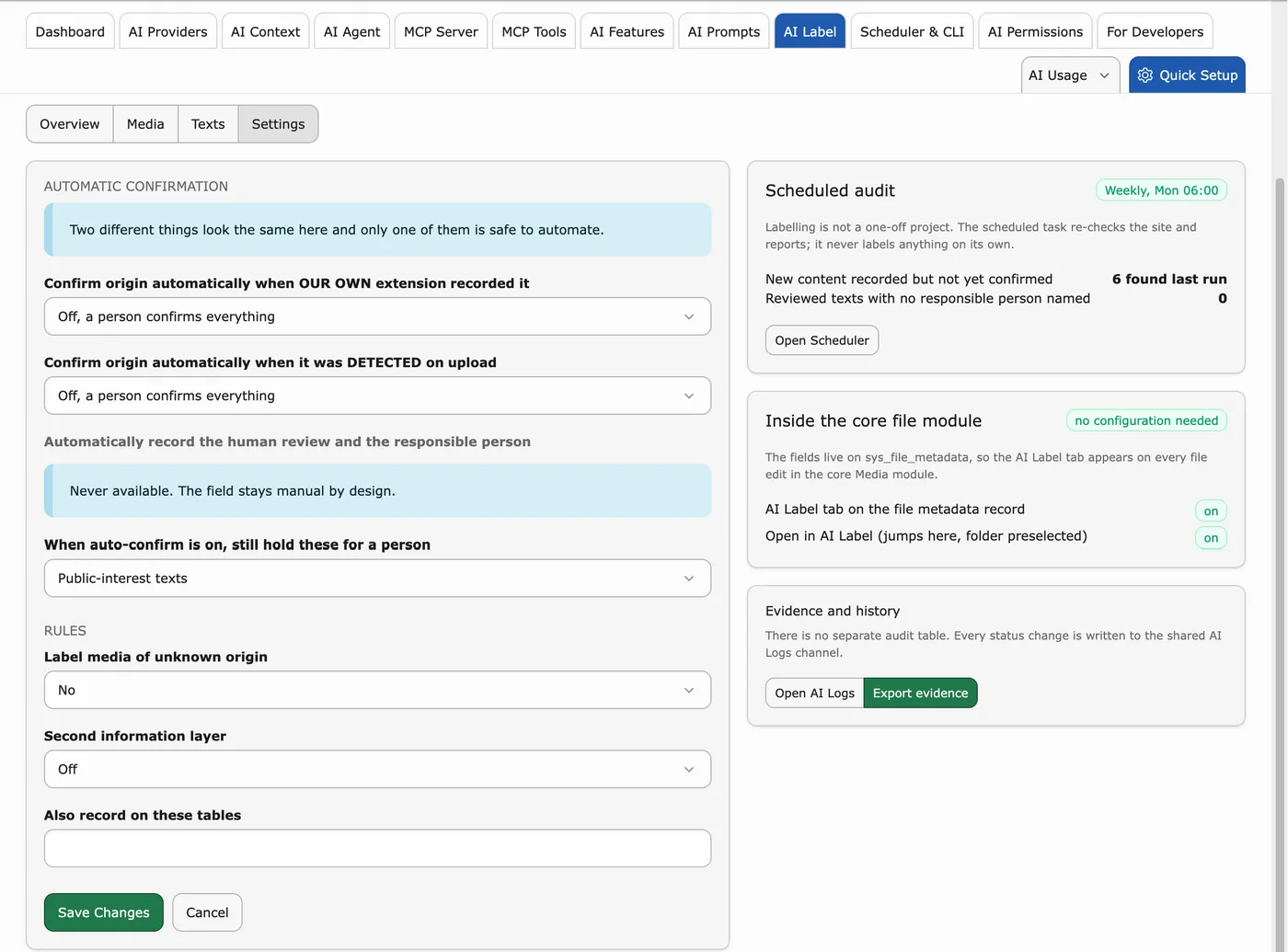
Show the notice where the duty applies.
- The origin is recorded at generation
- Nothing shows until a person confirms
- The official EU icon, or a short text label
Review
Keep a person in the loop.
- Automatic confirmation ships off
- The responsible person can never be set automatically
- Workspaces as the publish gate
Export
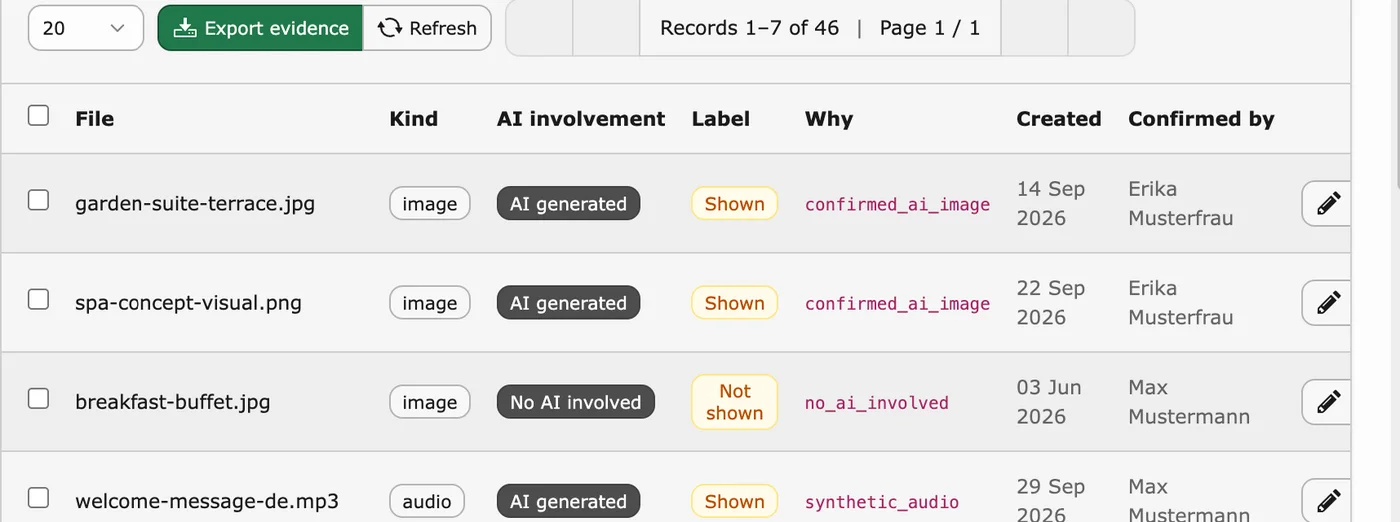
Hand over the proof in minutes.
- Export evidence with reason codes
- Every status change lands in AI Logs
- A review date on every register row
Screens: TYPO3 v14 on our demo install, sample data.
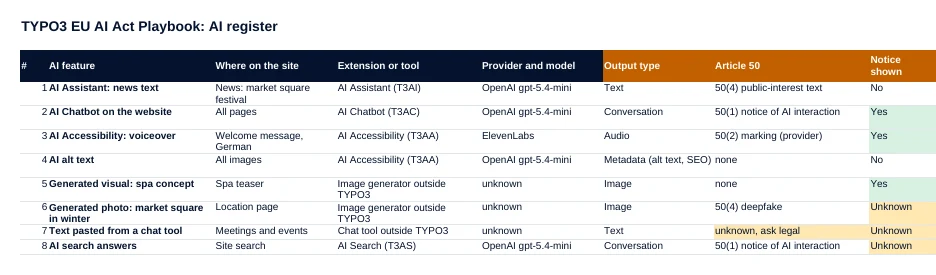
One row per AI feature, a real name per row
One row per AI feature: where it runs, provider and model, output type, Article 50 paragraph, whether a notice is shown, human review, owner, evidence and next review date. A summary tab fills itself.
- Dropdowns for output type, Article 50 paragraph and notice
- A summary tab that counts itself and flags gaps in red
- Opens in Excel, LibreOffice and Google Sheets
20 minutes with Jürgen
Send your filled AI register beforehand and we use the 20 minutes for your setup in TYPO3: where AI Label records, which rules fit, how the evidence export works. Legal questions go to your legal adviser.
Jürgen · Your contact at T3PlanetWho it is for
Site owners and compliance colleagues
You answer for the site. You get the four duties in plain words, a decision table, and evidence you can put on the table, without anyone promising more than a tool can do.
In-house TYPO3 teams and agencies
You run the AI features. You get the backend screens, the rules to set, the review step in workspaces, and an AI register to share with clients.
Frequently asked questions
Which AI content on a website needs a label under the EU AI Act?
Under Article 50, visitors must learn that they are talking to an AI at the first interaction, which covers chatbots and AI answers in site search. Unreviewed AI text on matters of public interest needs a label, text that a named person reviewed and approved does not, and deepfake images always do. The decision table is on page 7.
Is the playbook really free?
Yes. You get the PDF and the Excel AI register straight away, with no payment details.
Does this make my site compliant?
No guide and no tool can promise that. The playbook shows how to find, classify, label and document AI content. Which of your content counts as a matter of public interest is a judgement your organisation makes. AI Foundation is compliance-ready tooling, not a compliance guarantee.
Do I need AI Foundation?
No. The register and the decision table work without it. AI Label, the labelling module in the playbook, is part of the free and open-source AI Foundation and needs no AI provider configured.
Which TYPO3 version does it cover?
The screens show TYPO3 v14. AI Label ships in AI Foundation (ns_t3af) 1.2.0 of 26 August 2026 and in AI Assistant (ns_t3ai) 14.3.0 of 25 August 2026. AI Universe supports TYPO3 v12 to v14 with PHP 8.2 or newer.
What happens with my email address?
We send you this guide and, if you ask for it, one call. No newsletter. Details in our Privacy Policy.