

TYPO3 _assets: How to Migrate typo3conf/ext Assets in Composer
Development


TYPO3 routing turns page paths and extension parameters into clean, readable URLs. Standard pages use Site Configuration and page slugs, while extension arguments rely on route enhancers and aspects to map dynamic values into meaningful paths.
Before:/index.php?id=13&tx_news_pi1[news]=42
After:/news/example-article
From TYPO3 14.1, extensions and site packages can also provide reusable route enhancers through Site Sets. This guide covers setup, YAML examples, multilingual routing, cHash, redirects, and troubleshooting for TYPO3 v13 and v14. RealURL is now relevant only for legacy migrations.
TYPO3 routing maps incoming URLs to pages or extension actions and turns technical parameters into clear, structured paths. It combines page routing with route enhancers and aspects for more complex extension URLs.
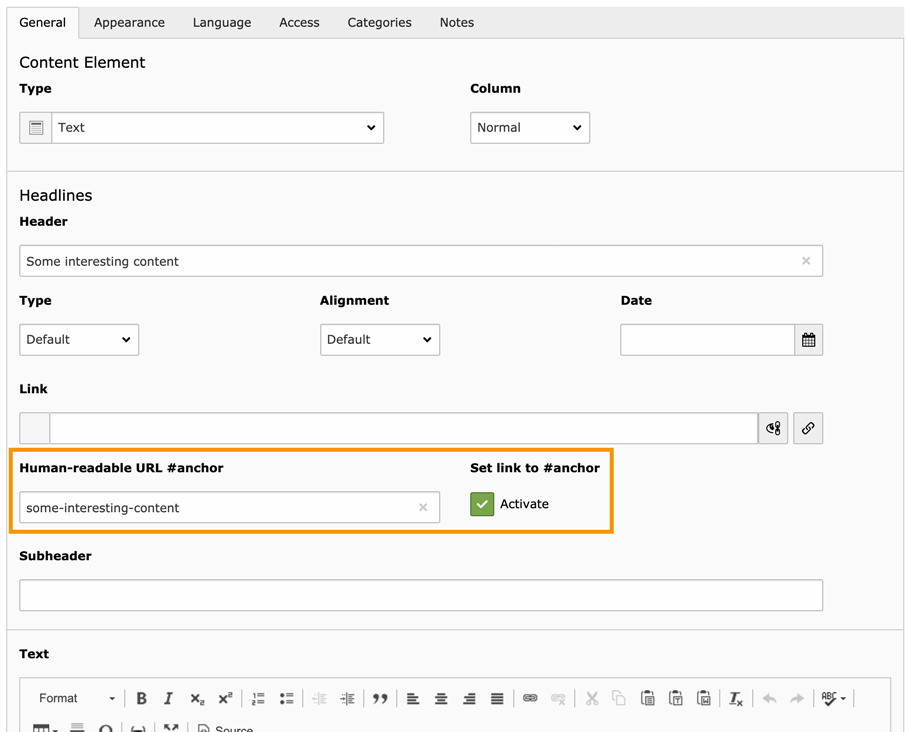
Technical URL: /index.php?id=13
Speaking URL: /news/
Extension parameters can also become readable paths:
Before: ?tx_news_pi1[news]=42
After: /news/example-article
Standard page URLs come from the TYPO3 Site Configuration and page slugs. Route enhancers are needed when extension records, pagination, filters, plugin arguments, or controller actions should appear in the URL.
| Term | Purpose | Example |
| Route | Complete URL path | /news/example |
| Slug | Readable page or record value | example |
| Placeholder | Variable inside a route | {news-title} |
| Route enhancer | Defines the route pattern | /news/{news-title} |
| Aspect | Maps one route value | 42 → example |
| cHash | Validates dynamic cache variations | ?cHash=... |
A route enhancer defines the URL structure, while an aspect converts an individual value. For example, PersistedAliasMapper can replace a news record UID with its stored slug.
Modern TYPO3 versions include routing in the Core. RealURL and CoolUri are only relevant when migrating older projects and preserving legacy URLs.
TYPO3 v13 keeps route enhancers in the site configuration, while TYPO3 14.1 adds reusable routing presets through Site Sets.
| Capability | TYPO3 13.4 | TYPO3 14.3 |
Site-level config.yaml enhancers | Yes | Yes |
| Site Sets | Yes | Yes |
| Route enhancers through Site Sets | No | Yes, from 14.1 |
Dedicated route-enhancers.yaml | No | Yes |
| Site-level override | Not applicable | Yes |
Route enhancers remain inside:
config/sites/your-site/config.yaml
Existing enhancers, aspects, and YAML imports can continue working without restructuring.
Extensions and site packages can provide reusable enhancers through:
EXT:my_extension/Configuration/Sets/MySet/route-enhancers.yaml
TYPO3 merges these presets according to Site Set dependency order. Values defined directly in the website’s Site Configuration take priority.
Use config.yaml or imported YAML files in TYPO3 v13. Use route-enhancers.yaml in TYPO3 14.1+ when routing should be shared across sites or delivered with an extension.
Clean URLs depend on a correct Site Configuration, language setup, web-server rewrites, document root, and cleared caches.
Create the site under Sites → Setup and connect it to the correct root page.
config/sites/your-site/config.yaml
The file defines the base URL, root page, languages, error handling, static routes, and route enhancers.
base: ‘https:// www. example. com/’rootPageId: 1
The rootPageId must match the site’s page-tree root. Incorrect values can cause broken links, redirects, or unresolved routes.
Every site needs a default language with languageId: 0.
languages:- title: Englishenabled: truelanguageId: 0base: /locale: en_US.UTF-8hreflang: en-US
Additional languages need unique IDs, URL bases, locales, and hreflang values.
Apache must have mod_rewrite enabled and allow TYPO3’s .htaccess rules:
AllowOverride Indexes FileInfo
NGINX must forward unmatched requests to TYPO3:
location / {try_files $uri $uri/ /index.php$is_args$args;}
IIS requires the Microsoft URL Rewrite module and a valid web.config.
Composer installations normally use public/ as the document root. Non-public configuration and dependency files must not be exposed.
Flush TYPO3 caches after changing routing or language configuration:
vendor/bin/typo3 cache:flush
With DDEV:
ddev typo3 cache:flush
public/.Page-based routing converts the TYPO3 page tree into clean URLs. Once the Site Configuration and page slugs are correct, standard pages do not need a custom route enhancer.
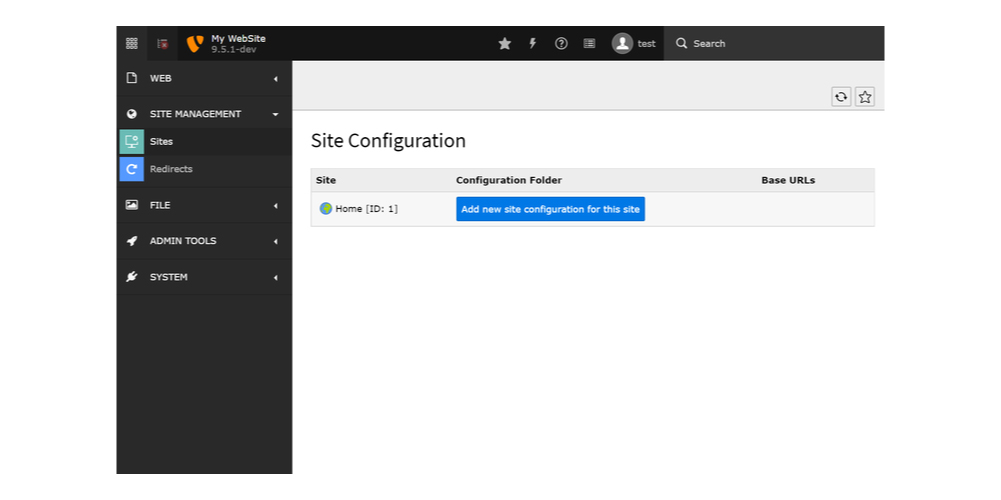
Go to Sites → Setup, create the Site Configuration, and connect it to the correct root page.
TYPO3 stores the settings in:
config/sites/example/config. yaml
Each website root should belong to one Site Configuration to avoid conflicting routes.
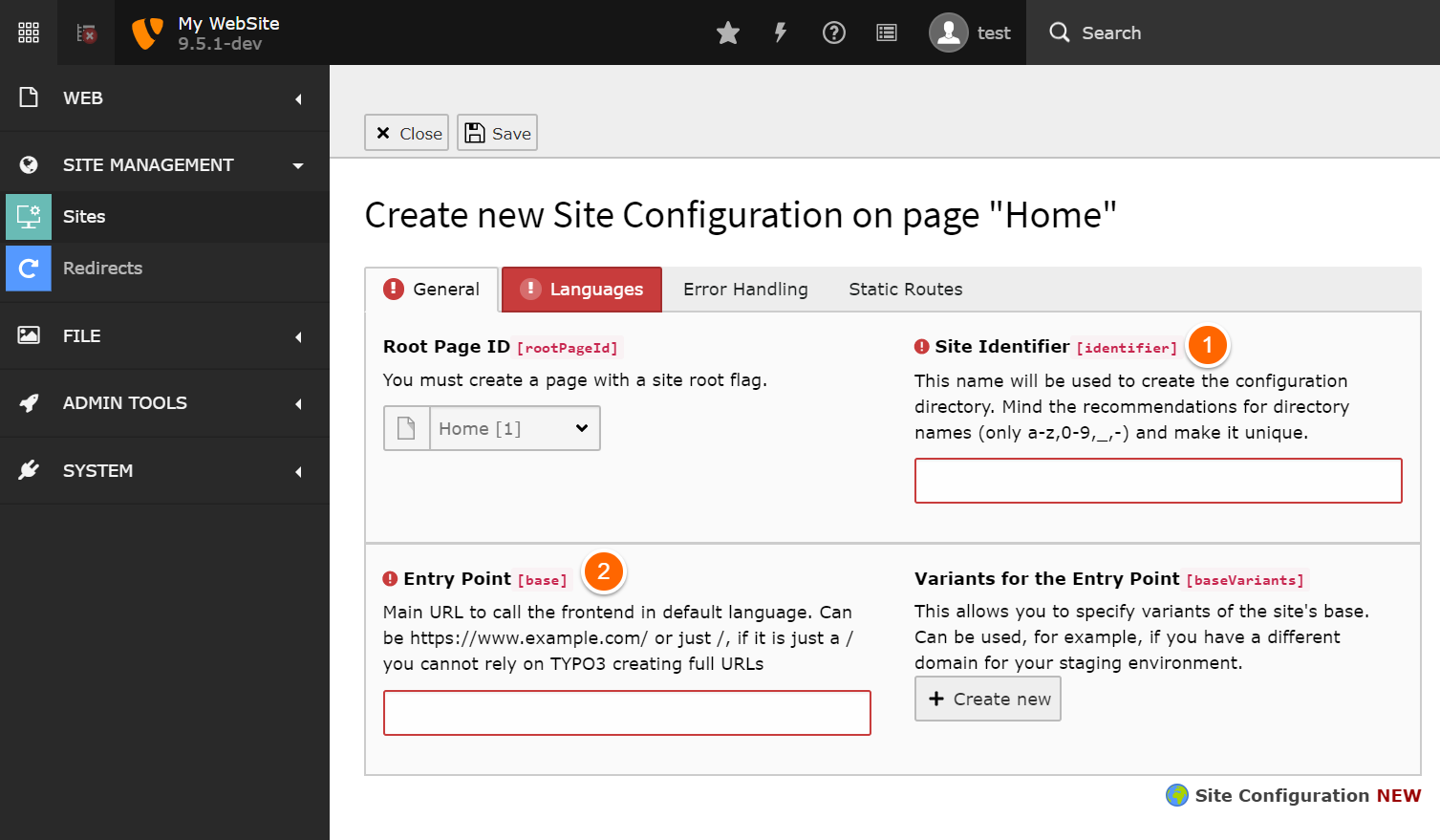
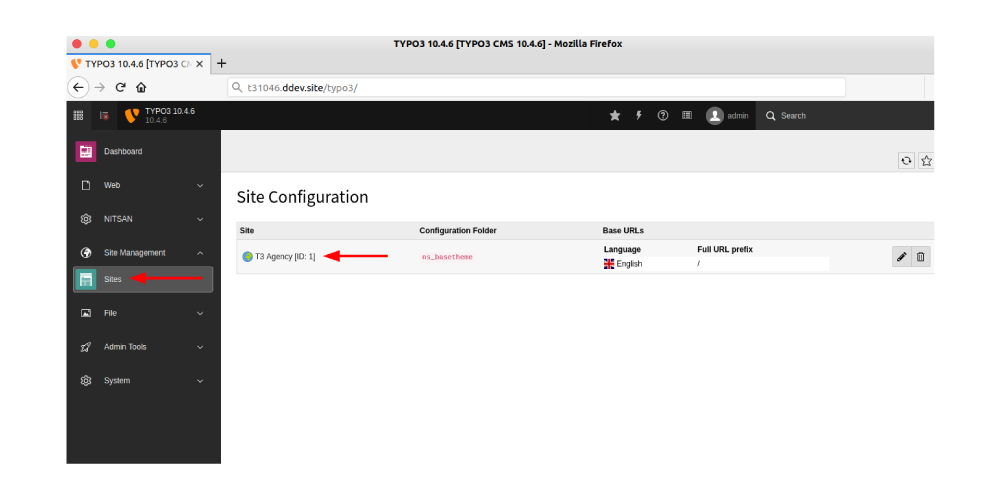
The site-level base defines the main domain, while each language can use its own path prefix or domain.
base: 'https:// example. com/'languages:- title: Englishenabled: truelanguageId: 0base: /locale: en_GB.UTF-8hreflang: en-GB
Every site needs a default language with languageId: 0. Additional languages can use paths such as /de/ or separate domains.
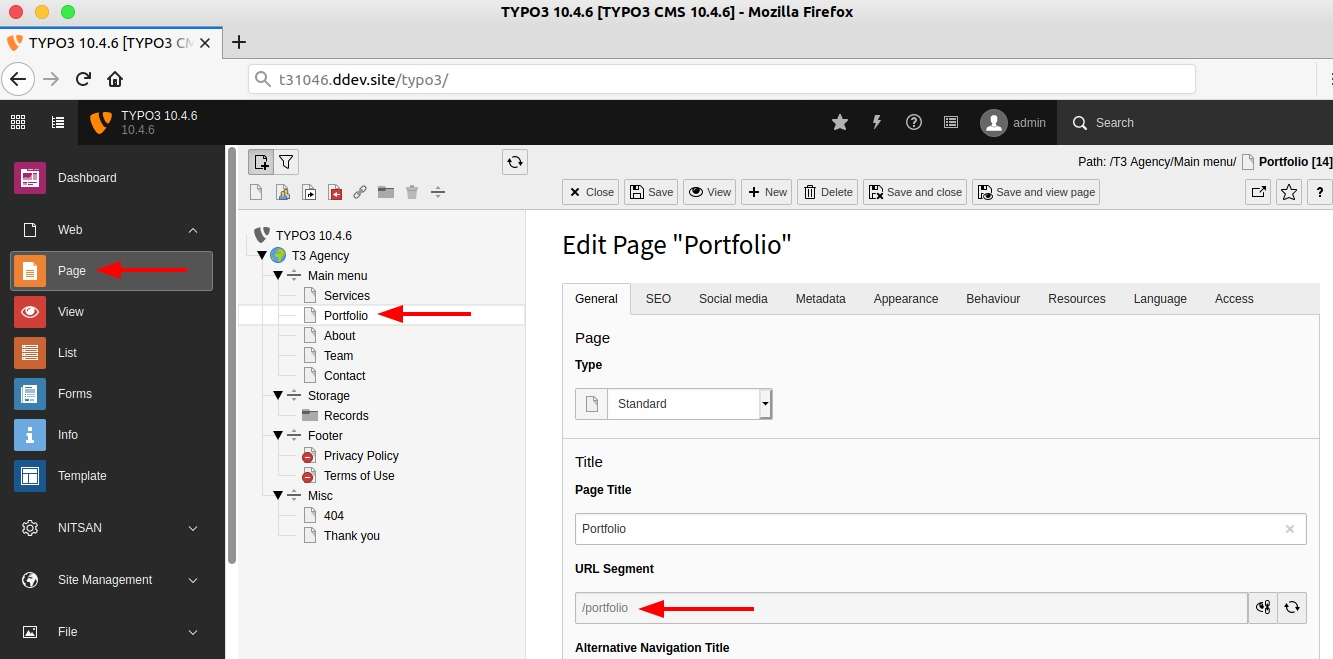
TYPO3 builds page URLs from the slug field in Page Properties. Editors can adjust the slug when the page title does not create the desired path.
Page tree: Home → News → Example Article
Slugs: / /news /example-article
URL: /news/example-article
Slugs should remain readable, lowercase, and unique within the site.
Child-page URLs usually include their parent paths. Changing or moving a parent page can therefore affect every URL below it.
Before changing an established slug, review the affected child pages and confirm that redirects will preserve the old URLs.
Two pages should not resolve to the same path. Use distinct slugs where pages have similar titles, especially across branches that could generate identical URLs.
After saving the Site Configuration and page slugs:
curl.config.yamlThis example is suitable for TYPO3 13.4 and 14.3:
# config/sites/example/config.yamlbase: 'https://example.com/' # Main website domainrootPageId: 1 # UID of the page-tree rootwebsiteTitle: 'Example Website'languages:- title: Englishenabled: truelanguageId: 0base: /locale: en_GB.UTF-8hreflang: en-GBnavigationTitle: Englishflag: gberrorHandling:- errorCode: '404'errorHandler: PageerrorContentSource: 't3://page?uid=99'routes:- route: robots.txttype: staticTextcontent: |User-agent: *Allow: /routeEnhancers: {}
base defines the website entry point.rootPageId connects the site to the correct page-tree root.languages controls language availability and URL prefixes.errorHandling defines responses such as a custom 404 page.routes creates fixed paths such as robots.txt.routeEnhancers is only needed when extension arguments must become readable URL segments.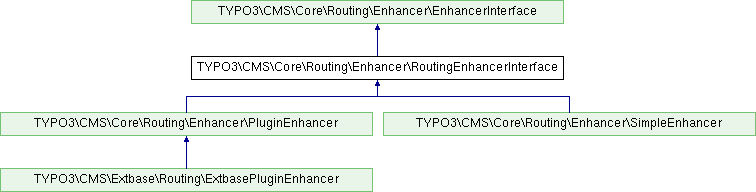
Route enhancers are used when extension arguments or output types need to become part of a readable URL. Standard TYPO3 pages already use page-based routing and require no additional enhancer.
| Scenario | Enhancer needed? | Method |
| Standard TYPO3 page | No | Page routing |
| Regular GET parameter | Yes | Simple Enhancer |
| Namespaced pi-based plugin | Yes | Plugin Enhancer |
| Extbase plugin | Yes | Extbase Enhancer |
| RSS, JSON, XML, or suffix | Yes | PageType Decorator |
robots.txt | No | Static route |
A route enhancer extends an existing page route, maps request arguments to placeholders, and connects the resulting path to the correct plugin action.
| Property | Purpose |
type | Selects the enhancer type |
limitToPages | Restricts the enhancer to selected page UIDs |
extension | Identifies the Extbase extension |
plugin | Identifies the registered plugin |
routes | Contains the available route definitions |
routePath | Defines the readable path pattern |
_controller | Connects the route to a controller action |
_arguments | Maps placeholders to plugin arguments |
defaults | Defines optional default values |
requirements | Restricts accepted values |
aspects | Maps arguments to readable or static values |
The following current EXT:news example creates a speaking detail URL:
# config/sites/example/config.yamlrouteEnhancers:News:type: ExtbaselimitToPages:- 13extension: Newsplugin: Pi1routes:- routePath: '/article/{news-title}'_controller: 'News::detail'_arguments:news-title: newsaspects:news-title:type: NewsTitle
Before:/news?tx_news_pi1[news]=42
After:/news/article/example-article
limitToPages ensures that this configuration applies only to the page containing the News detail plugin. The route path defines the visible URL structure, _arguments connects the placeholder to the News record, and the NewsTitle aspect resolves its optimized path segment. Current EXT:news documentation recommends using either limitToPages or a clear prefix such as /article/ to reduce routing conflicts.
When several Extbase routes could match the same parameters, TYPO3 uses the first matching configuration. Place specific routes before broader ones, then clear all caches and test both generated links and manually entered URLs.
TYPO3 provides different enhancers for plain parameters, namespaced plugins, Extbase actions, and page output formats. Choosing the correct type keeps routes predictable and prevents unresolved parameters.
| Type | Best used for |
| Simple Enhancer | Regular GET parameters |
| Plugin Enhancer | Namespaced pi-based plugins |
| Extbase Enhancer | Extbase controllers, actions, and records |
| PageType Decorator | RSS, JSON, XML, and URL suffixes |
| Custom Enhancer | Project-specific routing logic |
Use the Simple Enhancer for non-namespaced parameters such as filters or categories.
routeEnhancers:Category:type: SimplelimitToPages: [13]routePath: '/category/{category}'aspects:category:type: StaticValueMappermap:news: 1events: 2
Before: ?category=1
After: /category/news
Use a Plugin or Extbase Enhancer instead when parameters belong to a plugin namespace.
Use the Plugin Enhancer for pi-based plugins with namespaced arguments.
routeEnhancers:Login:type: PluginlimitToPages: [25]namespace: tx_felogin_pi1routePath: '/login/{action}'requirements:action: ‘login|forgot|reset’
The namespace must match the actual request parameters. Otherwise, TYPO3 may retain the original query string.
Use the Extbase Enhancer when routes must connect to controller actions and records.
routeEnhancers:News:type: ExtbaselimitToPages: [13]extension: Newsplugin: Pi1routes:- routePath: '/article/{news-title}'_controller: 'News::detail'_arguments:news-title: newsdefaultController: 'News::list'aspects:news-title:type: PersistedAliasMappertableName: tx_news_domain_model_newsrouteFieldName: path_segment
Before: ?tx_news_pi1[news]=42
After: /article/example-news-title
TYPO3 evaluates Extbase routes in order, so place specific routes before broader patterns.
Use the PageType Decorator for readable output formats and suffixes.
routeEnhancers:PageTypeSuffix:type: PageTypedefault: ''map:'.json': 100'.xml': 200'feed.rss': 9818
This converts ?type=100 into .json. Apply suffixes consistently, especially on established websites where URL changes may require redirects.
Create a custom enhancer only when the full route needs behaviour that TYPO3 Core does not provide. If only one placeholder needs special mapping, a custom aspect is usually simpler and safer.
Aspects map individual route values. They can replace IDs with slugs, translate fixed segments, or limit values to a known range.
| Aspect | Purpose | Typical use |
StaticValueMapper | Maps fixed values | Categories or months |
LocaleModifier | Translates static segments | archive → archiv |
StaticRangeMapper | Limits numeric values | Pagination |
PersistedAliasMapper | Reads a stored slug | News detail routes |
PersistedPatternMapper | Combines record fields | Title plus UID |
Custom aspect | Adds custom mapping logic | Project-specific values |
An enhancer defines the route pattern, while an aspect maps one placeholder inside it.
routePath: '/news/{news-title}'
Here, PersistedAliasMapper can convert {news-title} from a record UID into its stored slug.
# Fixed valuesaspects:month:type: StaticValueMappermap:january: 1february: 2# Localized segmentaspects:archive:type: LocaleModifierdefault: archivelocaleMap:- locale: 'de_.*'value: archiv# Paginationaspects:page:type: StaticRangeMapperstart: '1'end: ‘100’# Database slugaspects:news-title:type: PersistedAliasMappertableName: tx_news_domain_model_newsrouteFieldName: path_segment
Use PersistedPatternMapper when a route value must combine several record fields. Create a custom aspect only when none of the built-in mappers can handle the required conversion.
cHash remains when TYPO3 still treats one or more arguments as dynamic. A route enhancer alone does not guarantee its removal.
Aspects and supported static values help TYPO3 recognise predictable arguments. A regex requirement only restricts what can match the route and should not be treated as a universal cHash-removal method.
Keep cHash when dynamic parameters genuinely create different cacheable content.
TYPO3 14.1 allows reusable route enhancers to be delivered through Site Sets.
Use site-level routing for one website:
config/sites/my-site/config.yaml
Use a Site Set when routes should be shared across projects or shipped with an extension:
EXT:my_extension/Configuration/Sets/MySet/├── config.yaml└── route-enhancers.yamlrouteEnhancers:ProductCategory:type: SimpleroutePath: ‘/category/{category}’
Site Set routes are merged by dependency order. Later Sets can override earlier values, while configuration defined directly at site level has final priority.
TYPO3 v13 does not support the dedicated route-enhancers.yaml file. Keep enhancers in config.yaml or import separate YAML files
These examples show how routing converts common parameters into readable paths.
routeEnhancers:Category:type: SimpleroutePath: ‘/category/{category}’
Before: ?category=12
After: /category/12
routeEnhancers:Products:type: ExtbaselimitToPages: [20]extension: Productsplugin: Listroutes:- routePath: '/{product}'_controller: 'Product::show'_arguments:product: productaspects:product:type: PersistedAliasMappertableName: tx_products_domain_model_productrouteFieldName: slug
Before: ?tx_products_list[product]=42
After: /example-product
routes:- routePath: '/page-{page}'_controller: 'News::list'_arguments:page: currentPageaspects:page:type: StaticRangeMapperstart: '1'end: ‘100’
Before: ?currentPage=2
After: /page-2
After changing any route enhancer, clear TYPO3 caches and test both generated links and manually entered URLs.
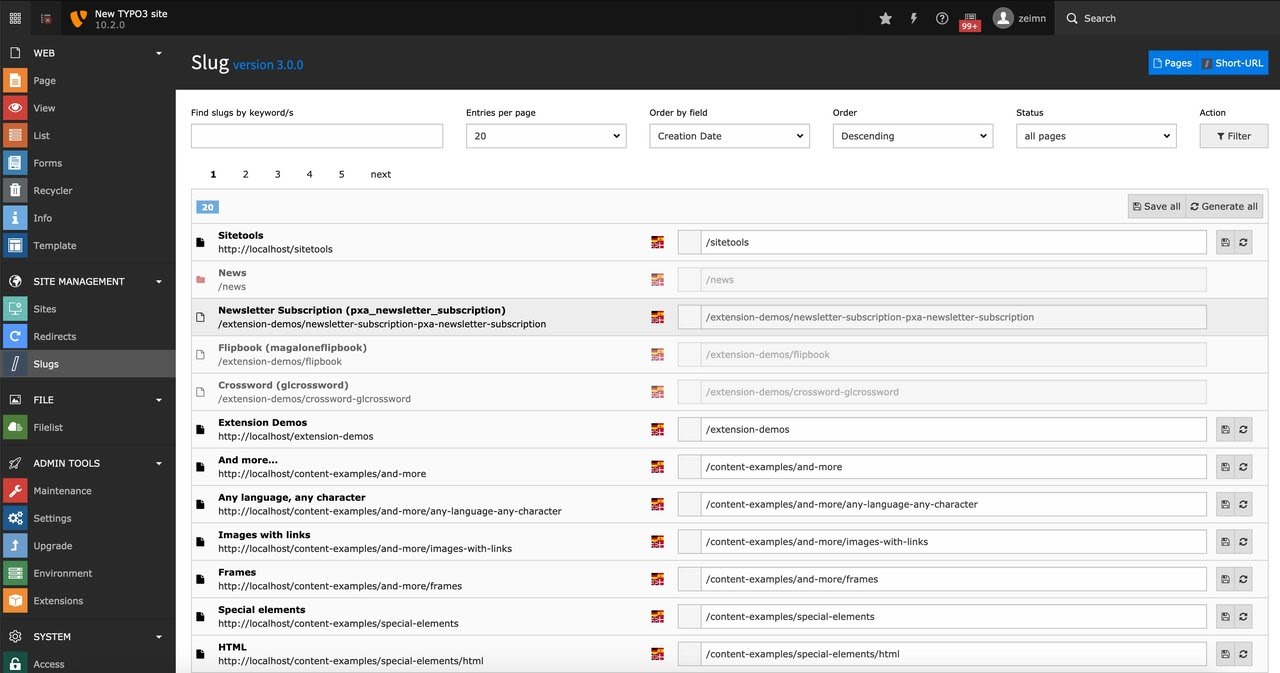
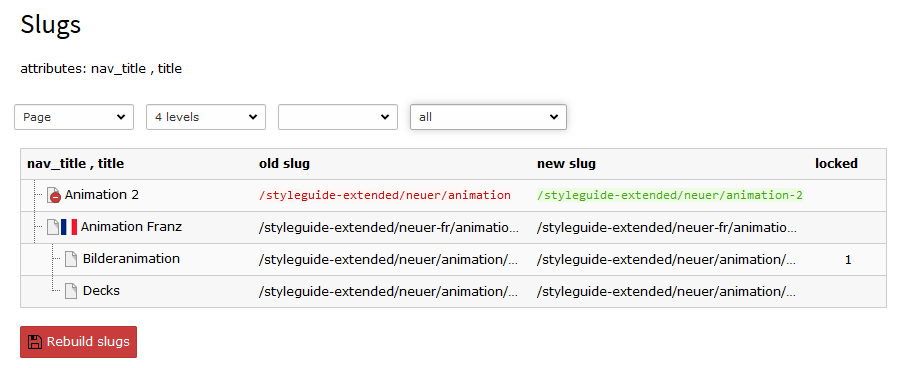
Slugs create readable page and record paths, while language configuration controls translated URLs.
Page slugs come from the page tree. Record slugs belong to extensions such as news, products, or events.
languages:- title: EnglishlanguageId: 0base: /- title: GermanlanguageId: 1base: /de/
Use LocaleModifier for translated static segments:
| Language | Route |
| English | /archive/2026 |
| German | /archiv/2026 |
Language-switching 404 errors usually come from missing translations, hidden pages, invalid slugs, or strict fallback settings.
Static routes handle fixed paths such as robots.txt, favicons, and sitemap URLs.
routes:- route: robots.txttype: staticTextcontent: |User-agent: *Allow: /
Use a PageType decorator for formats such as RSS or JSON:
routeEnhancers:PageType:type: PageTypemap:feed.xml: 9818data.json: 100
TYPO3 v13 commonly uses manual sitemap routing. TYPO3 14.1 can provide sitemap routes through the SEO Site Set.
When slugs change, EXT:redirects can create redirects automatically. Keep temporary redirects for temporary moves and use permanent redirects only when the URL change is final. Avoid redirect chains by pointing old URLs directly to the final destination.
Stable, consistent routes help search engines crawl the correct URLs and prevent avoidable duplication.
Avoid changing established paths without a migration plan. Use readable, unique slugs and prevent route patterns that could resolve the same request differently.
Apply limitToPages so enhancers run only where needed. Keep pagination, category, tag, and filter routes predictable, and avoid generating unlimited parameter combinations.
When typo3/cms-seo is active, TYPO3 can generate canonical and hreflang links. Verify that these point directly to the final routed URLs in every language. Sitemap entries should also use the canonical URL rather than a redirect or parameter-based variation.
200.Most routing failures come from cached configuration, incorrect route scope, mismatched arguments, or unresolved slugs.
| Symptom | Likely cause | Fix |
| Enhancer ignored | Page excluded | Check limitToPages |
| Old route remains | Cached YAML | Flush TYPO3 caches |
| cHash remains | Dynamic argument | Add a suitable aspect |
| Detail page returns 404 | Alias unresolved | Check table, slug, and record visibility |
| Wrong action loads | Route order | Put specific routes first |
| Plugin parameters remain | Wrong namespace | Match the request namespace |
| Pagination fails | Incorrect argument mapping | Check _arguments |
| Language route fails | Missing translation or slug | Review localized records |
| Duplicate route | Overlapping paths | Add a distinct prefix |
| Site Set route missing | Site override | Check merge order |
Debug incoming requests in PageRouter, outgoing Extbase URLs in ExtbasePluginEnhancer, and test responses with:
curl -I https:// example(.)com/ news/ example
A 404 indicates that no valid page or enhanced route resolved. A redirect status means TYPO3 matched a redirect before reaching the final page.
Modern TYPO3 uses Core routing, so RealURL and CoolUri are not required for current projects. EXT:news documentation also confirms that Core enhancers and aspects replace these older URL-rewriting extensions.
Preserve the old RealURL tables until the slug migration wizard has finished. Generate and review page slugs, map important legacy paths, create redirects, and crawl the migrated website before removing old routing data.
| Extension | Current status |
justincase | Supports TYPO3 11–13 |
content_slug | Supports TYPO3 14 and current v13/v12 releases |
my_configurable_routes | Listed for TYPO3 9 only |
slug, ig_slug, routes | Verify before retaining |
Use this checklist before deploying new or updated routing configuration.
rootPageId are correct.limitToPages where appropriate.TYPO3 routing becomes much easier once page routes, enhancers, aspects, slugs, and static routes are treated as separate parts of the same system. Start with a correct Site Configuration, add only the routes your extensions need, keep patterns predictable, and test every language and redirect before deployment.
Need support with complex extension routes, multilingual URLs, or a legacy RealURL migration? Explore T3Planet’s TYPO3 solutions or connect with the team for practical implementation guidance.
Have a Happy TYPO3 Routing!
TYPO3 routing converts technical page IDs and extension parameters into readable URLs. It uses Site Configuration, page slugs, route enhancers, and aspects to transform URLs such as /?id=13&tx_news_pi1[news]=42 into paths such as /news/example-article.
No. Standard pages are routed automatically through the TYPO3 Site Configuration and their page slugs. Route enhancers are needed when extension arguments, controller actions, pagination values, categories, or record identifiers must be converted into readable URL segments.
In TYPO3 13.4, route enhancers are usually defined in the site’s config.yaml file or imported from separate YAML files. From TYPO3 14.1 onward, extensions and site packages can also provide reusable enhancers through a dedicated Site Set route-enhancers.yaml file.
TYPO3 14.1 introduced route enhancers inside Site Sets. Extensions can now ship reusable routing presets through route-enhancers.yaml. These presets are loaded according to Site Set dependency order, while routing defined directly in the website’s Site Configuration takes priority.
cHash appears when TYPO3 still considers one or more request arguments dynamic. Adding a route enhancer does not automatically remove it. Use suitable aspects or supported static values when parameters can be mapped predictably, but retain cHash when dynamic arguments genuinely create different cacheable content.
Use an Extbase route enhancer that defines the extension, plugin, controller action, route path, and argument mapping. Add a PersistedAliasMapper when the internal record UID should be replaced with a readable slug stored in the extension’s database table.
Create an Extbase enhancer for the News extension and define routes for detail pages, pagination, categories, tags, or archives. Restrict it with limitToPages or use clear prefixes such as /article/ to reduce conflicts with other routes.
Yes, from TYPO3 14.1 onward. Add a route-enhancers.yaml file inside the Site Set directory and include the Set as a dependency of the website. TYPO3 13 supports Site Sets, but route enhancers must still remain in the site configuration or imported YAML files.
A multilingual route may return a 404 when the translated page or record is missing, hidden, disabled, or has no valid localized slug. Also check the language base, fallback configuration, route aspect, and whether the requested record is available in the selected language.
No. Modern TYPO3 versions provide Core routing for pages and extension parameters. RealURL and CoolUri are only relevant when migrating older installations. Existing URLs should be mapped carefully, with redirects added before the legacy routing extension and its configuration are removed.

Wolfgang Weber shapes TYPO3 with passion and expertise. As a TYPO3 enthusiast at T3Planet Shop, he has contributed to TYPO3 projects that make websites faster and more secure. Outside of TYPO3, you’ll probably find him exploring local cafés and enjoying football.

Hi! I could have sworn I've been to this website before but after browsing through a few of the articles
I realized it's new to me. Regardless, I'm definitely pleased I stumbled upon it and I'll be
bookmarking it and checking back frequently!Arzemju kazino
https://totalizators.online/review/boomerang-bet/
Hey very cool web site!! Man .. Excellent .. Wonderful .. I'll bookmark your web site and take the feeds additionally? I am glad to seek out numerous helpful information right here within the publish, we want develop extra strategies in this regard, thank you for sharing. . . . . .http://clients1.google.ca/url?q=https%3A%2F%2Fste-b2b.agency
Your style is really unique compared to other people I've read stuff from. Many thanks for posting when you've got the opportunity, Guess I will just book mark this page.http://zoomir10.ru/bitrix/redirect.php?goto=https://ste-b2b.agency/
We are a bunch of volunteers and opening a brand new scheme in our community. Your site provided us with valuable information to work on. You've performed an impressive job and our entire community can be grateful to you.https://www.maigoo.com/ajaxstream/link/?url=https://ste-b2b.agency/
Very good information. Lucky me I discovered your blog by chance (stumbleupon). I have saved as a favorite for later!http://B.R.EA.Kab.Leactorgiganticprof.Iter@Harverst.Com.ua/bitrix/redirect.php?event1=&event2=&event3=&goto=https://www.asphalite.ru/bitrix/redirect.php%3Fgoto=https://ste-b2b.agency/
What's up, for all time i used to check web site posts here early in the daylight, because i love to learn more and more.https://man-komi.ru/bitrix/redirect.php?goto=https://ste-b2b.agency/
This site was... how do you say it? Relevant!! Finally I have found something that helped me. Cheers!https://chat.chatovod.ru/away/?to=https://ste-b2b.agency/
I loved as much as you will receive carried out right here. The sketch is attractive, your authored material stylish. nonetheless, you command get got an edginess over that you wish be delivering the following. unwell unquestionably come further formerly again since exactly the same nearly very often inside case you shield this increase.https://kb.drivenet.cz/api.php?action=https://www.kwaliteitopmaat.org/index.php?url=https://ste-b2b.agency/
If some one wishes to be updated with newest technologies after that he must be go to see this website and be up to date every day.http://Atlas.Monaxikoslykos@1156.xg4ken.com/media/redir.php?prof=45&camp=4780&affcode=kw2517&cid=27026014547&networkType=search&url=https://www.as-briefmarken.de/firmeneintrag-loeschen%3Fnid=590&element=https://ste-b2b.agency/
Link exchange is nothing else but it is only placing the other person's webpage link on your page at suitable place and other person will also do same in support of you.http://aquarium-vl.ru/forum/go.php?url=aHR0cHM6Ly92ZXQtb3Jlbi5ydS9iaXRyaXgvcmVkaXJlY3QucGhwP2dvdG89aHR0cHM6Ly9zdGUtYjJiLmFnZW5jeS8
Great article! That is the type of info that are meant to be shared across the internet. Shame on the search engines for no longer positioning this post higher! Come on over and seek advice from my website . Thank you =)https://413divers.com/x/cdn/?https://ste-b2b.agency/
Hello, everything is going perfectly here and ofcourse every one is sharing facts, that's truly excellent, keep up writing.https://www.jewelrycatalogue.net/delete-company?element=//ste-b2b.agency
Hi there! This is kind of off topic but I need some guidance from an established blog. Is it very difficult to set up your own blog? I'm not very techincal but I can figure things out pretty quick. I'm thinking about making my own but I'm not sure where to start. Do you have any points or suggestions? With thankshttp://aquarium-vl.ru/forum/go.php?url=aHR0cHM6Ly9hbWVyaWNhdGhlb2JsaWdlZC5jb20vaW5kZXgucGhwP3RpdGxlPUhvd19BX0xvdF9Eb19Zb3VfQ29zdF9Gb3JfQjJC
Wonderful post! We will be linking to this great post on our website. Keep up the great writing.http://D.OCI.Le.Q.Rf@Twitter.Podnova.com/go/?url=https://wiki.klausbunny.tv/api.php%3Faction=https://ste-b2b.agency/
I think the admin of this web page is really working hard in favor of his website, since here every data is quality based data.http://18364.users.rrmail1.com/go/iRlY.Zl9np.fz75.1z1Lvb/?aHR0cDovL2NsaWVudHMxLmdvb2dsZS5jby5pZC91cmw/c2E9dCZ1cmw9aHR0cHMlM0ElMkYlMkZzdGUtYjJiLmFnZW5jeQ
Just desire to say your article is as astonishing. The clarity in your post is simply excellent and i can assume you're an expert on this subject. Well with your permission let me to grab your feed to keep updated with forthcoming post. Thanks a million and please keep up the enjoyable work.http://cozume.parks.com/external.php?site=http%3a%2f%2fshinhwaspodium.com%2Fbbs%2Fboard.php%3Fbo_table%3Dfree%26wr_id%3D4269796
I am regular reader, how are you everybody? This article posted at this web page is genuinely pleasant.http://openx.boadiversao.com.br/revive305/www/delivery/ck.php?ct=1%26oaparams=2__bannerid=4347__zoneid=11__cb=95fce0433f__oadest=https://ste-b2b.agency/
I every time emailed this web site post page to all my contacts, as if like to read it next my contacts will too.http://Atlas.Monaxikoslykos@1156.xg4ken.com/media/redir.php?prof=45&camp=4780&affcode=kw2517&cid=27026014547&networkType=search&url=http://tateo.ru/bitrix/rk.php%3Fgoto=https://ste-b2b.agency/
I am actually delighted to read this website posts which contains plenty of valuable information, thanks for providing such information.https://2kwlwgstkmm5zjirbe5o6tcqpewoxkaqfqgvhwtvsvuvq5khmmmq.cdn.ampproject.org/c/www.bausch.kr-3Ewww.bausch.kr-%3Eatlas.Monaxikoslykos%40www.bausch.kr-3Eatlas.Monaxikoslykos%40www.bausch.kr-3Eatlas.Monaxikoslykos%40H.U.F.Eng.K.U.A.N.Gn.I.U.B.I.U.K3.8%40%252528...%252529A.langton%40Sus.ta.i.n.j.ex.k%40fen.Gku.an.gx.r.ku.ai8.xn%252520.xn%252520.u.k%40Meli.S.a.Ri.c.h4223%40e.xultan.tacoustic.sfat.lettuceerz%40fault.ybeamdulltnderwearertwe.s.e%40p.laus.i.bleljh%40r.eces.si.v.e.x.g.z%40leanna.langton%40WWW.EMEKAOLISA%40www.karunakumari46%40sh.jdus.h.a.i.j.5.8.7.4.8574.85%40c.o.nne.c.t.tn.tu%40Go.o.gle.email.2.%25255C%25255Cn1%40sarahjohnsonw.estbrookbertrew.e.r%40hu.fe.ng.k.Ua.ngniu.bi..uk41%40Www.Zanele%40silvia.woodw.o.r.t.h%40%28...%29a.langton%40Sus.ta.i.n.j.ex.k%40fen.Gku.an.gx.r.ku.ai8.xn%20.xn%20.u.k%40Meli.S.a.Ri.c.H4223%40e.xultan.tacoustic.sfat.lettuceerz%40fault.ybeamdulltnderwearertwe.s.e%40p.laus.i.bleljh%40r.eces.si.v.e.x.g.z%40leanna.langton%40WWW.EMEKAOLISA%40www.karunakumari46%40sh.jdus.h.a.i.j.5.8.7.4.8574.85%40c.o.nne.c.t.tn.tu%40Go.o.gle.email.2.%5C%5C%5C%5C%5C%5C%5C%5Cn1%40sarahjohnsonw.estbrookbertrew.e.r%40hu.fe.ng.k.Ua.ngniu.bi..uk41%40Www.Zanele%40silvia.woodw.o.r.t.h%40%28...%29a.langton%40Sus.ta.i.n.j.ex.k%40fen.Gku.an.gx.r.ku.ai8.xn%20.xn%20.u.k%40Meli.S.a.Ri.c.h4223%40e.xultan.tacoustic.sfat.lettuceerz%40fault.ybeamdulltnderwearertwe.s.e%40p.laus.i.bleljh%40r.eces.si.v.e.x.g.z%40leanna.langton%40WWW.EMEKAOLISA%40www.karunakumari46%40sh.jdus.h.a.i.j.5.8.7.4.8574.85%40c.o.nne.c.t.tn.tu%40Go.o.gle.email.2.%5C%5C%5C%5C%5C%5C%5C%5Cn1%40sarahjohnsonw.estbrookbertrew.e.r%40hu.fe.ng.k.Ua.ngniu.bi..uk41%40Www.Zanele%40silvia.woodw.o.r.t.h%40w.anting.parentcrazyre.stfir.stdro%40www.mondaymorninginspiration%40fidelia.commons%40Hu.Fen.Gk.Uang.Ni.U.B.I.Xn--.U.K.6.2%40p.a.r.a.ju.mp.e.r.sj.a.s.s.en20.14%40Leanna.Langton%40Your.Qwe.Aqmail%40Sus.Ta.I.N.J.Ex.K%40reenergo.com%2Ffeedback%2Fsent%2F%3Freferer%3Dhttp%3A%2F%2Fste-b2b.agency%2F/
Oh my goodness! Amazing article dude! Thank you, However I am encountering problems with your RSS. I don't know why I can't subscribe to it. Is there anybody having similar RSS problems? Anyone who knows the answer will you kindly respond? Thanks!!http://Hu.Feng.Ku.Angn.I.Ub.I...U.K37@Hu.Feng.Ku.Angn.I.Ub.I...U.K37@logictim.ru/bitrix/redirect.php?goto=http://www.wdwip.com/proxy.php%3Flink=https://ste-b2b.agency/
Thanks for finally writing about >TYPO3 Routing Guide 2026: v13 & v14 <Loved it!https://tractor-rb.ru/redirect?url=https://ste-b2b.agency/
Hi to every body, it's my first pay a quick visit of this web site; this web site includes awesome and in fact fine data in support of readers.https://solar-dom.com/bitrix/redirect.php?goto=https://ste-b2b.agency/
You really make it appear really easy along with your presentation however I to find this matter to be actually one thing which I feel I'd never understand. It kind of feels too complicated and extremely huge for me. I am taking a look forward for your subsequent submit, I will try to get the hang of it!https://secure.downsyndromealabama.org/np/clients/downsyndromealabama/tellFriend.jsp?subject=Attending%20IEPs+-+Communicating+with+the+Team&url=https://ste-b2b.agency/
Good blog you have here.. It's hard to find high-quality writing like yours nowadays. I honestly appreciate individuals like you! Take care!!https://wiki.american-kingdoms.com/index.php?title=Favourite_B2B_Assets_For_2025
It's great that you are getting ideas from this post as well as from our dialogue made at this time.https://bostitch.co.uk/?URL=https://ste-b2b.agency/
Awesome blog! Is your theme custom made or did you download it from somewhere? A theme like yours with a few simple tweeks would really make my blog shine. Please let me know where you got your design. Cheershttp://18364.users.Rrmail1.com/go/iRlY.Zl9np.fz75.1z1Lvb/?aHR0cDovL2FpbnRlZGxlcy55b283LmNvbS9nby9hSFIwY0hNNkx5OWhjbUZ0WVhSaGJtUmhjM052WTJsaGRHVnpMbU52YlM5NEwyTmtiaTgvYUhSMGNITTZMeTl6ZEdVdFlqSmlMbUZuWlc1amVTOA
I was recommended this blog by my cousin. I'm no longer sure whether or not this submit is written through him as nobody else recognize such targeted approximately my problem. You're wonderful! Thank you!https://wysingartscentre.org/?URL=ste-b2b.agency
Hello to every body, it's my first pay a quick visit of this blog; this blog includes amazing and genuinely excellent material for readers.https://bujroo77ymbwzsiczzpwh45kgpdziu25lupzdbu7odola2vhbfuq.cdn.ampproject.org/c/%2525252528...%2525252529A.langton%40Sus.ta.i.n.j.ex.k%40fen.Gku.an.gx.r.ku.ai8.xn%2525252520.xn%2525252520.u.k%40Meli.S.a.Ri.c.h4223%40e.xultan.tacoustic.sfat.lettuceerz%40fault.ybeamdulltnderwearertwe.s.e%40p.laus.i.bleljh%40r.eces.si.v.e.x.g.z%40leanna.langton%40WWW.EMEKAOLISA%40www.karunakumari46%40sh.jdus.h.a.i.j.5.8.7.4.8574.85%40c.o.nne.c.t.tn.tu%40Go.o.gle.email.2.%252525255C%252525255Cn1%40sarahjohnsonw.estbrookbertrew.e.r%40hu.fe.ng.k.Ua.ngniu.bi..uk41%40Www.Zanele%40silvia.woodw.o.r.t.h%40%28...%29a.langton%40Sus.ta.i.n.j.ex.k%40fen.Gku.an.gx.r.ku.ai8.xn%20.xn%20.u.k%40Meli.S.a.Ri.c.H4223%40e.xultan.tacoustic.sfat.lettuceerz%40fault.ybeamdulltnderwearertwe.s.e%40p.laus.i.bleljh%40r.eces.si.v.e.x.g.z%40leanna.langton%40WWW.EMEKAOLISA%40www.karunakumari46%40sh.jdus.h.a.i.j.5.8.7.4.8574.85%40c.o.nne.c.t.tn.tu%40Go.o.gle.email.2.%5C%5C%5C%5C%5C%5C%5C%5C%5C%5C%5C%5C%5C%5C%5C%5Cn1%40sarahjohnsonw.estbrookbertrew.e.r%40hu.fe.ng.k.Ua.ngniu.bi..uk41%40Www.Zanele%40silvia.woodw.o.r.t.h%40%28...%29a.langton%40Sus.ta.i.n.j.ex.k%40fen.Gku.an.gx.r.ku.ai8.xn%20.xn%20.u.k%40Meli.S.a.Ri.c.h4223%40e.xultan.tacoustic.sfat.lettuceerz%40fault.ybeamdulltnderwearertwe.s.e%40p.laus.i.bleljh%40r.eces.si.v.e.x.g.z%40leanna.langton%40WWW.EMEKAOLISA%40www.karunakumari46%40sh.jdus.h.a.i.j.5.8.7.4.8574.85%40c.o.nne.c.t.tn.tu%40Go.o.gle.email.2.%5C%5C%5C%5C%5C%5C%5C%5C%5C%5C%5C%5C%5C%5C%5C%5Cn1%40sarahjohnsonw.estbrookbertrew.e.r%40hu.fe.ng.k.Ua.ngniu.bi..uk41%40Www.Zanele%40silvia.woodw.o.r.t.h%40w.anting.parentcrazyre.stfir.stdro%40www.mondaymorninginspiration%40fidelia.commons%40Hu.Fen.Gk.Uang.Ni.U.B.I.Xn--.U.K.6.2%40p.a.r.a.ju.mp.e.r.sj.a.s.s.en20.14%40Leanna.Langton%40Your.Qwe.Aqmail%40Sus.Ta.I.N.J.Ex.K%40Fen.Gku.An.Gx.R.Ku.Ai8.Xn--.Xn--.U.KMeli.S.A.Ri.C.H4223%40Hu.Feng.Ku.AngnUbxn--.Xn--.U.K37%40Bridgejelly71fusi.Serena%40www.woostersource.co.uk%2F%3Fpage_id%3D2/
If you would like to improve your knowledge just keep visiting this website and be updated with the newest information posted here.https://eu.research.net/r/2MTKTKN?URL=ste-b2b.agency
Hi superb blog! Does running a blog similar to this take a lot of work? I've absolutely no knowledge of computer programming but I was hoping to start my own blog in the near future. Anyway, if you have any recommendations or techniques for new blog owners please share. I understand this is off subject nevertheless I simply wanted to ask. Thanks!http://www.siac.gov.co/ja/web/atencion-y-participacion-ciudadana/transparencia-y-acceso-a-informacion-publica/plan-anual-de-adquisiciones?p_p_id=110_INSTANCE_dBTz879z4FD3&p_p_lifecycle=0&p_p_state=normal&p_p_mode=view&p_p_col_id=column-1&p_p_col_count=1&_110_INSTANCE_dBTz879z4FD3_struts_action=%2Fdocument_library_display%2Fview_file_entry&_110_INSTANCE_dBTz879z4FD3_redirect=http%3A%2F%2Fste-b2b.agency&_110_INSTANCE_dBTz879z4FD3_fileEntryId=76027634
A fascinating discussion is definitely worth comment. I think that you ought to publish more about this subject matter, it might not be a taboo subject but typically people do not discuss such subjects. To the next! Kind regards!!http://0629.ru/redirect?url=http://khunzakh.ru/bitrix/rk.php?goto=https://add.az/yonlendirme?to=aHR0cHM6Ly9zdGUtYjJiLmFnZW5jeS8/d3B0b3VjaF9zd2l0Y2g9bW9iaWxlJnJlZGlyZWN0PWh0dHBzOi8vc3RlLWIyYi5hZ2VuY3kv
It's a shame you don't have a donate button! I'd most certainly donate to this excellent blog! I suppose for now i'll settle for bookmarking and adding your RSS feed to my Google account. I look forward to new updates and will share this website with my Facebook group. Talk soon!https://70.espresionium.com/index/download?aurl=http%3A%2F%2F%252525252528...%252525252529a.langton%40Sus.ta.i.n.j.ex.k%40fen.Gku.an.gx.r.ku.ai8.xn%252525252520.xn%252525252520.u.k%40Meli.S.a.Ri.c.h4223%40e.xultan.tacoustic.sfat.lettuceerz%40fault.ybeamdulltnderwearertwe.s.e%40p.laus.i.bleljh%40r.eces.si.v.e.x.g.z%40leanna.langton%40WWW.EMEKAOLISA%40www.karunakumari46%40sh.jdus.h.a.i.j.5.8.7.4.8574.85%40c.o.nne.c.t.tn.tu%40Go.o.gle.email.2.%25252525255C%25252525255Cn1%40sarahjohnsonw.estbrookbertrew.e.r%40hu.fe.ng.k.Ua.ngniu.bi..uk41%40Www.Zanele%40silvia.woodw.o.r.t.h%40%28...%29a.langton%40Sus.ta.i.n.j.ex.k%40fen.Gku.an.gx.r.ku.ai8.xn+.xn+.u.k%40Meli.S.a.Ri.c.h4223%40e.xultan.tacoustic.sfat.lettuceerz%40fault.ybeamdulltnderwearertwe.s.e%40p.laus.i.bleljh%40r.eces.si.v.e.x.g.z%40leanna.langton%40WWW.EMEKAOLISA%40www.karunakumari46%40sh.jdus.h.a.i.j.5.8.7.4.8574.85%40c.o.nne.c.t.tn.tu%40Go.o.gle.email.2.n1%40sarahjohnsonw.estbrookbertrew.e.r%40hu.fe.ng.k.Ua.ngniu.bi..uk41%40Www.Zanele%40silvia.woodw.o.r.t.h%40%28...%29a.langton%40Sus.ta.i.n.j.ex.k%40fen.Gku.an.gx.r.ku.ai8.xn+.xn+.u.k%40Meli.S.a.Ri.c.h4223%40e.xultan.tacoustic.sfat.lettuceerz%40fault.ybeamdulltnderwearertwe.s.e%40p.laus.i.bleljh%40r.eces.si.v.e.x.g.z%40leanna.langton%40WWW.EMEKAOLISA%40www.karunakumari46%40sh.jdus.h.a.i.j.5.8.7.4.8574.85%40c.o.nne.c.t.tn.tu%40Go.o.gle.email.2.n1%40sarahjohnsonw.estbrookbertrew.e.r%40hu.fe.ng.k.Ua.ngniu.bi..uk41%40Www.Zanele%40silvia.woodw.o.r.t.h%40w.anting.parentcrazyre.stfir.stdro%40www.mondaymorninginspiration%40fidelia.commons%40Hu.Fen.Gk.Uang.Ni.U.B.I.Xn--.U.K.6.2%40p.a.r.a.ju.mp.e.r.sj.a.s.s.en20.14%40Leanna.Langton%40Your.Qwe.Aqmail%40Sus.Ta.I.N.J.Ex.K%40ste-b2b.agency&pushMode=popup
Heya i'm for the first time here. I came across this board and I in finding It truly useful & it helped me out much. I'm hoping to present one thing back and aid others such as you helped me.https://image.google.rw/url?q=https://ste-b2b.agency/
Spot on with this write-up, I honestly feel this amazing site needs a great deal more attention. I'll probably be back again to read through more, thanks for the information!https://new.arun-adur-ramblers.org.uk/walks/walk-register-guestbook.html
Attractive section of content. I just stumbled upon your weblog and in accession capital to assert that I get actually enjoyed account your blog posts. Any way I'll be subscribing to your augment and even I achievement you access consistently quickly.https://www.tropicalaquarium.co.za/proxy.php?link=https%3A%2F%2Fste-b2b.agency
Link exchange is nothing else however it is just placing the other person's website link on your page at suitable place and other person will also do same in favor of you.https://sodick.su/bitrix/click.php?goto=http://abm-invest.ru/bitrix/redirect.php%3Fgoto=https://d2-studio.com/redirect%3Furl=https://ste-b2b.agency/
I loved as much as you will receive carried out right here. The sketch is tasteful, your authored subject matter stylish. nonetheless, you command get got an impatience over that you wish be delivering the following. unwell unquestionably come further formerly again since exactly the same nearly a lot often inside case you shield this hike.https://crownmouldingbiz.my-free.website/s/cdn/?ste-b2b.agency
Wonderful post however , I was wanting to know if you could write a litte more on this topic? I'd be very grateful if you could elaborate a little bit more. Kudos!https://medic.insure/bitrix/redirect.php?goto=http://africafocus.org/printit/mob-test.php?https://a-result.ru/bitrix/redirect.php?goto=https://ste-b2b.agency/
If you wish for to improve your experience simply keep visiting this website and be updated with the newest information posted here.http://B.R.EA.Kab.Leactorgiganticprof.Iter@Harverst.Com.ua/bitrix/redirect.php?event1=&event2=&event3=&goto=http://cgi.www5d.biglobe.ne.jp/~moolich/post-bin/yybbs.cgi
This piece of writing is truly a fastidious one it helps new web users, who are wishing for blogging.http://aquarium-vl.ru/forum/go.php?url=aHR0cDovLzRjaGFuLm5iYnMuYml6L2t1c3lvbl9iLnBocD9odHRwczovL2xpYnByb3h5LmthcnRzLmFjLmtyL19MaWJfUHJveHlfVXJsL2h0dHBzOi8vc3RlLWIyYi5hZ2VuY3kv
I have been browsing on-line greater than 3 hours nowadays, yet I by no means discovered any fascinating article like yours. It's beautiful price enough for me. In my view, if all website owners and bloggers made excellent content material as you did, the net will probably be a lot more helpful than ever before.http://Www.Fashionmoon.com/jump/aHR0cDovL0h1LkZlbmcuS3UuQW5nbi5JLlViLkkuWG4uWG4uVS5LMzdAZmVuZy1zaHVpLnVhL2JpdHJpeC9yZWRpcmVjdC5waHA/Z290bz1odHRwczovL3d3dy54bi0tLS1kdGJmZnBodTNhZC54bi0tcDFhaS91ZGF0YS9lbWFya2V0L2Jhc2tldC9wdXQvZWxlbWVudC8xNjUxNS8lM0ZyZWRpcmVjdC11cmk9aHR0cHM6Ly9zdGUtYjJiLmFnZW5jeS8
Excellent blog here! Also your site loads up very fast! What web host are you using? Can I get your affiliate link to your host? I wish my web site loaded up as fast as yours lolhttp://0629.ru/redirect?url=http://18364.users.rrmail1.com/go/iRlY.Zl9np.fz75.1z1Lvb/?aHR0cHM6Ly93d3cua2lkc2F3YXJkLnJ1L2JpdHJpeC9yZWRpcmVjdC5waHA/Z290bz1odHRwcyUzQSUyRiUyRnN0ZS1iMmIuYWdlbmN5
As the admin of this web site is working, no hesitation very rapidly it will be renowned, due to its feature contents.https://cse.google.ki/url?sa=t&url=https%3A%2F%2Fste-b2b.agency
Wow, this piece of writing is fastidious, my sister is analyzing these things, therefore I am going to tell her.http://0629.ru/redirect?url=http://aquarium-vl.ru/forum/go.php?url=aHR0cHM6Ly93aWtpLmR1bG92aWMudGVjaC9pbmRleC5waHAvV2hhdF9zX1JpZ2h0X0Fib3V0X0IyQg
If you wish for to take a great deal from this paragraph then you have to apply these methods to your won web site.https://kakaku.com/jump/?url=https://ste-b2b.agency/
I used to be recommended this web site by my cousin. I am not positive whether this publish is written via him as nobody else know such distinctive approximately my problem. You are wonderful! Thank you!https://woundcaregurus.com/the-a-z-of-b2b-marketing/
Howdy! I'm at work browsing your blog from my new apple iphone! Just wanted to say I love reading your blog and look forward to all your posts! Keep up the superb work!https://47.cholteth.com/index/d1?diff=0&utm_source=ogdd&utm_campaign=26607&utm_content=&utm_clickid=g00w000go8sgcg0k&aurl=http%3A%2F%2Fste-b2b.agency&pushMode=popup
I'm really enjoying the theme/design of your weblog. Do you ever run into any internet browser compatibility issues? A number of my blog readers have complained about my blog not working correctly in Explorer but looks great in Safari. Do you have any solutions to help fix this issue?https://ready.chair6.net/?url=linedoor-yug.ru/bitrix/redirect.php%3Fevent1%3Dclick_to_call%26event2%3D%26event3%3D%26goto%3Dhttps%3A//kirpich.center/bitrix/redirect.php%3Fgoto%3Dhttps%3A//ste-b2b.agency/
There is certainly a lot to learn about this topic. I really like all the points you have made.https://tz25.ru/bitrix/redirect.php?goto=https://ste-b2b.agency
Excellent post. Keep writing such kind of information on your blog. Im really impressed by your site.
Hi there, You've performed a fantastic job. I will certainly digg it and in my view suggest to my friends. I'm confident they'll be benefited from this site.https://xn--12-dlc3da2a.xn--p1ai/bitrix/redirect.php?goto=https://ste-b2b.agency/
Thank you for the auspicious writeup. It in fact was a amusement account it. Look advanced to more added agreeable from you! By the way, how could we communicate?https://takuya-1st.hatenablog.jp/iframe/hatena_bookmark_comment?canonical_uri=https%3A%2F%2Fste-b2b.agency
My spouse and I stumbled over here by a different website and thought I might check things out. I like what I see so i am just following you. Look forward to looking over your web page yet again.https://pennynelson.com/x/cdn/?ste-b2b.agency
Hey there! Do you know if they make any plugins to assist with SEO? I'm trying to get my blog to rank for some targeted keywords but I'm not seeing very good results. If you know of any please share. Thanks!https://go.115.com/?https%3A%2F%2Fste-b2b.agency/
Howdy just wanted to give you a quick heads up. The words in your post seem to be running off the screen in Firefox. I'm not sure if this is a format issue or something to do with browser compatibility but I thought I'd post to let you know. The style and design look great though! Hope you get the problem resolved soon. Cheershttp://archive.predistoria.org/index.php?name=Info&url=ste-b2b.agency
When some one searches for his necessary thing, thus he/she needs to be available that in detail, thus that thing is maintained over here.https://anybag.ua/bitrix/redirect.php?goto=https://ste-b2b.agency/