

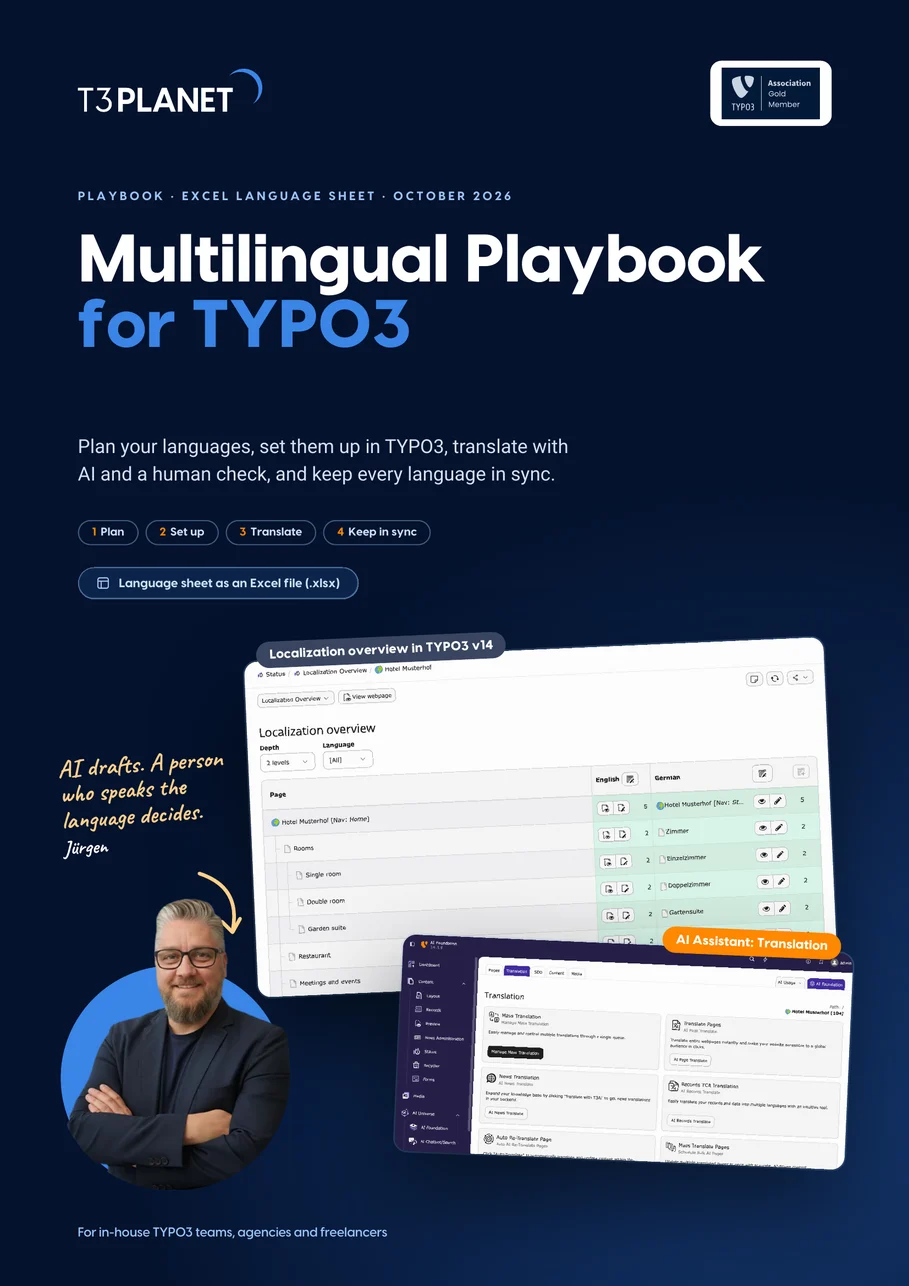
Run a multilingual TYPO3 site without stale pages
Plan your languages, set them up in TYPO3, translate with AI and a human check, and keep every language current. Four phases with real TYPO3 v14 screens and a fictional hotel as the running example.
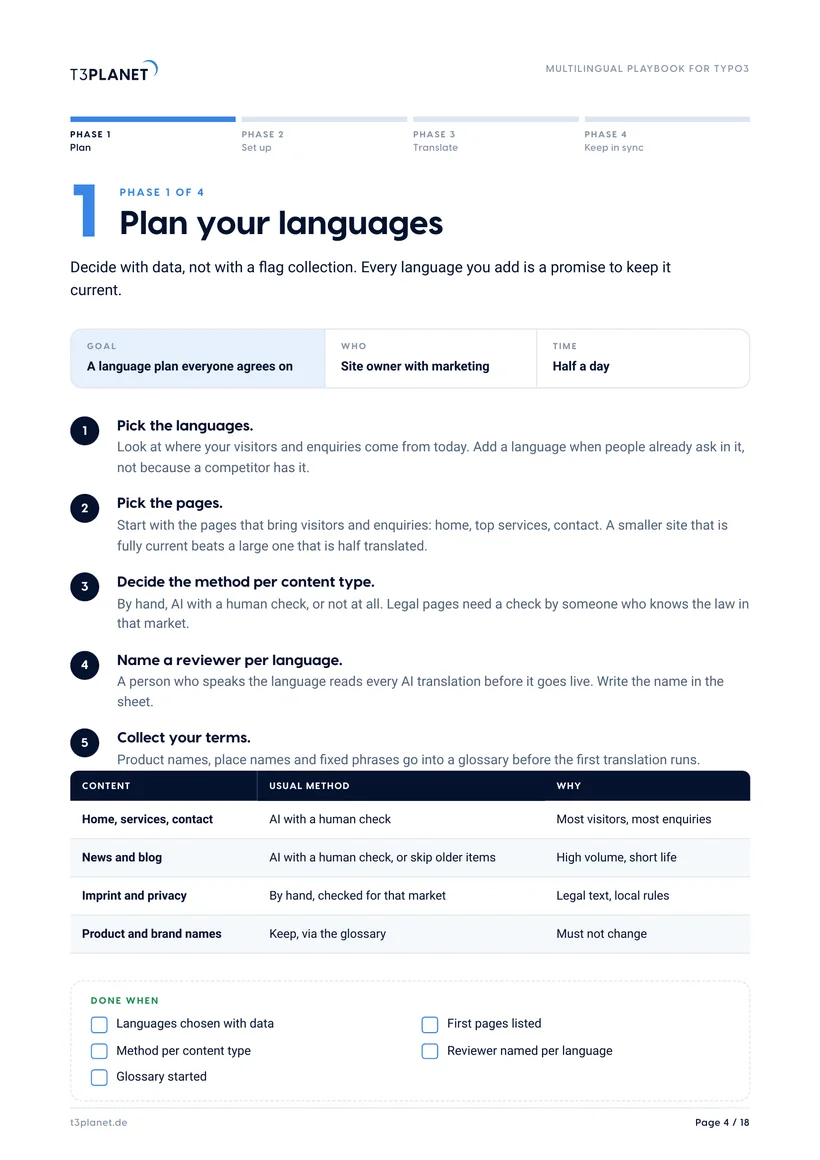
- Pick languages and pages with data, and name a reviewer per language
- Set up languages, URLs and fallback in the TYPO3 site configuration
- Translate with AI where it saves time, and keep every language in sync
What do you need first?
Pick languages by where visitors and enquiries come from, start with the pages that bring them, and name a reviewer per language. Playbook page 4.
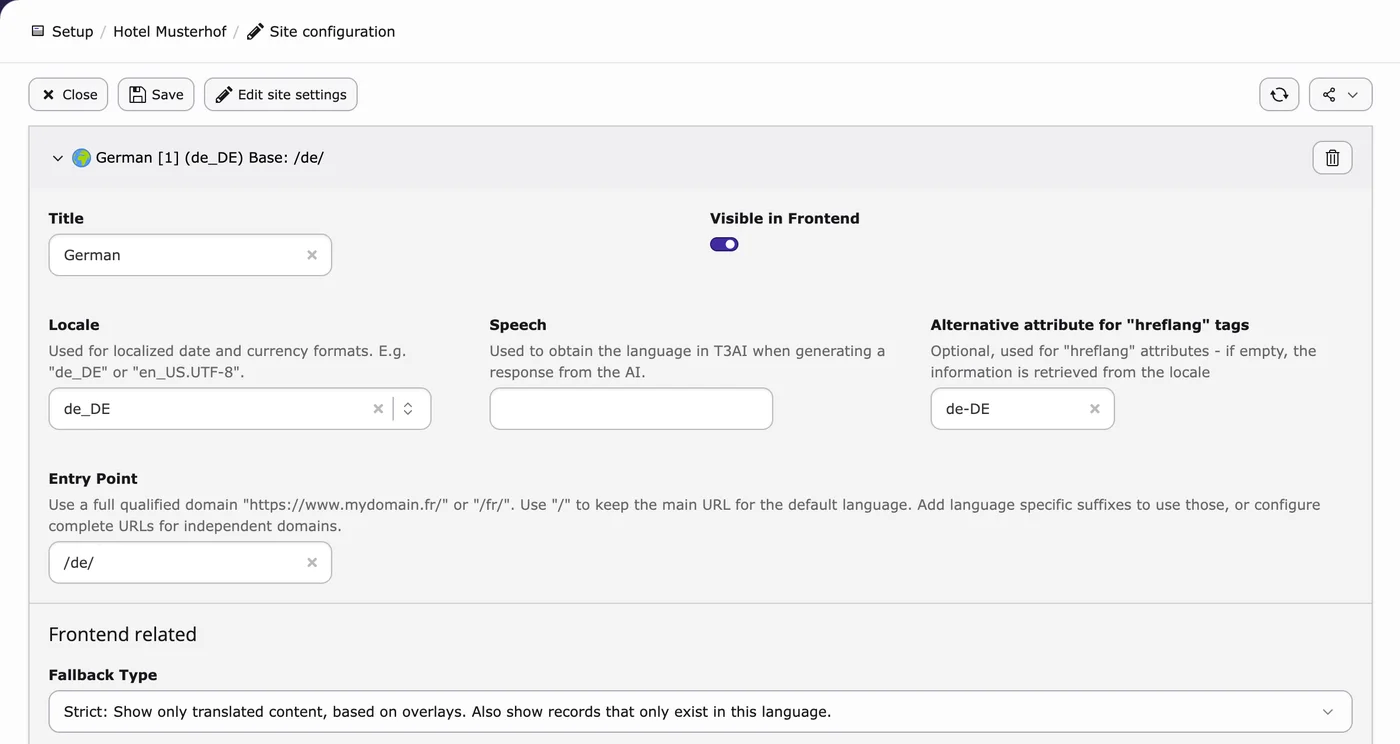
Languages live in the site configuration: locale, hreflang, URL and fallback type. Set them before you translate. Playbook page 5.
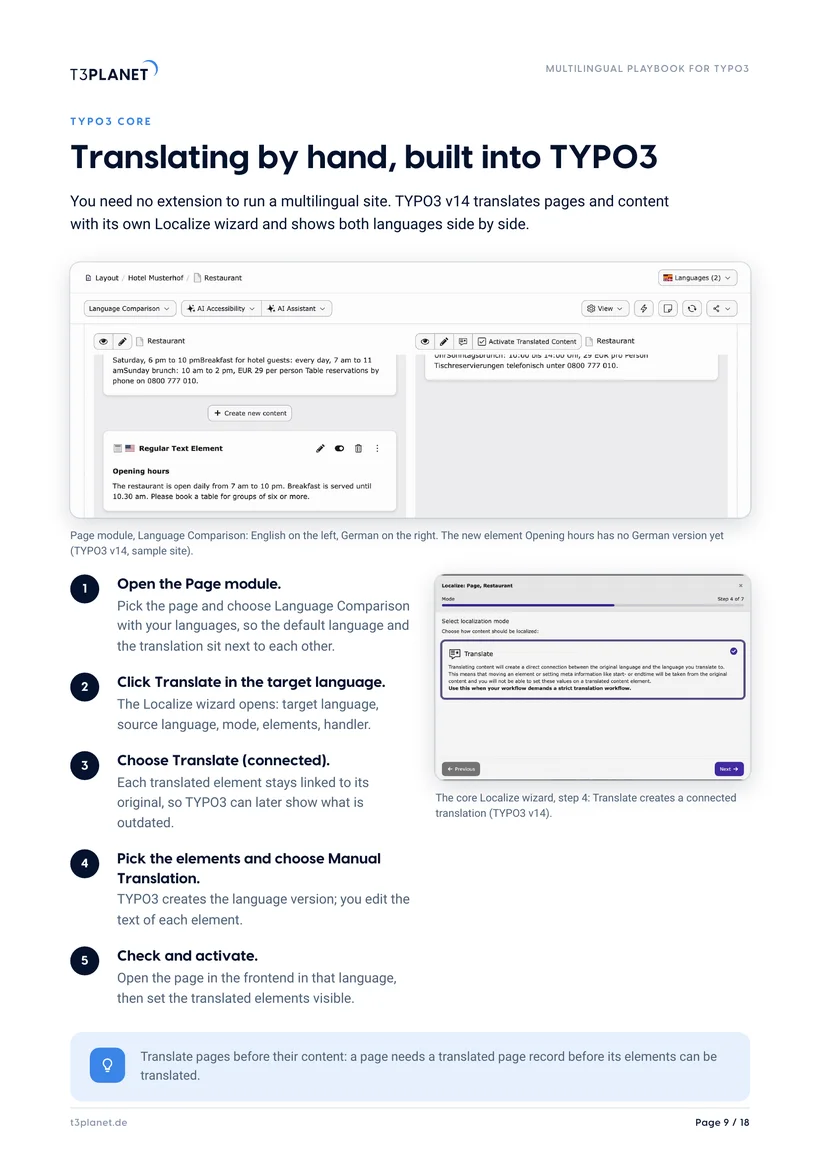
TYPO3 core translates by hand with its Localize wizard, no extension needed. AI Assistant adds one-click page translation. Either way a reviewer reads it. Playbook pages 8 and 9.
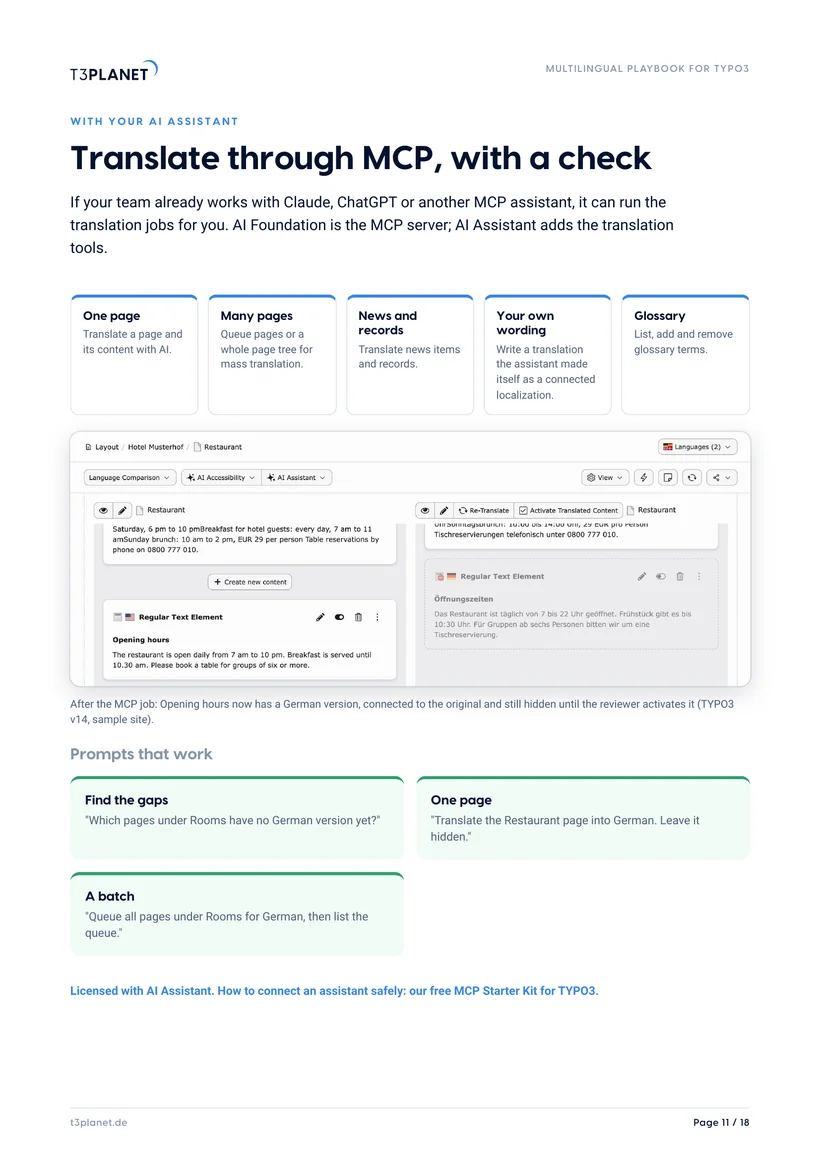
Mass translation, also for a whole page tree, comes with the licensed AI Assistant, in the backend or from your AI assistant through MCP. Try it free for 30 days. Playbook pages 10 and 11.
Brand, product and place names go into a glossary first; AI Assistant has a language glossary in the backend. Playbook pages 4 and 10.
Buttons and system texts come from XLIFF files. AI Localization translates those files; it does not translate pages. Playbook page 13.
A first orientation. What fits your site depends on your languages, your content and who can review it.
Get the playbook and language sheet, free
PDF and Excel file, instant download. We only email you about this guide.
How we use your details: Privacy Policy.

Questions before you download? Jürgen answers personally. juergen@t3planet.de

How do you run a multilingual TYPO3 website?
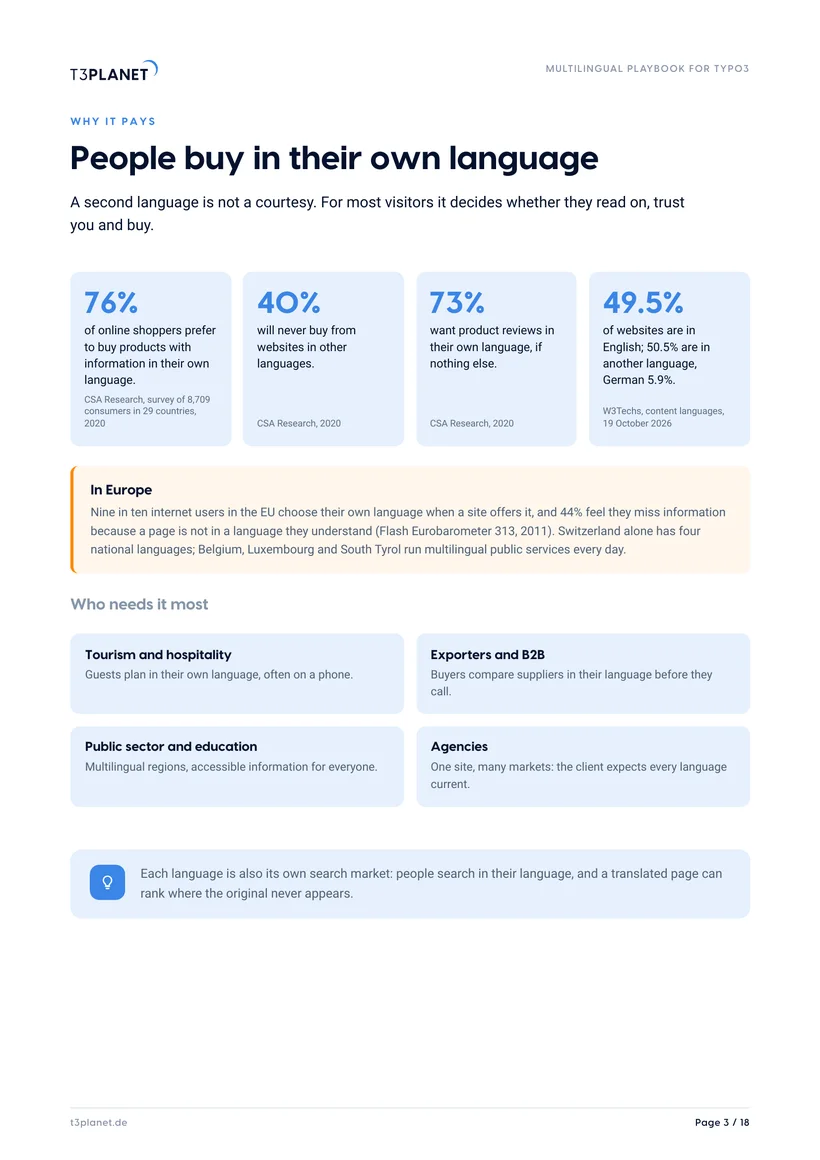
- 76% of online shoppers prefer to buy with product information in their own language, and 40% never buy from sites in other languages (CSA Research, 2020).
- In TYPO3 v14 every language is set in the site configuration: locale, hreflang value, URL and fallback type; TYPO3 core translates pages and content without an extension.
- The fallback type decides what visitors see when a page has no translation yet: only translated content, the default language, or content made for that language only.
- Connected translations point to their original, so TYPO3 can show which language versions are outdated; free copies can differ but are harder to keep in sync.
- AI translation saves the most time when a person who speaks the language reads every page before it goes live and fixes terms in a glossary.
AI drafts. A person who speaks the language decides.
Three questions from the first month
Turn a card to see what the playbook recommends.
A page has no German version yet. What do visitors see?
The English price changed. Is the German page wrong now?
The Book now button is still in English.
Sources: TYPO3 v14 core; AI Credits rate card, T3Planet, October 2026.
A language is only as good as its owner
Five roles, five jobs. Pick a role to see what it covers.
TYPO3 core
- Owner
- Your integrator
- Covers
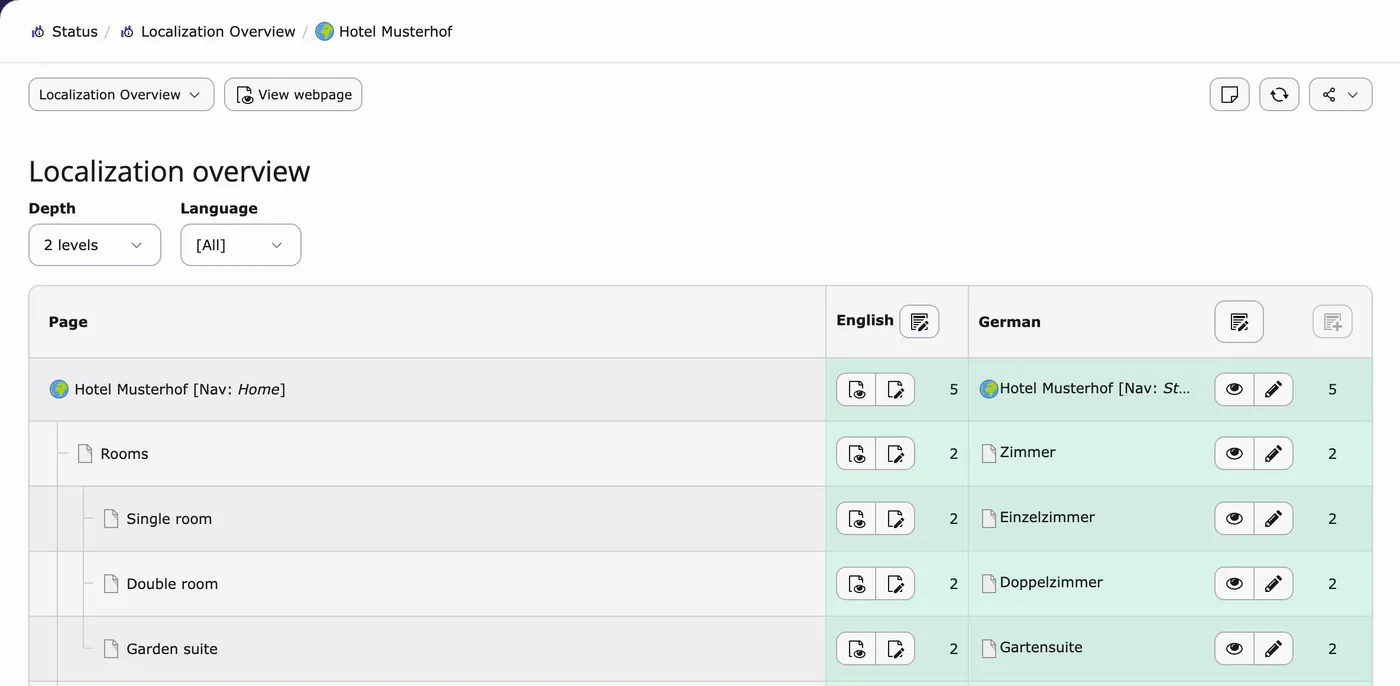
- Site configuration: languages, locale, hreflang, URLs, fallback type. Localization overview.
- Playbook
- Phase 2
The language sheet has a reviewer column for every language. Put a real name in it, not a role.
AI Assistant
- Owner
- Editor in charge
- Covers
- One-click page translation, mass translation, news and records, language glossary. Licensed, 30-day free trial.
- Playbook
- Phase 3
The language sheet has a reviewer column for every language. Put a real name in it, not a role.
AI Foundation
- Owner
- Agency admin
- Covers
- Which AI provider handles the text. Your own key is the default, with no T3Planet proxy in the data path. Free and open source.
- Playbook
- Page 12
The language sheet has a reviewer column for every language. Put a real name in it, not a role.
Reviewer
- Owner
- A person who speaks the language
- Covers
- Reads every translation before it goes live, feeds the glossary.
- Playbook
- Phases 3 and 4
The language sheet has a reviewer column for every language. Put a real name in it, not a role.
Developer
- Owner
- Extension or template developer
- Covers
- XLIFF label files of extensions and templates, by hand or with AI Localization.
- Playbook
- Page 13
The language sheet has a reviewer column for every language. Put a real name in it, not a role.
Eighteen pages, four phases, one language sheet
Why it pays
Jürgen's letter, the playbook on one page, and the figures: 76% prefer to buy in their own language.
Plan and set up
Languages and pages by data, site configuration, fallback types, connected or free, real TYPO3 v14 screens.
Translate in TYPO3 core
Three routes compared, then the core Localize wizard step by step, no extension needed.
Translate with AI
AI Assistant in the backend, your AI assistant through MCP, where your text goes and what it costs.
Labels and sync
XLIFF and AI Localization, the monthly sync routine.
Checks and rollout
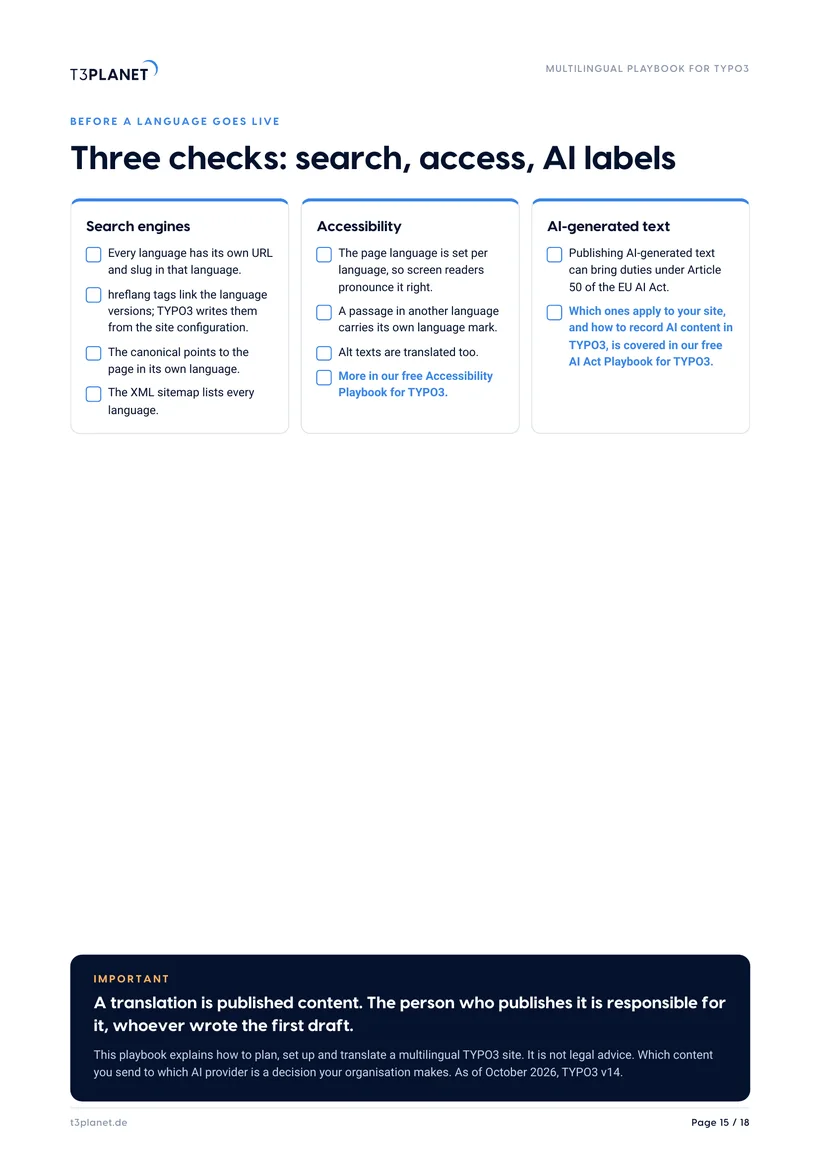
Search, accessibility, AI labels, a checklist, 20 minutes with Jürgen.
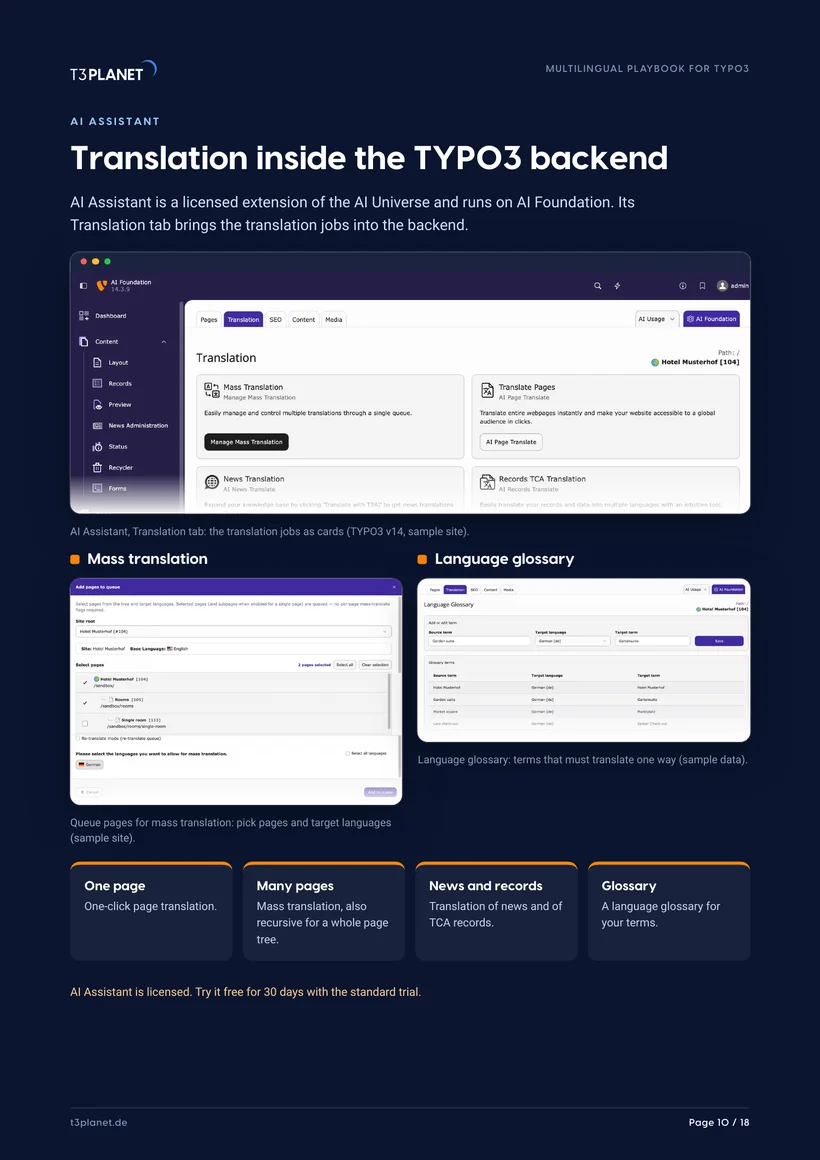
AI Assistant translates pages, content, news and records. AI Localization translates the XLIFF label files of extensions. Both are licensed extensions of the AI Universe.
Five steps, from plan to a reviewed translation
Plan
Languages and pages by data.
- Where visitors and enquiries come from
- Top pages first
- A reviewer per language
Set up
Languages in the site configuration.
- Locale and hreflang
- One URL per language
- Fallback type per language
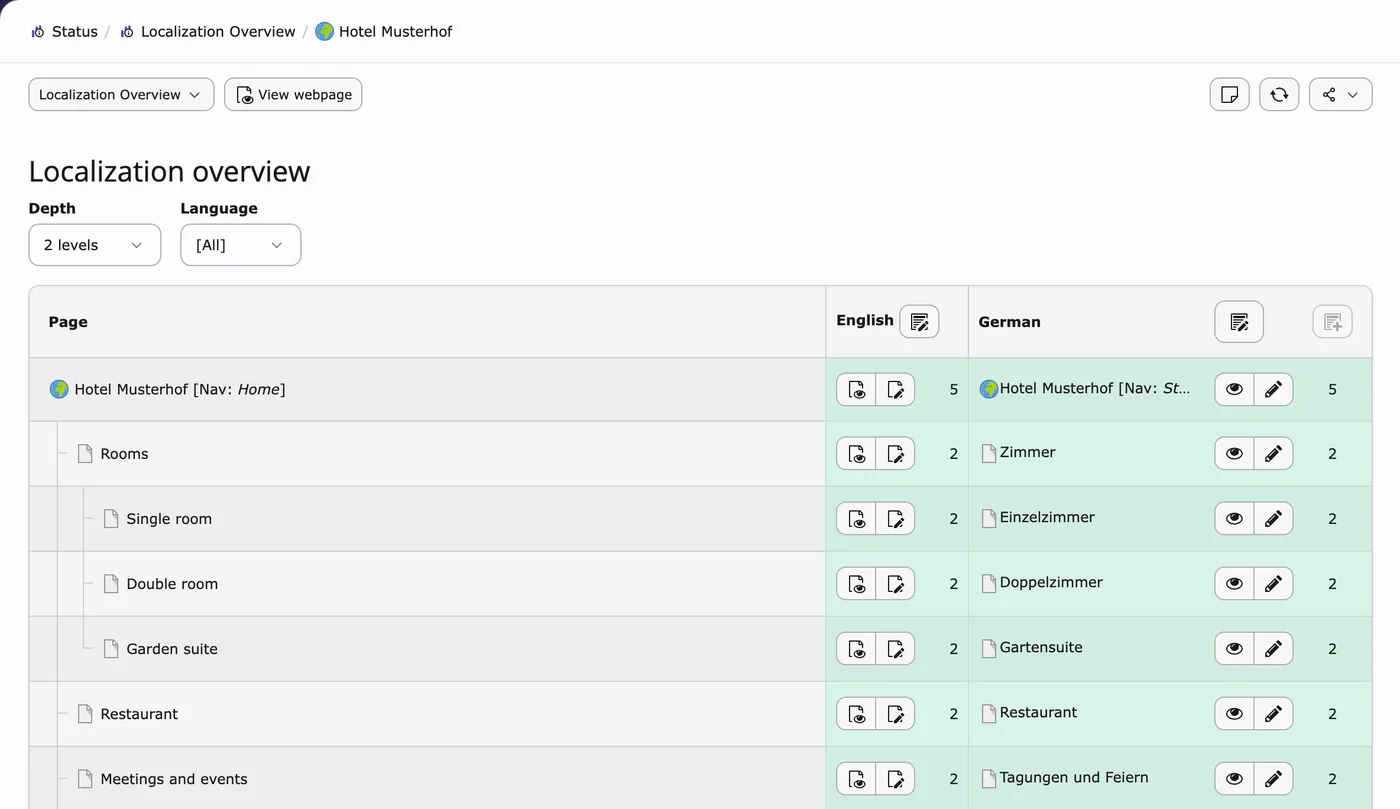
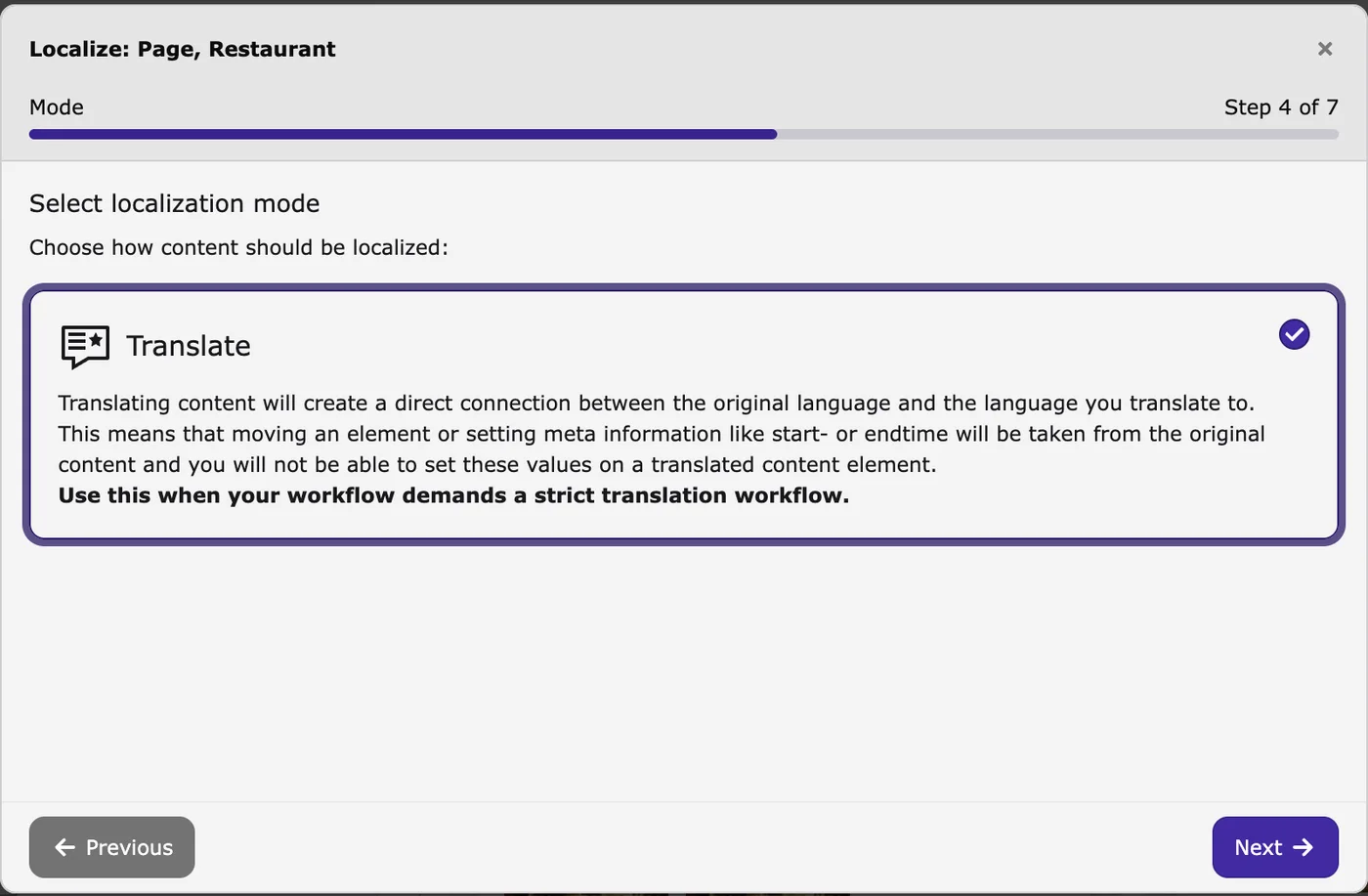
By hand
The core Localize wizard, no extension.
- Language Comparison in the Page module
- Translate creates a connected version
- Edit, check, activate
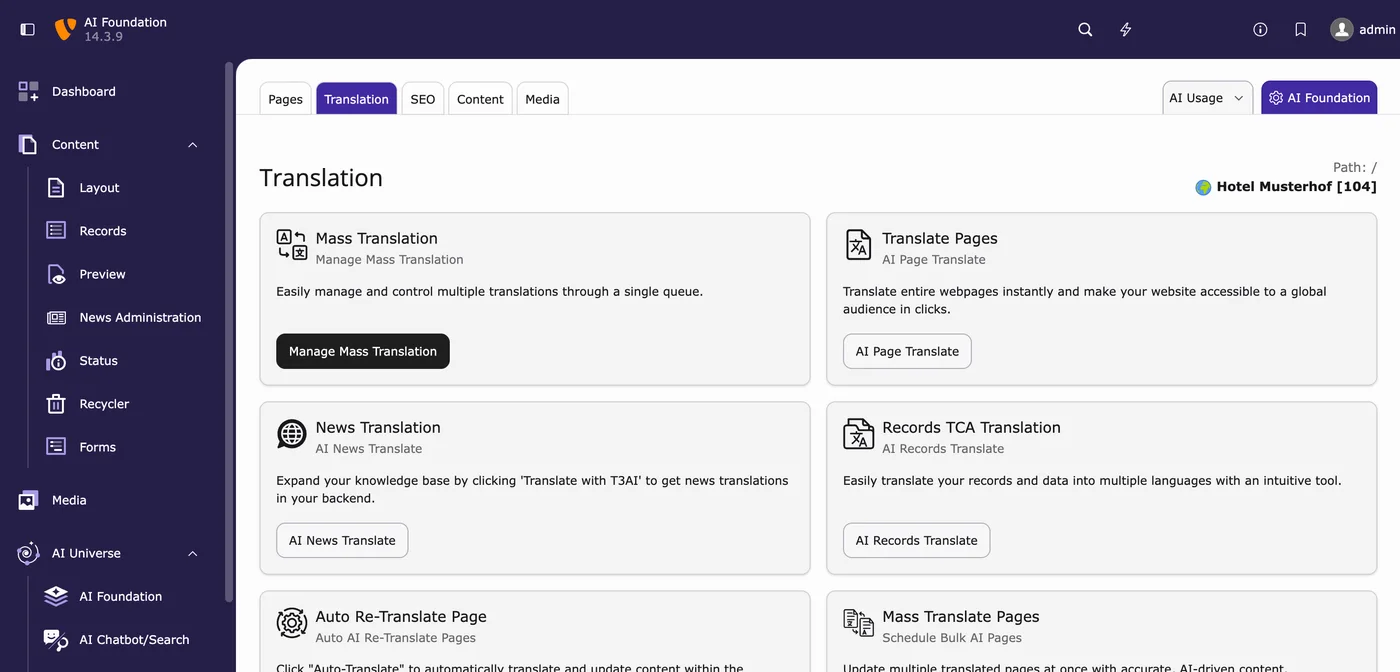
With AI
One page first, then batches.
- One-click page translation
- Mass translation for many pages
- A glossary for your terms
Through MCP
Your AI assistant runs the job.
- Translate a page or queue a tree
- Arrives hidden for review
- Reviewer activates it
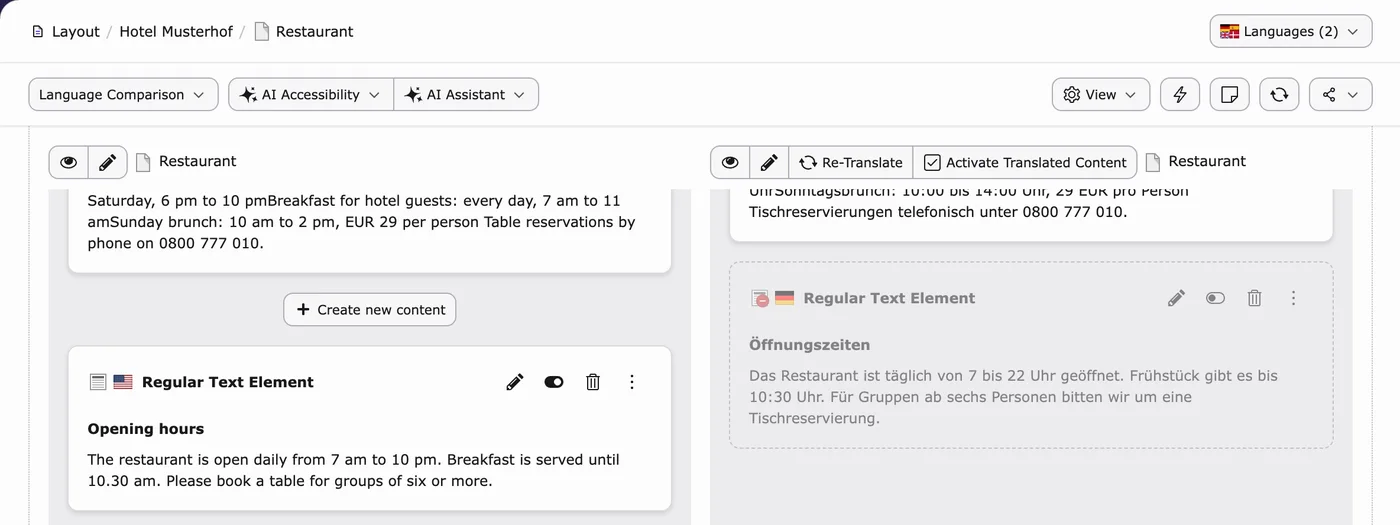
Screens: TYPO3 v14 on our demo install, sample data.
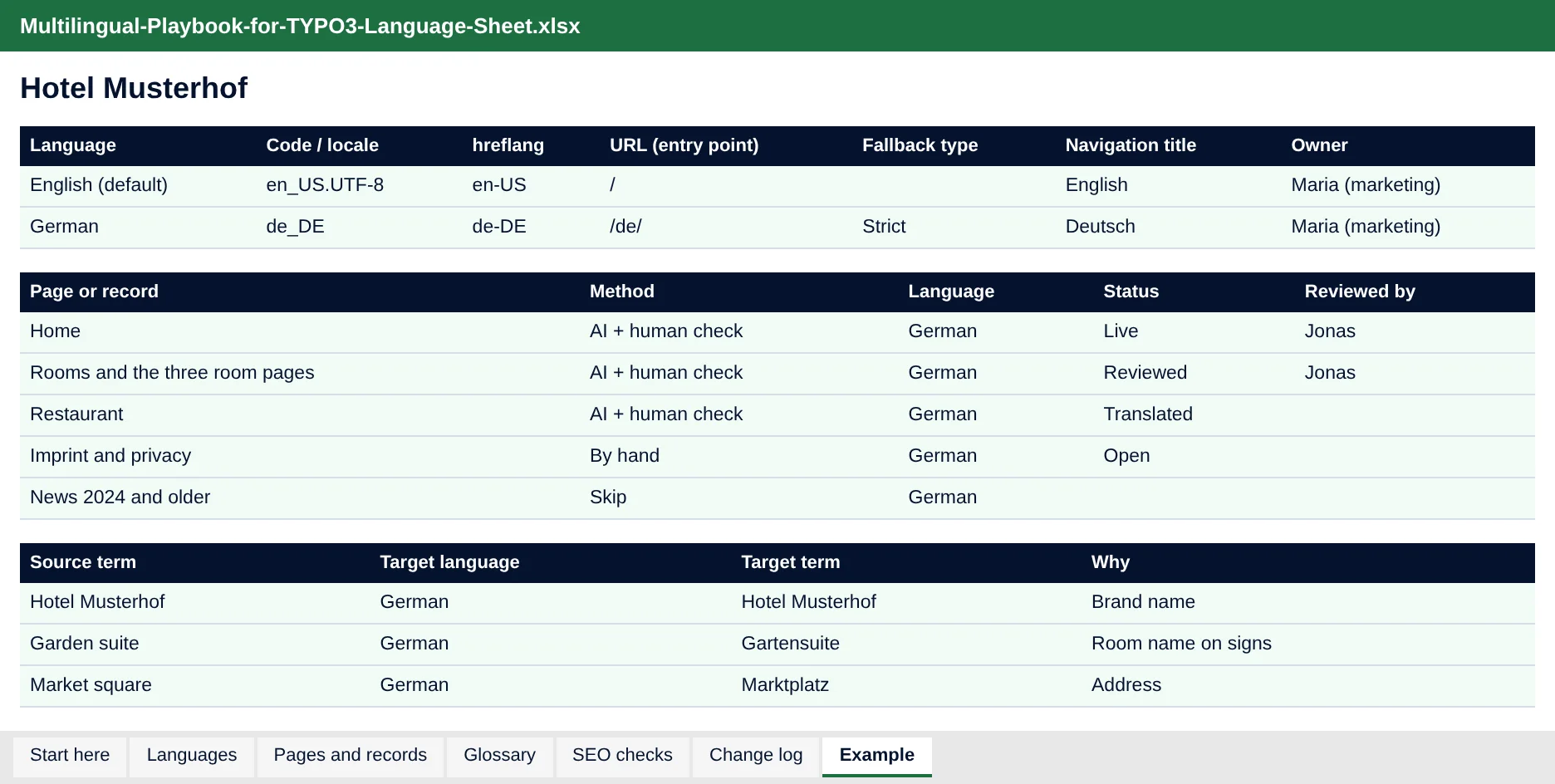
One row per language, one line per change
Languages: code, hreflang, URL, fallback, owner and reviewer. Pages and records: translate, keep or skip, and the status of each. A glossary tab, SEO checks per language and a change log.
- Dropdowns for method, status and checks
- A filled example for Hotel Musterhof
- Opens in Excel, LibreOffice and Google Sheets
20 minutes with Jürgen
Send your filled language sheet beforehand and we use the 20 minutes for your site: which languages, which URLs, which pages first, and where AI fits.
Jürgen · Your contact at T3PlanetWho it is for
In-house TYPO3 teams
You run a site in two or more languages. You get a plan, the settings in TYPO3, a translation route with a review step and a monthly routine.
Agencies and freelancers
You launch languages for clients. You get a checklist for the project plan, a sheet to share with the client and a clear split between content and labels.
Frequently asked questions
How do I make a TYPO3 website multilingual?
Add each language in the site configuration with its locale, hreflang value, URL and fallback type. Then translate pages and content, by hand or with AI, and check every language in the frontend before it goes live. The playbook walks through all four phases.
Is the playbook really free?
Yes. You get the PDF and the Excel language sheet straight away, with no payment details.
Can TYPO3 translate without an extension?
Yes. TYPO3 core translates pages and content by hand with its Localize wizard and shows both languages side by side in the Page module. Extensions such as AI Assistant add AI translation on top.
Can AI translate my TYPO3 pages?
Yes, with AI Assistant: one-click page translation, mass translation also for a whole page tree, translation of news and records, and a language glossary. AI Assistant is licensed and has a free 30-day trial. Through AI Foundation's MCP server, an assistant such as Claude or ChatGPT can run these jobs too. A person who speaks the language should read every page before it goes live.
What is the difference between AI Assistant and AI Localization?
AI Assistant translates pages, content, news and records. AI Localization translates the XLIFF label files of extensions, such as buttons and system texts. It does not translate pages or content.
Where does my text go when AI translates it?
To the AI provider set in AI Foundation. By default that is your own provider key, with no T3Planet proxy in the data path. With the optional AI Credits, T3Planet is in the data path and the AVV is available on request.
Which TYPO3 version does it cover?
The screens and steps show TYPO3 v14. Languages, fallback types and the Localization overview are available in TYPO3 v12 and v13 too.