


TYPO3 v14 Backend Access, User Roles & Permissions: Complete Admin Guide (2026)
Security


PHP2Shell explained for TYPO3: the two critical PHP flaws, fixed versions, a 5-step check and how T3Planet helps.
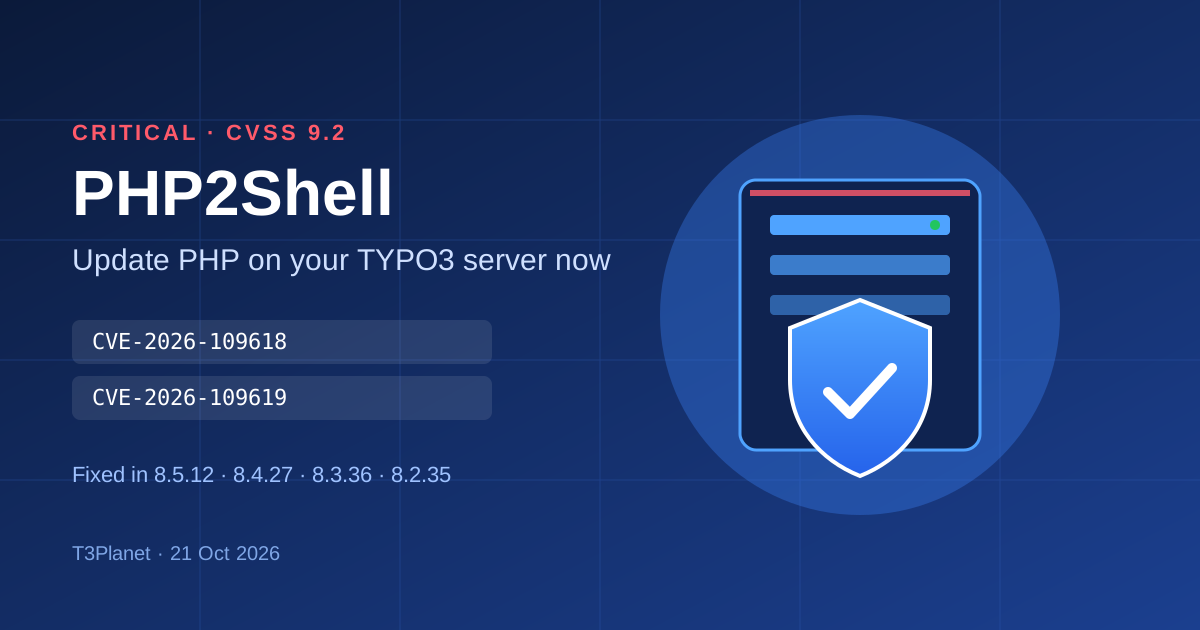
In short: On 21 October 2026 the PHP project released PHP 8.5.12, 8.4.27, 8.3.36 and 8.2.35. They fix two critical flaws, CVE-2026-109618 and CVE-2026-109619 (CVSS 9.2), that can let an attacker run code on a server without logging in. Every TYPO3 site runs on PHP, so every TYPO3 site is affected until its server runs a patched PHP version. Updating TYPO3 alone does not help: update PHP today, or let us check it for you for free.
ACT NOW
Not sure which PHP version your TYPO3 site runs? We check it for free and send you a written next-step plan.
PHP2Shell is the name for two critical vulnerabilities in PHP itself, CVE-2026-109618 and CVE-2026-109619. Under the right conditions they let an unauthenticated attacker run their own code on a web server. They were fixed on 21 October 2026 in PHP 8.5.12, 8.4.27, 8.3.36 and 8.2.35.
The flaws sit in the parts of PHP that nearly every request touches: memory management and error handling. That is why they affect every PHP application, not one CMS.
| CVE | Name | What it does |
|---|---|---|
| CVE-2026-109618 | Remote code execution via out-of-memory corruption | A request that hits PHP's memory_limit at the wrong moment leaves half-built internal data behind, and PHP later treats it as valid. On Apache with mod_php this works before any application code runs, with default settings. It was also confirmed on PHP-FPM through application code paths. |
| CVE-2026-109619 | Remote code execution via stale global state | A fatal error at the wrong point can leave PHP pointing to memory from an earlier request. The next request on the same worker can then use that freed memory. |
Both flaws affect every runtime that serves web requests: PHP-FPM, Apache with mod_php, php-cgi, FrankenPHP and LiteSpeed. The PHP project rates the risk highest for mod_php. According to the PHP Foundation, the root cause was first noticed during an external audit in 2024. Several security firms later showed working attacks, which made the fix the team's top priority.
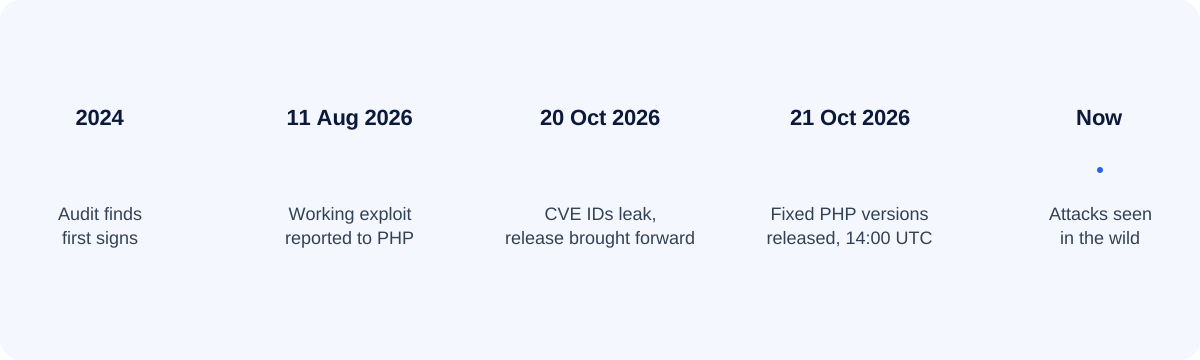
Because details leaked before the fix, attackers had a head start. Treat this as urgent.
Any server that runs PHP is affected, whatever the application: TYPO3, WordPress, Laravel or custom code. The bugs go back many years, so every PHP version is affected until it is patched.
| Your PHP version | Fixed version | Status | What to do |
|---|---|---|---|
| 8.5.x | 8.5.12 | Affected below fix | Update to 8.5.12 or newer |
| 8.4.x | 8.4.27 | Affected below fix | Update to 8.4.27 or newer |
| 8.3.x | 8.3.36 | Affected below fix | Update to 8.3.36 or newer |
| 8.2.x | 8.2.35 | Affected below fix | Update to 8.2.35, then plan 8.3+ (8.2 ends 31 Dec 2026) |
| 8.1 and older | None (end of life) | No official fix | Upgrade PHP, usually together with TYPO3 |
| TYPO3 version | Typical PHP | Your path |
|---|---|---|
| v14 LTS, v13 LTS | 8.2 to 8.5 | Patch PHP within your branch. Usually a quick package update. |
| v12 LTS | 8.1 to 8.4 | On 8.2 or newer: patch PHP. On 8.1: switch to PHP 8.2 or newer first. |
| v11 (ELTS) | 7.4 to 8.x | On 8.2 or newer: patch PHP. Otherwise upgrade PHP and plan the TYPO3 upgrade. |
| v10 and older | 7.x | No PHP fix possible. Upgrade TYPO3 and PHP, or take the site offline until then. |
For PHP 7.4, 8.0 and 8.1 the PHP security team published minimal source backports for people who build PHP themselves, and some Linux distributions and LTS vendors ship backported fixes. Check with your vendor, or move to a supported PHP version. National cyber security agencies such as the UK NCSC advise taking systems offline if they cannot be fixed quickly. If your site needs more than a PHP patch, our parent company NITSAN plans and carries out the TYPO3 upgrade for you.
Paste your PHP version, the output of php -v, or an X-Powered-By header. The result appears instantly.
Runs only in your browser; nothing is sent to us. Where to find the version: TYPO3 backend › Admin Tools › Environment › Environment Status, your hosting panel, or the command below.
php -r 'echo PHP_VERSION, " ", PHP_SAPI, PHP_EOL;'
php -i | grep -E "session.upload_progress.enabled|memory_limit|post_max_size"
The command-line PHP can differ from the PHP that serves your website. To be sure, compare it with the version in TYPO3 Admin Tools.
External scanners guess the version from headers. Many TYPO3 sites hide it, and Linux distributions often backport the fix without changing the version number. Treat "unknown" as "not confirmed safe".
PHP2Shell is one more reason to harden TYPO3 itself. Our 30-point TYPO3 security checklist covers the rest.
php -v. The command-line PHP and the web server PHP can differ.php.ini, the FPM pool or the Apache config, then restart every worker. Do not rely on ini_set() or .user.ini. These settings reduce the risk but do not make PHP safe.fileadmin/ and typo3temp/, new or changed backend users, memory-exhaustion errors reported as "Unknown on line 0", and PHP workers that start a shell.Temporary settings from the PHP security advisory:
; CVE-2026-109619, all branches
session.upload_progress.enabled = 0
; CVE-2026-109619, PHP 8.5 only
fatal_error_backtraces = 0
; CVE-2026-109618 (FPM: php_admin_value)
memory_limit = -1
post_max_size = 8M   ; 32M if you need uploads
Example update on your own Debian or Ubuntu server (package names depend on your PHP source):
sudo apt update && sudo apt install --only-upgrade 'php8.3*'
sudo systemctl restart php8.3-fpm     # or: apache2 for mod_php
php -r 'echo PHP_VERSION, PHP_EOL;'
find fileadmin typo3temp -name '*.php' -newermt '2026-10-17'
Datadog Security Labs reports first attack attempts from 17 October 2026, so check your logs from that date.
Running TYPO3 v10, v11 or v12 on PHP 8.1 or older? A patch alone is not possible. We plan the PHP and TYPO3 upgrade with you, with a fixed scope. Background: TYPO3 update vs upgrade.
Plan my PHP + TYPO3 upgradeT3Planet builds and supports TYPO3 templates and extensions every day, so we know which PHP versions each TYPO3 setup needs. T3Planet is the TYPO3 product brand of NITSAN GmbH, our parent company and a TYPO3 Association Gold Member. Every request is handled by NITSAN's team of more than 20 TYPO3 developers.
| Service | What you get | For whom |
|---|---|---|
| Free PHP security check | We check your PHP version, TYPO3 version and hosting, and send a written next-step plan | Every TYPO3 site |
| Emergency PHP update | We patch PHP on your server or coordinate with your host, restart every worker and test the site | Sites on PHP 8.2 to 8.5 |
| Compatibility check | We test your T3Planet templates and extensions on the patched PHP version | T3Planet customers |
| PHP + TYPO3 upgrade | Upgrade to TYPO3 v13 or v14 LTS on a supported PHP version, with a fixed scope | Sites on PHP 8.1 or older |
| Clean-up after an attack | We look for backdoors, remove them and restore a clean, hardened site | Sites with signs of an attack |
You send the short form below or open a support ticket.
Step 1 · 2 minutesWe review your PHP version, TYPO3 version and hosting, and confirm whether PHP2Shell affects you.
Step 2 · freeYou get a written plan with a fixed scope and price. Nothing starts without your OK.
Step 3 · no obligationWe patch PHP or run the upgrade, on your server or together with your host, and restart every worker.
Step 4 · fixed scopeWe test front end, backend, forms and extensions, and scan for signs of an attack.
Step 5 · checkedYou get a short report of what changed and what to watch next.
Step 6 · documentedTell us your website and PHP version and choose a service. Our TYPO3 team replies within one business day.
PHP2Shell is the name security researchers gave to two critical PHP flaws, CVE-2026-109618 and CVE-2026-109619. Both are rated 9.2 (CVSS v4.0) and can let an attacker run code on a server without logging in. They were fixed on 21 October 2026 in PHP 8.5.12, 8.4.27, 8.3.36 and 8.2.35.
No. The flaws are in PHP, not in TYPO3, its extensions or templates. A TYPO3 site is at risk because it runs on PHP, so updating PHP is the fix.
PHP 8.5.12, 8.4.27, 8.3.36 and 8.2.35 or newer in the same branch. PHP 8.1 and older are end of life and get no official release; only minimal source backports and fixes from some LTS vendors exist.
Use the PHP2Shell checker on this page: paste your PHP version or the output of php -v and you get the result instantly. Read the version in TYPO3 under Admin Tools › Environment › Environment Status, because the command-line PHP can differ from the web server PHP.
Not for these two flaws, as long as your PHP version can be patched. If you run PHP 8.1 or older, you must upgrade PHP, and an older TYPO3 version may need an upgrade to run on it.
Many hosts have patched or added protection. Check your exact PHP version anyway with the checker on this page, and ask your host whether all PHP workers were restarted.
Only partial ones. Setting session.upload_progress.enabled = 0, fatal_error_backtraces = 0 on PHP 8.5, memory_limit = -1 and a small post_max_size reduces the risk. The PHP project says only the update is a complete fix.
Datadog Security Labs reports first attack attempts from 17 October 2026, four days before the fix, and watchTowr reports exploitation in the wild. Check your logs from 17 October onwards.
The fixes are patch releases within the same PHP branch, so no code changes should be needed. We test your setup on request as part of the compatibility check.
We look at your PHP version, TYPO3 version and hosting setup, tell you whether you are affected, and give you a written next-step plan. There is no cost and no obligation.
T3Planet is the TYPO3 product brand of NITSAN GmbH, our parent company and a TYPO3 Association Gold Member with more than 20 TYPO3 developers and offices in Dresden, Berlin and Viernheim.
An attacker makes your server run their own code, which usually means full control of the site.
Common Vulnerabilities and Exposures, the public ID for a known security flaw.
Common Vulnerability Scoring System, a 0 to 10 severity score. 9.0 and above is critical.
Two ways a web server runs PHP. mod_php runs inside Apache; PHP-FPM runs as a separate process pool.
A version that no longer gets security fixes, such as PHP 8.1 and older.
Don't wait for an attack. Get a free check today. Existing T3Planet customer? Open a support ticket and we prioritise it.
Get my free PHP security checkOpen a support ticketWe update this post as new information arrives. Last update: 21 October 2026.

Jürgen Pietschmann
AI Consultant for TYPO3Jürgen Pietschmann is a T3Planet Product Consultant at T3Planet Shop. He specialises in integrating AI into editorial workflows – from intelligent content creation and automated SEO to AI-powered search and chatbot solutions for TYPO3 sites. As a technical consultant for T3Planet AI Universe, he works closely with agencies and editorial teams on practical TYPO3 implementations. Jürgen has been writing the This Month in TYPO3 series since December 2025 and has spoken at T3CON25 and TYPO3 Developer Days 2026 (T3DD26), where he co-presented Content Editing Unlocked.
More From Author