



Great product for the migration of our WordPress blogs to Typo3. T3Planet was very helpful and supported us well with... Great product for the migration of our WordPress blogs to Typo3. T3Planet was very helpful and supported us well with the import and all questions. Very friendly and courteous customer support!
Overview
Are you a WordPress CMS user looking to migrate your WordPress blogs, pages, or news to TYPO3? Migrating from WordPress to TYPO3 can be a complex task, but with T3Planet’s WordPress Migration Extension, you can easily migrate all your data with a single click.
Migrate your WordPress website to TYPO3 CMS effortlessly using our WordPress migration extension! This TYPO3 extension allows you to move your WordPress pages, blogs, or news with a simple, straightforward process, and your migration is completed without any data loss.
Plus, it's compatible with the latest TYPO3 version 14!
1-Click Migration From WordPress to TYPO3
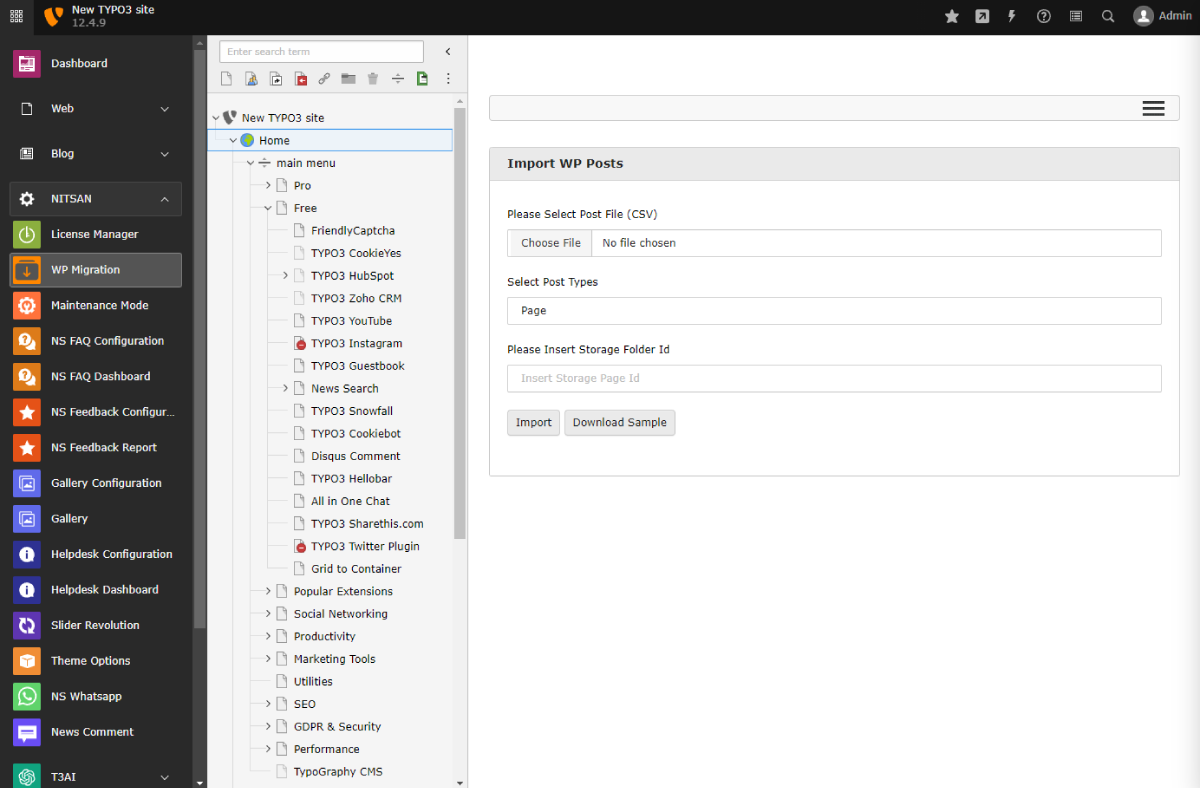
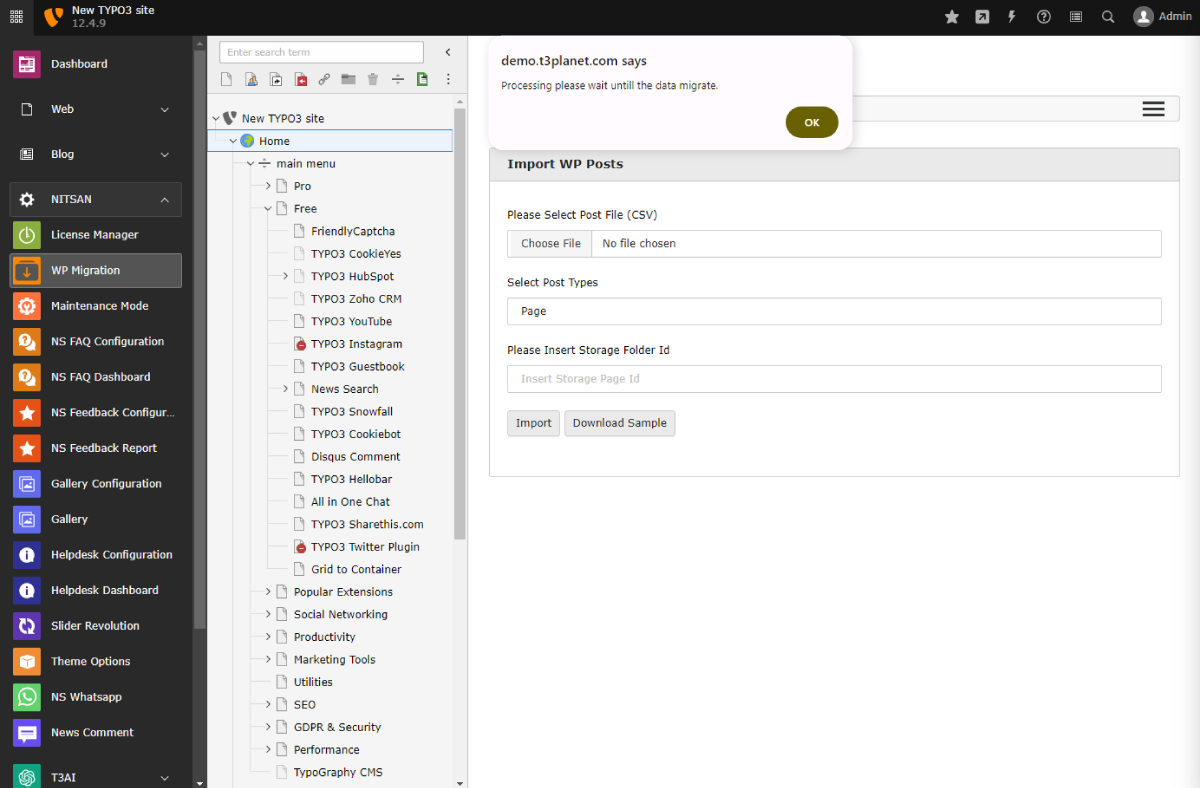
This feature allows you to migrate your WordPress blogs from your WordPress website to TYPO3 by simply
uploading your CSV file. It is essential to add the CSV file in the same format as the provided sample.
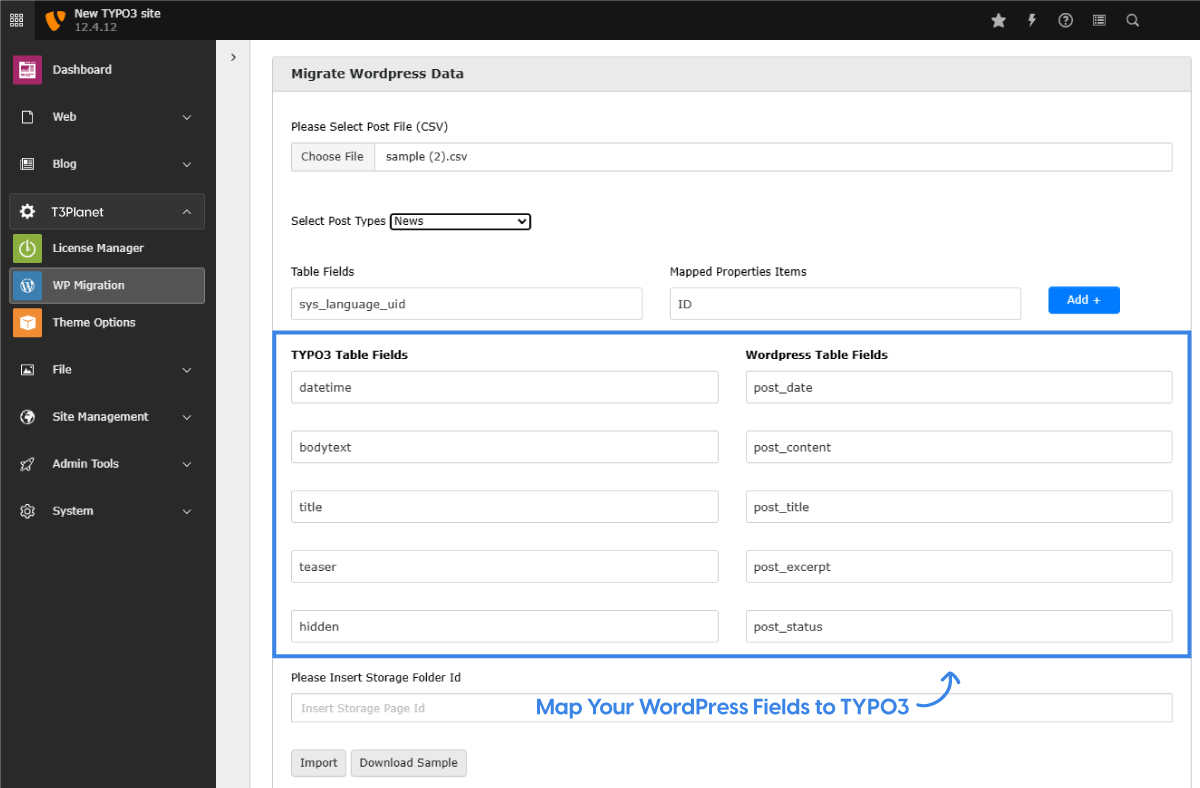
Easy Field Mapping Between WordPress and TYPO3 Blogs
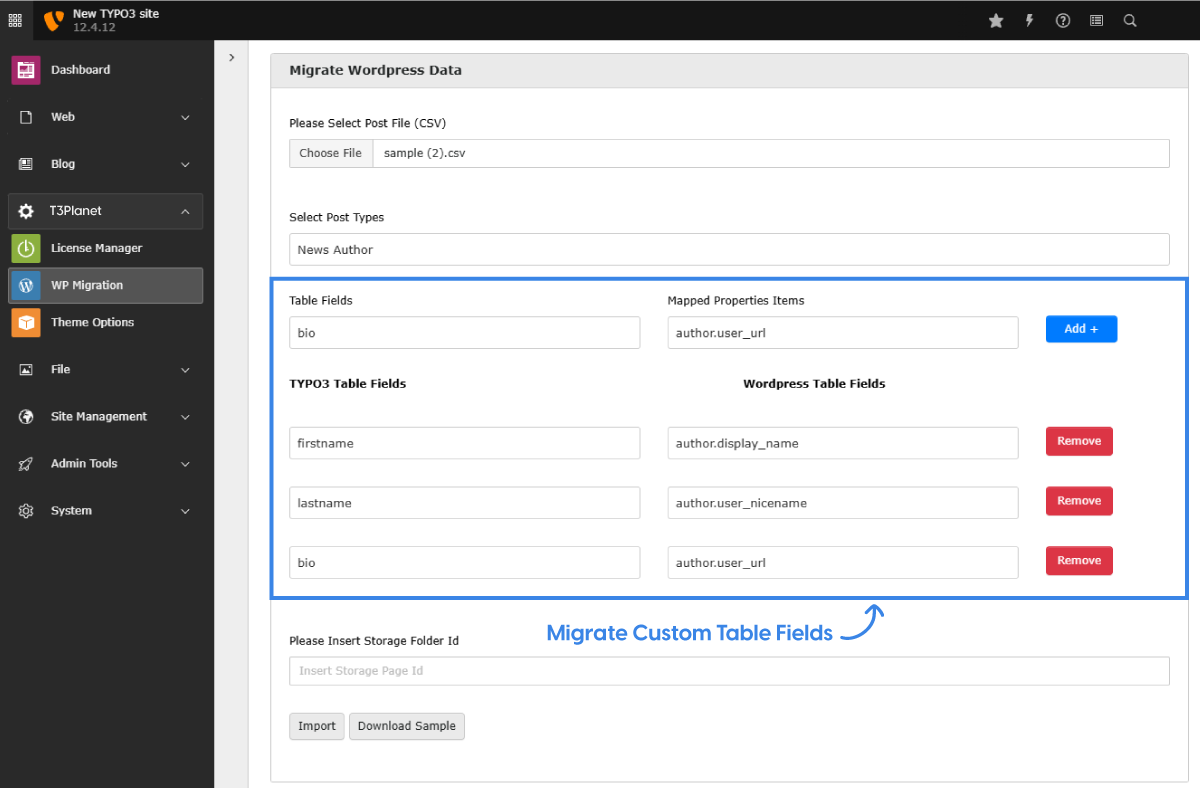
With the WordPress to TYPO3 Extension, you can easily import custom fields like author bios or any unique data.
Just select the fields you want to map, align them with TYPO3 fields, and the extension handles the rest
Flexible Table Field Customization Options
If you want to migrate custom fields from news, blogs, or pages, simply add the required fields as shown in the demo
and click on "Import." The WP Migration Extension will transfer your custom data in seconds!
Other Highlights
-
Plugin-Play Integration
-
Highly Customizable
-
Easy migration
-
Secure Blog Data Transfer
-
Follow TYPO3 Standards
-
No data loss
TYPO3 WP Migration - Backend Tour


What Our Customers Say
Reviews from Google, Trustpilot and Community
Very courteous and competent team. Very courteous and competent team. All my problems were solved with confidence. Very courteous and competent team. Very courteous and competent team. All my problems were solved with confidence.
As a TYPO3 developer, I am always looking for interesting extensions and templates. T3Planet offers very engaging and... As a TYPO3 developer, I am always looking for interesting extensions and templates. T3Planet offers very engaging and illustrative products and very useful extensions. Do check their website out and you won't regret it.
Transparent Pricing
All inclusive. No extra costs.
Simple, honest pricing. No credit card, no auto-charge. Buy when you're ready. Choose what works for you
Free Download Free Trial
Try Free for 30 Days
Full access to all features. Test on live, staging, or local. Stops after 30 days - no charges, no auto-subscription.
- Every feature fully unlocked
- Works on live, staging and local domains
- Email support during trial period
- No credit card required
- No auto-conversion to paid plan
€0
Start Free Trial Try for FreeNo credit card · No auto-charge · Simply stops after 30 days Secure checkout · Instant license delivery · 30-day money-back guarantee
Buy Now Buy now
Annual License
Production domains
Purchased product never stops working. Pay annually only for updates & support - not to keep the product running.
- Staging & local installations always free.
- Once installed, your copy keeps running.
- 12 months of updates and support included.
- Dedicated support manager.
- Instant license delivery to inbox.
€229/year Custom quote
Secure checkout · Instant license delivery · 30-day money-back guarantee
All prices EUR, annual licence. Production domains only. Staging and local installations are free and do not count towards your limit. 30-day money-back guarantee.
Running a different number, like 2 or 7? Tell us how many and we will send a custom order priced for your count, not rounded up to the next tier. Same for 11 domains or more. Tell us your number →
Free Vs Pro Features
KEY FEATURE LIST | FREE | Premium |
|---|---|---|
| Easy migration of Page from Wordpress Export your WordPress blogs to TYPO3 with One Click | ||
| Easy migration of Page Content from Wordpress Migrate Your Blogs, News , Pages at Your TYPO3 Backed in Less time | ||
| Multi Pages Migration Option Build a Multi-Page Structure Directly at Your Backend | ||
| Auto Migrate Text & Media Files Migrate your assets with Wp Extension with No data loss. | ||
| Map Your WordPress Fields to TYPO3 Sync your WordPress fields to TYPO3 for seamless data integration. | ||
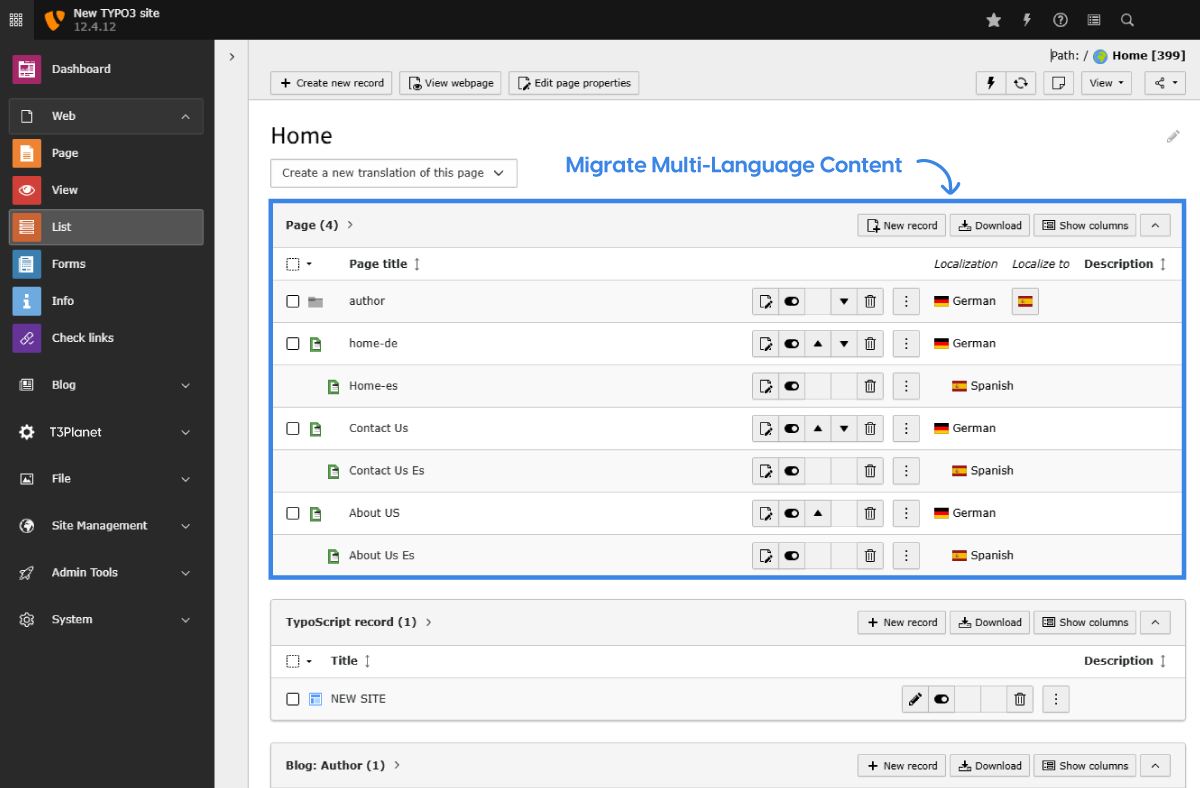
| Migrate Multi-Language Content Migrate your blog or news pages across multi languages with ease | ||
| Migrate Custom table fields Easily transfer custom fields from WordPress to TYPO3 for easy data migration. |
Compatibility Data
Change Log
Frequently Asked Questions
More FAQs
T3Planet extensions generally work with all 3rd-party TYPO3 extensions from TER (TYPO3 Extensions Repository). If you come across a compatibility issue with any third-party module, we’ll help you.
If you face any technical issues, please reach out to our Support team to receive help from our professionals.
We recommend that you perform a backup before starting the installation process to ensure that nothing can provoke a conflict.
Yes. Every premium T3Planet extension is an annual subscription, and product updates and support are included for as long as your subscription is active. Your subscription will auto-renew each year until cancelled.
If a subscription ends, the extension keeps working on your site, but updates and support stop until you renew.
Read more about the subscription model.
Yes, we provide professional installation service at €49. You can purchase it while checking out with your purchased extension.
You can request a customisation service if you need to configure it according to your business needs.
Yes. Premium T3Planet products come with a 30-day free trial: use "Start Free Trial" on the product page. Every premium purchase is also covered by a 30-day money-back guarantee.
Most of our TYPO3 extensions also have a frontend demo and a live TYPO3 backend demo, so you can see how a module works before you install it.
Yes, you can install any T3Planet extension on a test site and configure all the settings there before doing it on your live store. You can easily change your domain from a staging site to a live site on your own or may contact our support team to do it for you. Also, you can use activate/de-activate license feature.
Every premium licence includes support and updates for the term of your annual subscription, plus a 30-day money-back guarantee. If you find a bug or run into trouble, contact our Support team and we will reply within 1 business day.
To keep support and updates after the first year, simply renew your annual subscription.
Whenever Team T3Planet releases a new version, particularly for the TYPO3 product, you will get email information about the newly released version.
You can then update the extension from your account
Step 1. Go to NITSAN > License Management
Step 2. Click on “Check for Updates” to your purchased product.
Step 3. If new updates are available, click on your particular product's “Update to X.X.X” button.
Check out our updated version of documentation.
You can install your TYPO3 extension with the below steps.
Step 1. Download EXT.ns_license
Step 2. Go to Admin Tools > Extensions > Install EXT.ns_license extension.
Step 3. Switch to NITSAN > License Management > Add Your License Key.
Step 4. Go to Admin Tools > Extensions > Activate Your Purchased Extension.
Detailed information can be found via documentation, License activation documentation”.
Yes, For a free TYPO3 extension, you can just use the mentioned composer installation command on this page. For the premium TYPO3 extension, we provide you access to our Private TYPO3 Composer Server.
Detailed information can be found via documentation, Read more - Documentation.
Our license system allows you to access, download and install your purchased TYPO3 product(s) using a "license key". Each licence covers one production domain, including its subdomains. Staging, development and local installs are free and do not count. For example, if you want to use a product on 3 production domains, choose the licence for up to 3 domains.
Support is provided for the domains covered by your active annual subscription. If the modules are on another account, they will not be supported.
We have detailed documentation for every TYPO3 product, please click on the documentation link on this page which will lead you to our official documentation.
We take care well of the backend usability of all the TYPO3 products. You can find all the details like installation, configuration, and usage in our documentation. Yes, with our extended support service, our TYPO3 experts also train and help our customers to get familiar with and get used to the TYPO3 backend.
Yes, According to our vision, all the TYPO3 products are compatible with the current and last TYPO3 LTS version.
You can easily transfer your license key from one domain to a new domain. Please follow our De-activate/activate license feature at Documentation.
If you want to set up your purchased TYPO3 product on your local, staging, or testing server, please send us the information through our Support team.
There is no need to pay any additional cost after purchasing our products. But in case you need our installation or customization services, a fee will be required. For free products, our support will be given as the charged service.