

TYPO3 llms.txt: How to Create, Test and Add It

llms.txt for TYPO3: what the file is, whether it helps, three ways to add it, copy-ready code and how to test it.
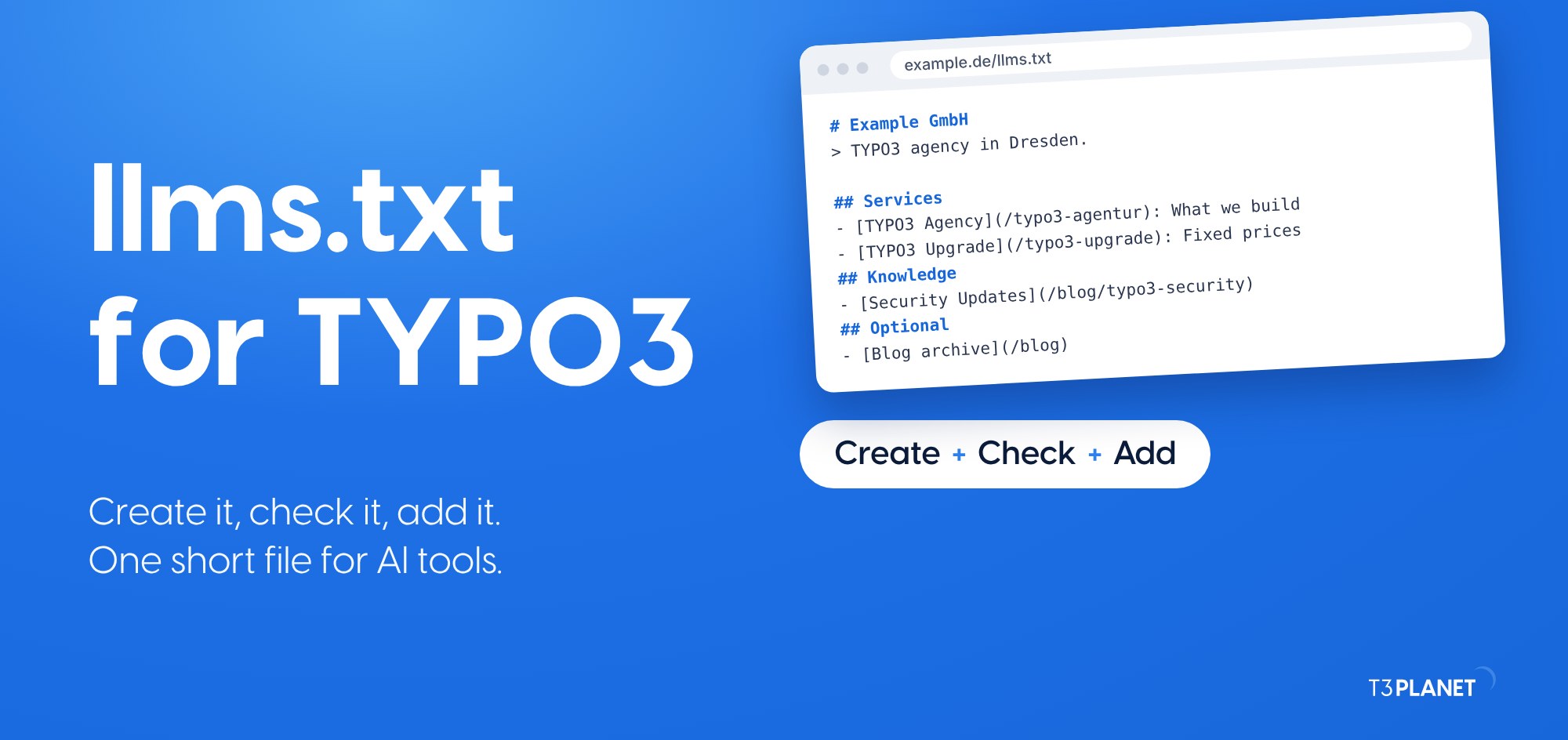
In short: An llms.txt is a Markdown file at /llms.txt that gives AI tools a short, curated map of your site: a title, a one-line summary and links to your key pages. In TYPO3 you add it with a static file, a site configuration route or the web-vision extension. Google states it has no effect on Search rankings.
llms.txt in 60 seconds
- llms.txt is a Markdown file at
/llms.txtwith a short, curated list of your key pages for AI tools. - Only the H1 site name is required. A summary, link sections and an "Optional" section are common.
- Google says Search ignores the file (June 2026), so do not expect rankings from it.
- Ahrefs checked 137,210 domains in May 2026: 28% publish a file, and about 97% of those files got no request of any kind.
- In TYPO3 you add it in three ways: a static file, a site route or an extension.
- Write 10 to 30 links with one short note each, as absolute URLs that return status 200.
- Test it with curl, then read your server log after four weeks.
What is an llms.txt file?
llms.txt is a plain Markdown file in the root of a website that gives AI tools a short, curated overview of the site. Jeremy Howard of Answer.AI proposed it in September 2024. It is meant for AI tools that look up a page while they answer a question, not for model training. It complements the sitemap and robots.txt and replaces neither.
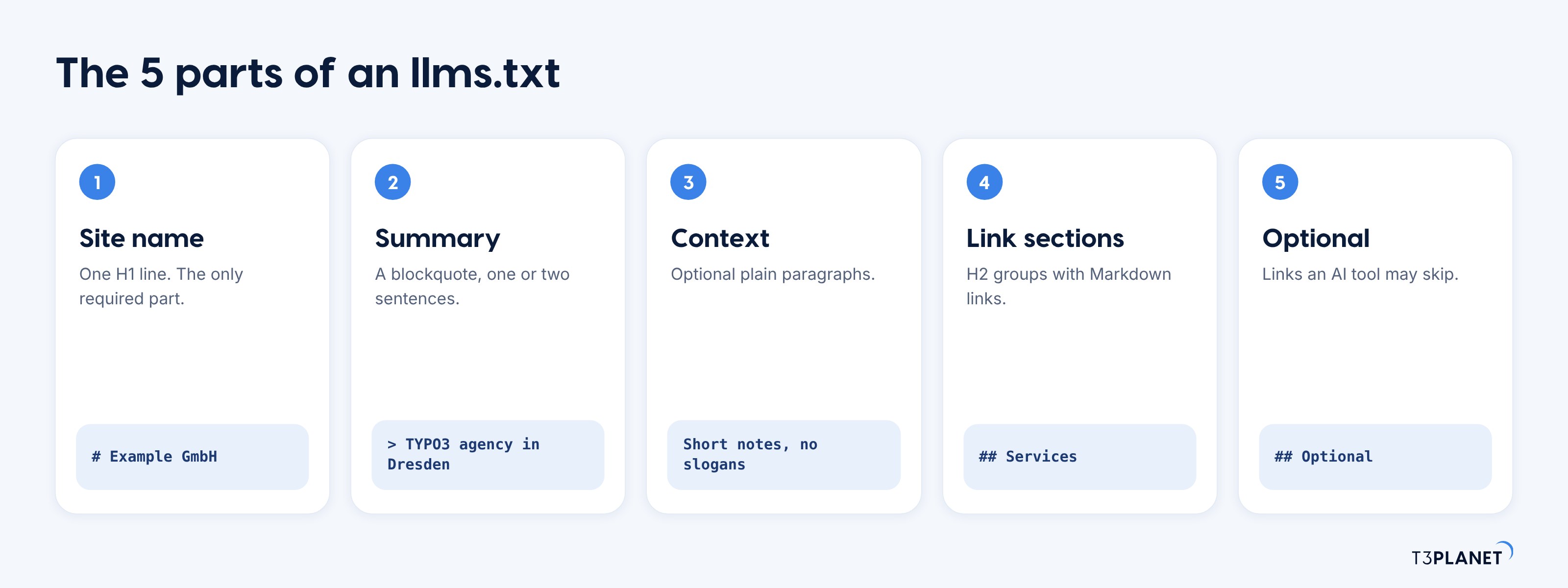
The format is fixed. Only the first element is required:
- An H1 with the name of the site.
- A blockquote with a summary in one or two sentences.
- Optional paragraphs with context.
- H2 sections that hold link lists. Each entry is a Markdown link, optionally followed by a colon and a short note.
- An H2 named "Optional" for links an AI tool may skip when it needs less context.
The proposal adds one more idea: a page can offer a clean Markdown version at the same URL with .md added. A tool then reads the content without the page layout.
How is llms.txt different from robots.txt and sitemap.xml?
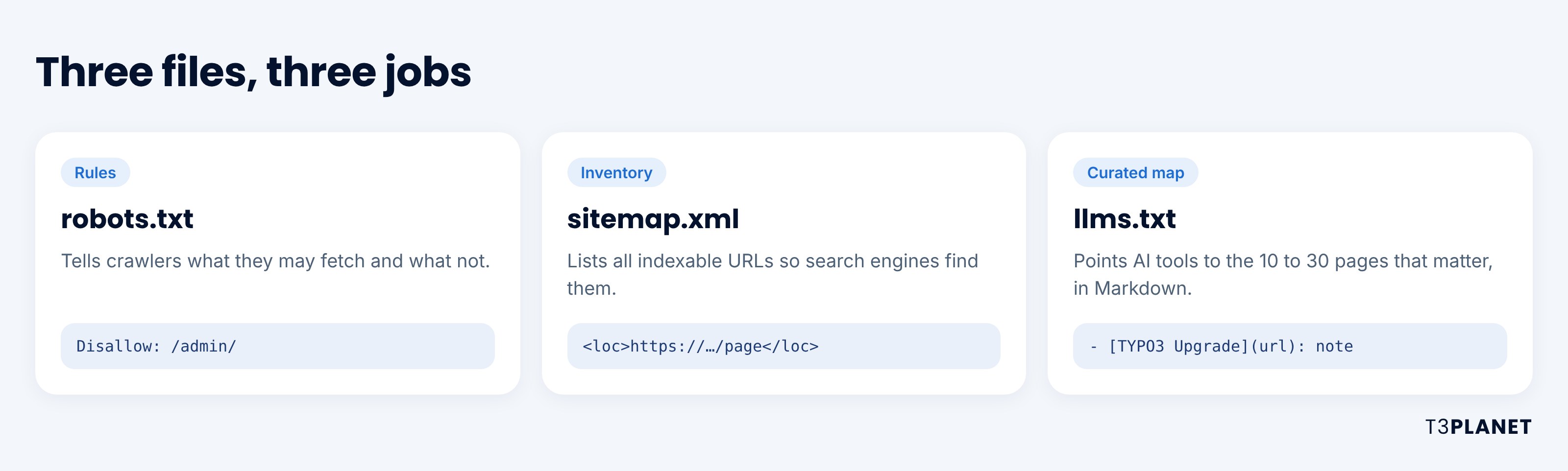
The three files are often mixed up. They have different readers and different jobs:
- robots.txt sets rules for crawlers, based on the Robots Exclusion Protocol. It does not describe content.
- sitemap.xml lists every URL you want indexed. It is complete, not curated.
- llms.txt is a short selection with notes. It is written for a reader, not for a crawler.
Keep all three. Changing one does not replace another.
How are AI tools supposed to use llms.txt?
The proposal describes use at answer time. A user asks about a product, a library or a service. The tool fetches your llms.txt, picks the link that fits the question and reads that page, ideally as Markdown. That is why every link carries a note, and why an "Optional" section exists: a tool with little room can skip it.
In practice few tools request the file today (see the numbers below). So treat llms.txt as a cheap way to be ready, not as the thing that earns citations. What AI answers quote are your pages. Put the answer in the first 40 to 60 words, use headings that read like questions and add structured data. Our guide on TYPO3 GEO covers that side.
Does llms.txt help your TYPO3 site?
Short answer: it costs little and promises little. Three facts from 2026:
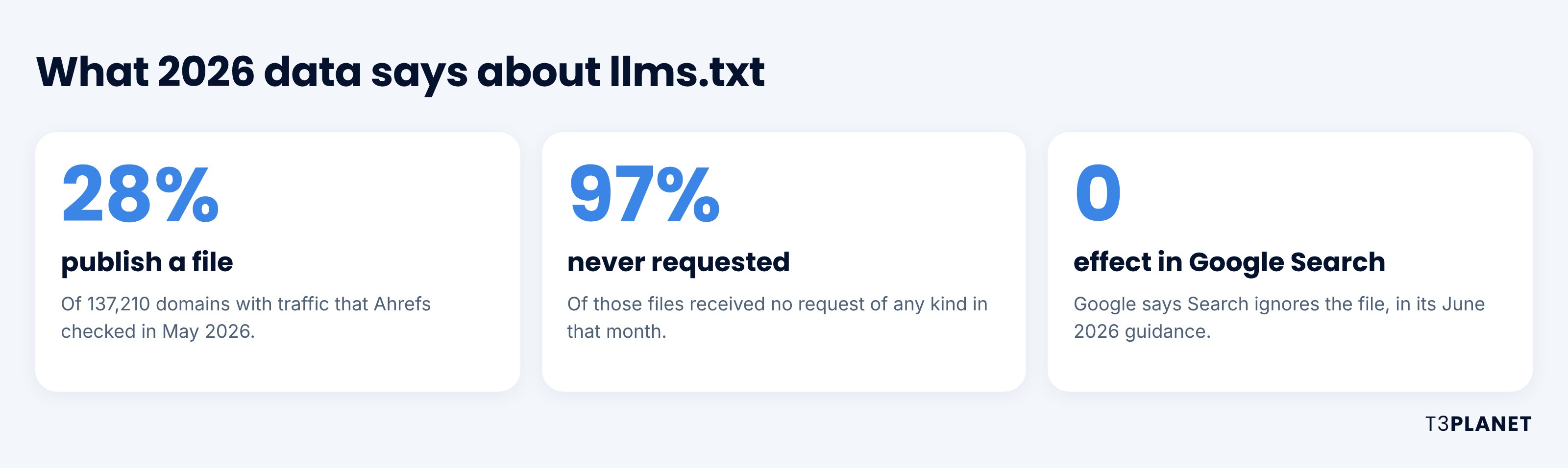
- Google updated its AI search guidance in June 2026: llms.txt has no effect on Search rankings or AI Overviews, positive or negative, because Search ignores the file. Source: Google Search Central
- Ahrefs analysed 137,210 domains with traffic in May 2026. 28% publish a file, and about 97% of those files received no request of any kind in that month. GPTBot was the most frequent named AI fetcher. Source: Ahrefs
- Chrome's Lighthouse (version 13.3, May 2026) has an Agentic Browsing category with an llms.txt audit. It checks that a machine-readable summary exists at the domain root. It is a readiness check, not a ranking factor. Source: Chrome for Developers
Should your TYPO3 site publish one?
Publish one if your site has documentation or many similar product pages, if developers use AI coding agents on your pages, or if 15 minutes is a fair price for being ready.
You can skip it if your site has a handful of pages with a clean sitemap, or if nobody will update the file after a relaunch. A stale file is worse than none.
Either way, the work that earns AI citations is on the pages themselves. If you want help there, see TYPO3 AI SEO for checks inside the TYPO3 backend, or the hub for TYPO3 AI.
What goes into a TYPO3 llms.txt?
Keep it short: 10 to 30 links to the pages you would show a new colleague first. Example for a TYPO3 agency site (replace the values):
# Example GmbH
> TYPO3 agency in Dresden. We build, host and maintain TYPO3 websites for companies in Germany, Austria and Switzerland.

## Services
- [TYPO3 Agency](https://www.example.com/typo3-agentur): What we build and for whom
- [TYPO3 Upgrade](https://www.example.com/typo3-upgrade): Version upgrades at fixed prices

## Knowledge
- [TYPO3 Security Updates](https://www.example.com/blog/typo3-security): What changed and what to patch

## Optional
- [Blog archive](https://www.example.com/blog): All articles
A product or extension site looks different. The sections follow what visitors look for:
# Example Extensions
> TYPO3 extensions for editors and agencies, with documentation and support in English and German.

## Products
- [TYPO3 Extensions](https://www.example.com/typo3-extensions): Full list with TYPO3 version support
- [Pricing](https://www.example.com/pricing): Licence options and what each includes

## Documentation
- [Installation guide](https://www.example.com/docs/install): Composer setup in five steps
- [Update guide](https://www.example.com/docs/update): Moving to TYPO3 14

## Optional
- [Changelog](https://www.example.com/changelog): Release notes by version
Write it in five steps
- Pick pages by question. List the questions customers ask AI tools about you, then choose the one page that answers each.
- Write the summary. One or two plain sentences: who you are, what you offer, where you work.
- Group the links. Use H2 headings that match how visitors think, such as Services, Products, Documentation.
- Add one note per link. Say what the reader finds there, in under 12 words.
- Move the rest to "Optional". Changelogs, archives and secondary pages go there.
Rules that keep the file useful: one H1, plain Markdown, absolute URLs that return status 200, no redirects, no noindex pages and no marketing slogans.
What changes with several languages, staging and caching?
- One file per site. If each language has its own domain, each domain needs its own file. On one domain, list the key pages of every language and name the language in the note.
- Production URLs only. Never list staging hosts or relative paths.
- Keep staging private. Protect it with HTTP authentication so AI tools cannot read a staging copy as if it were yours.
- The file is public. Anyone can open it. List only pages that are public and indexable.
- Flush caches after every change and run the curl check again.
- Add it to your release checklist: relaunch, URL changes and new languages all change the file.
How do I add llms.txt to TYPO3?
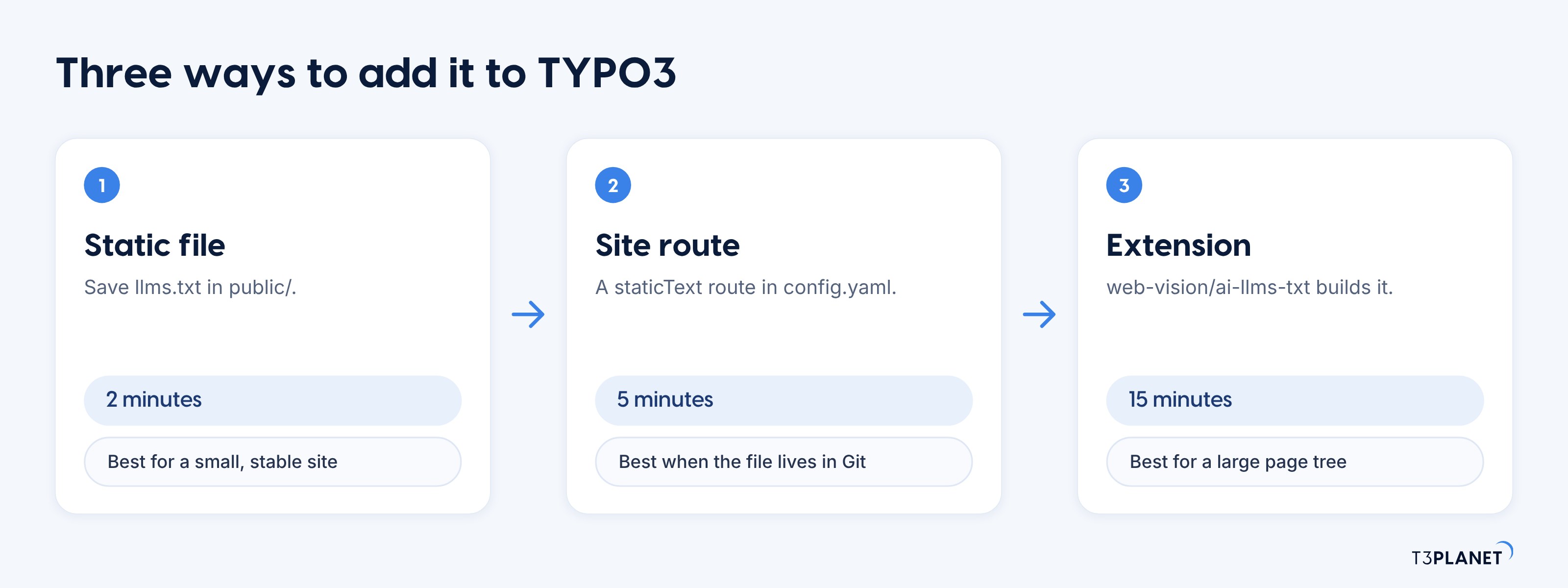
Three routes. Pick by effort.
Route 1: a static file (2 minutes)
Save the file as llms.txt in the public web folder (public/ in a Composer setup). Done. This suits a single site that rarely changes. The downside: you maintain it by hand.
Route 2: a route in the site configuration (5 minutes)
TYPO3 static routes deliver simple text from the site configuration, the way many sites serve robots.txt. TYPO3 documentation: static routes. Add this to config/sites/<identifier>/config.yaml:
routes:
  -
    route: llms.txt
    type: staticText
    content: |
      # Example GmbH
      > TYPO3 agency in Dresden. We build, host and maintain TYPO3 websites.
      ## Services
      - [TYPO3 Agency](https://www.example.com/typo3-agentur): What we build and for whom
Flush the caches and open /llms.txt. This suits a file that should live in version control with the site package. You get one file per site, so for DE and EN list the key pages of both languages in it.
Route 3: the web-vision extension (15 minutes)
The extension web-vision/ai-llms-txt generates the file from your page tree and can render any page as Markdown. It needs PHP 8.2 or higher and supports TYPO3 13 and 14 (v12 is listed in places, so check the documentation for your version).
composer require web-vision/ai-llms-txt
vendor/bin/typo3 cache:flush
Import its RouterEnhancer.yaml in your site configuration as the documentation describes. You then get /llms.txt and /.well-known/llms.txt, and adding .md to a page URL returns the Markdown version. Pages that are hidden in navigation, access-restricted, hidden or set to noindex are left out. The documentation lists limits: complex layouts, forms, JavaScript widgets and large tables convert badly, and sites above 1,000 pages can generate slowly. Read the output before you trust it.
Which route? Under 50 pages and rarely changing: route 1 or 2. Many pages and many editors: route 3. Check the file after every relaunch.
How do I test your llms.txt?
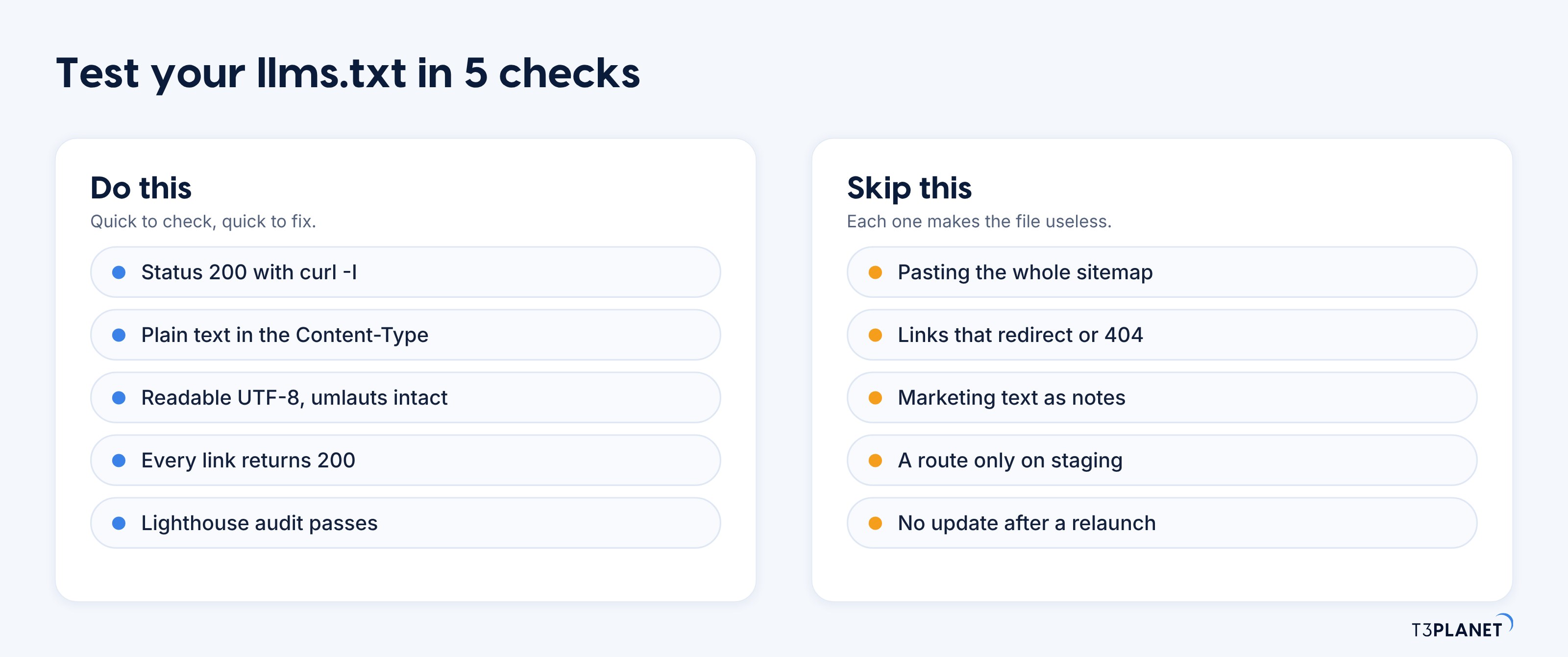
- Run
curl -I www.example.com/llms.txt. Expect status 200 and a text type (text/plain or text/markdown) in the Content-Type header. - Open the file in the browser. It must show readable Markdown in UTF-8, with umlauts intact.
- Click every link, or run the loop below. Each one must return 200 without a redirect.
- Run PageSpeed Insights or Chrome Lighthouse and open the Agentic Browsing results. The llms.txt audit should pass.
- After four weeks, check the server log for requests to /llms.txt. If nothing arrives, that is normal, see the Ahrefs numbers above.
To check all links at once, save the file as llms.txt and run:
grep -oE 'https?://[^) ]+' llms.txt | while read -r url; do
  echo "$(curl -s -o /dev/null -w '%{http_code}' "$url") $url"
done
Every line should start with 200. A 301 means a redirect, a 404 means a dead link. Fix both.
How do you check whether AI tools read your llms.txt?
The server log answers this. Search it for requests to the file and filter by user agent:
grep "GET /llms.txt" /var/log/nginx/access.log | grep -iE "gptbot|claudebot|perplexitybot|googlebot|bingbot"
The names are examples. Check each vendor's documentation for the current user agent. Then review once a month:
- Count requests to /llms.txt and note which user agents asked.
- See whether those agents then requested the pages you listed.
- Fix dead or redirected links.
- Update the notes after content changes.
Zero requests is common, as the Ahrefs numbers show. It does not mean the file is wrong. It means the file is ready if a tool asks for it.
Which mistakes make an llms.txt useless?
- Pasting the whole sitemap. A list of 500 links is not curated.
- Links to pages that redirect, return 404 or carry noindex.
- Marketing text instead of plain descriptions.
- A file that returns 404 on production because the route exists only on staging.
- Never updating it after a relaunch.
- Blocking /llms.txt in robots.txt, so tools cannot read it.
- Mixing languages without saying which language a link leads to.
Frequently asked questions about llms.txt in TYPO3
A Markdown file with an H1 site name, a blockquote summary and H2 sections of linked pages, optionally followed by an "Optional" section. See the examples above.
It gives AI tools a short list of the pages that matter, so they find the right sources faster when they look something up. It does not train models and does not change rankings.
Save a file in public/, add a staticText route to the site configuration, or install web-vision/ai-llms-txt. Test it with curl and check that every link returns status 200.
No. Google states in its AI search guidance (June 2026) that Search ignores the file.
No, it complements both. robots.txt controls crawling, the sitemap lists all URLs and llms.txt points to a short, curated selection.
No. TYPO3 has no built-in generator. Use a static file, a static route or an extension.
At the root of your domain, so it opens at www.example.com/llms.txt. In a Composer setup that means public/ or a site route.
Short. Our rule of thumb is 10 to 30 links with one note of under 12 words each.
After every relaunch, URL change or new key page. Add it to your release checklist and run the link check again.
Ahrefs found few requests. Among named AI fetchers, GPTBot was the most frequent. No tool is guaranteed to use the file, so check your own server log.
Related reading and sources
- TYPO3 AI SEO: our AI assistant extension for TYPO3 editors.
- TYPO3 AI: all T3Planet AI extensions in one place.
- TYPO3 GEO: how to get your TYPO3 pages cited by AI search.
Sources
- llmstxt.org: the llms.txt proposal
- Google Search Central: AI features (June 2026)
- Search Engine Roundtable: Google says llms.txt does not help or hurt rankings
- Ahrefs: 137K sites analysed, 97% of llms.txt files never get read
- TYPO3 documentation: static routes
- web-vision/ai-llms-txt documentation (version 0.2)
- Chrome for Developers: Lighthouse Agentic Browsing
Jürgen Pietschmann
AI Consultant for TYPO3Jürgen Pietschmann is a T3Planet Product Consultant at T3Planet Shop. He specialises in integrating AI into editorial workflows – from intelligent content creation and automated SEO to AI-powered search and chatbot solutions for TYPO3 sites. As a technical consultant for T3Planet AI Universe, he works closely with agencies and editorial teams on practical TYPO3 implementations. Jürgen has been writing the This Month in TYPO3 series since December 2025 and has spoken at T3CON25 and TYPO3 Developer Days 2026 (T3DD26), where he co-presented Content Editing Unlocked.
More From Author