


How to Setup TYPO3 Frontend Login in 2026 - Core, Extensions & Security
Extensions


Are you looking to migrate famous EXT.gridelements to new amazing EXT.container TYPO3 extensions? In this article, you will find two ways (1. Automatic extension based, 2. Manually migrate) to successfully update from old-age EXT.gridelements to new-shiny EXT.container TYPO3 extensions.
Are you looking to migrate from Grid Elements to the TYPO3 Container extension? In this article, you will find different approaches (1. automatic extension-based migration, 2. manual migration) to easily migrate existing Grid Elements configurations to EXT:container.
For many years, Grid Elements has provided TYPO3 projects with flexible grid functionality. The Grid Elements team has contributed to the TYPO3 ecosystem by maintaining and developing this solution over many years. - The community appreciate their dedication and efforts. Many TYPO3 projects require flexible content structures beyond the default Backend Layout capabilities. TYPO3 projects may require flexible content structures, and EXT:container provides another approach for creating containers and grids.
Since last year, We (T3Planet and NITSAN) have migrated our TYPO3 templates from EXT:gridelements to EXT:container. New projects may use EXT:container based on project requirements.
Why? Keep reading the blog; you will get an answer ;)
Before starting the blog, we want to acknowledge B13 GmbH for developing and maintaining the EXT:container TYPO3 extension, which provides an alternative approach to Grid Elements. We also thank the Grid Elements team for their contribution to the TYPO3 community over the years.
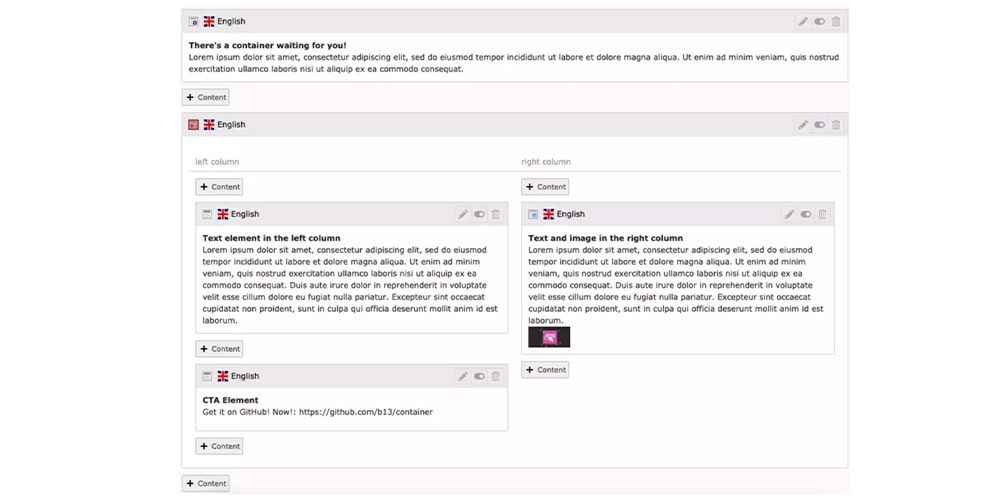
Before discussing migration approaches, let's look at why TYPO3 projects may choose another approach for creating flexible grid and container structures.
Because flexible in-page structures can be built using TYPO3-compatible container approaches.
Fact and Figure
EXT:container - TYPO3’s built-in concepts allow integrators to create setups for all kinds of page types, template types, and content management scenarios, but many projects end up needing more flexibility in placing substructures containing elements or modules within a content area.
Flexible containers (grids) as custom TYPO3 Content Elements (grids)
Benni and the team already mentioned, Why did we create another "Grid" extension?
Also, I highly recommend reading B13’s official blog on EXT:container.
Now, Let’s figure out how to migrate from EXT:gridelements to EXT:container with two options.
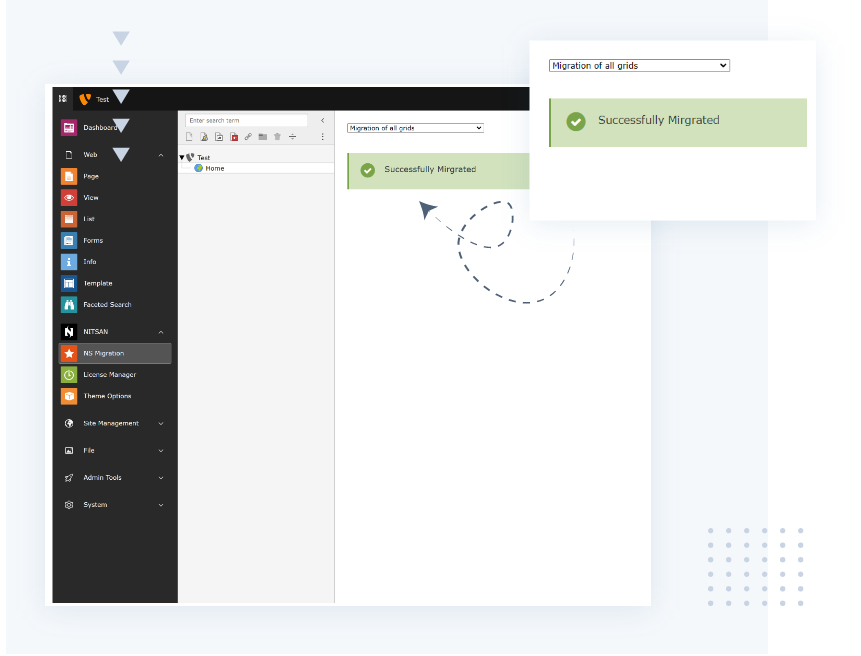
EXT:ns_gridtocontainer - We have developed one-click auto migration TYPO3 extension - Mostly use for our TYPO3 products and customers requests.
Grid Elements is available for current TYPO3 versions. Grid Elements v13 is publicly available for TYPO3 12.4 LTS and 13.4 LTS through the TYPO3 Extension Repository (TER) and Composer. Grid Elements v14, supporting TYPO3 13.4 and TYPO3 14, is currently available through Priority Access and Composer. Grid Elements remains licensed under GNU GPL, and Priority Access does not change its Open Source status. Distribution channels may evolve according to the Grid Elements team's release process.
EXT:container provides an alternative solution for creating grids and containers in TYPO3. For projects that choose to migrate from EXT:gridelements to EXT:container, EXT:ns_gridtocontainer helps simplify the migration process.
// Step 1. Install EXT:container
composer req b13/container

// Step 2. Install EXT.gridcontainer as dev dependencies
composer req --dev nitsan/ns-gridtocontainer

// Step 3. Start the Creation and Migration Process
Go to Backend Module to 1-click Migration
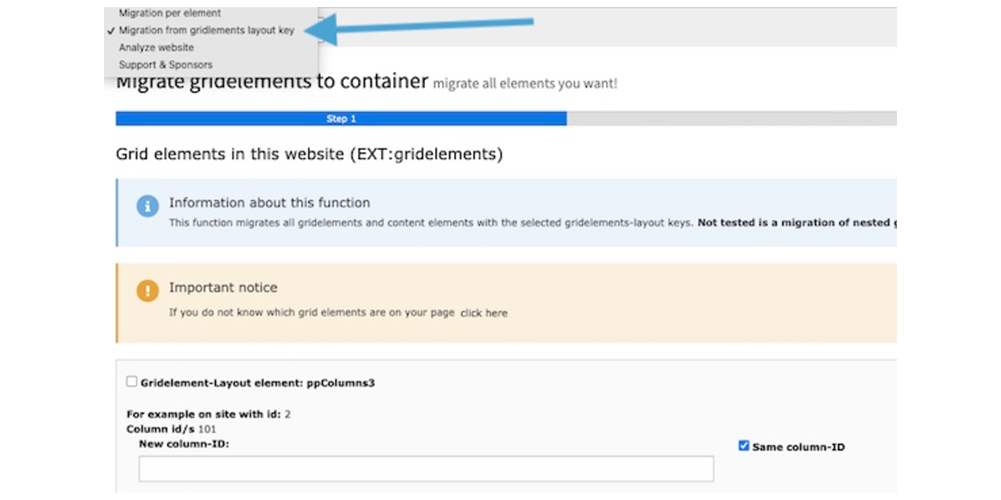
EXT:gridtocontainer - TYPO3 extension developed by Stefan Bublies. It is a small migration extension with a backend module for those who want to switch from EXT:gridelements to EXT:container.
For each gridelement used in your installation, you can manually choose which container element it should be migrated to. By default, the column numbers are kept. However, it is also possible to adjust the column number of the related content elements.
This extension should only be used on development systems. It is not recommended to use it on production systems. It can only be used by administrators with system maintainer rights.
// Step 1. Install EXT:container
composer req b13/container

// Step 2. Install EXT.gridcontainer as dev dependencies
composer req --dev sbublies/gridtocontainer

// Step 3. Start the Creation and Migration Process
Go to Admin tools > Grid migration provided by this extension. Click-n-go to create alternative containers, Migrate all grid elements to containers etc.EXT:migration - One of the good TYPO3 extension developed and maintained by In2code TYPO3 Agency.
With version9 of in2code/migration you now have the possibility to automatically migrate from gridelementsteam/gridelements to b13/container . And as always, when using in2code/migration, you should know which data should be transferred from which table field to which. We have already done this for you and drawn it on our whiteboard. In principle, everything revolves around the table tt_content and the content in it:
// Step 1. Install EXT:container
composer req b13/container

// Step 2. Install EXT.migration as dev dependencies
composer req --dev in2code/migration

// Step 3. Start the Creation and Migration Process
Follow steps to their official documentationIf you are interested in manual migration of Grid Elements to EXT:container, then try the below step-by-step guide.
Note: The examples below were originally tested with the following versions.
For the test-drive purpose, Here is the sample data-set configuration of Grid Elements
mod.web_layout.BackendLayouts {
  yourKey {
    title = Your Title
    icon = EXT:yourpackage/Resources/Public/Images/BackendLayouts/yourIcon.gif
    config {
      backend_layout {
        colCount = 2
        rowCount = 1
        rows {
          1 {
            columns {
              1 {
                name = Column1
                colPos = 1
              }
              2 {
                name = Column2
                colPos = 2
              }
            }
          }
        }
      }
    }
  }
}Let’s create the configuration of EXT:container as same as EXT.gridelements with Simple title and colPos.
$containerRegistry->configureContainer(
    (
    new \B13\Container\Tca\ContainerConfiguration(
        'yourKey',
        'Your Title',
        '',
        [
            [
                [
                    'name' => 'Column1',
                    'colPos' => 1
                ],
                [
                    'name' => 'Column2',
                    'colPos' => 2
                ],
            ]
        ]
    )
    )
);Now, It’s time to migrate CType all the gridelement’s records to the container.
UPDATE `tt_content` SET `CType`=CONCAT('yourKey’, `tx_gridelements_backend_layout`) WHERE `CType`='gridelements_pi1';

UPDATE `tt_content` SET `colPos`= `tx_gridelements_columns`,`tx_container_parent`=`tx_gridelements_container` WHERE `colPos`=-1; Using `lib.containerElement`, We need to set up the default TypoScript configuration to override your custom layout, templates and partial.
lib.containerElement =< lib.contentElement
lib.containerElement {
    layoutRootPaths {
        100 = EXT:fluid_styled_content/Resources/Private/Layouts
        110 = EXT:yourpackage/Resources/Private/Layouts/Containers
    }

    templateRootPaths {
        100 = EXT:fluid_styled_content/Resources/Private/Templates
        110 = EXT:yourpackage/Resources/Private/Templates/Containers
    }

    partialRootPaths {
        100 = EXT:fluid_styled_content/Resources/Private/Partials
        110 = EXT:yourpackage/Resources/Private/Partials/Containers
    }

    dataProcessing {
        10 = B13\Container\DataProcessing\ContainerProcessor
    }
} You will need to create a number of TypoScript objects of your container to assign `lib.containerElement` by assigning the Fluid template name.
tt_content.yourKey< lib.containerElement tt_content.yourKey{ templateName =yourTemplate}
Now your TYPO3 Fluid template is ready for container.
Grid Elements and EXT:container provide different approaches for configuring allowed content elements. EXT:container can be used together with compatible TYPO3 extensions such as EXT:content_defender for defining allowed or restricted content element types.
EXT:container is a compatible TYPO3 Extension EXT.content_defender. It’s very useful to Define allowed or denied content element types.
Here is the sample container configuration with EXT.content_defender.
$containerRegistry->configureContainer(
    (
    new \B13\Container\Tca\ContainerConfiguration(
        'YourName',
        'YourTitle',
        '',
        [
            [
                [
                    'name' => 'Column1',
                    'colPos' => 1,
                    'allowed' => [
                        'CType' => 'header,text,textpic,image,textmedia,bullets,form_formframework'
                    ]
                ],
                [
                    'name' => 'Column2',
                    'colPos' => 2,
                    'allowed' => [
                        'CType' => 'header,text,textpic,image,textmedia,bullets,form_formframework'
                    ]
                ],
            ]
        ]
    )
    )
);Thanks for reading my blog. I hope you liked and learned well.
Have you migrated a TYPO3 project from Grid Elements to EXT:container? We would like to hear about your experience and migration approach. I would love to know your thoughts in the comment box.
Have a Happy Migration!

Anna Scholz
Extension Support SpecialistAnna knows TYPO3 extensions inside out. With hands-on experience supporting both core and custom solutions at T3Planet Shop, she delivers answers that are not only correct but smart. Her priority: helping users unlock the full power of TYPO3 without the guesswork.
More From Author