

TYPO3 MCP clients compared: which AI assistant works with your TYPO3?
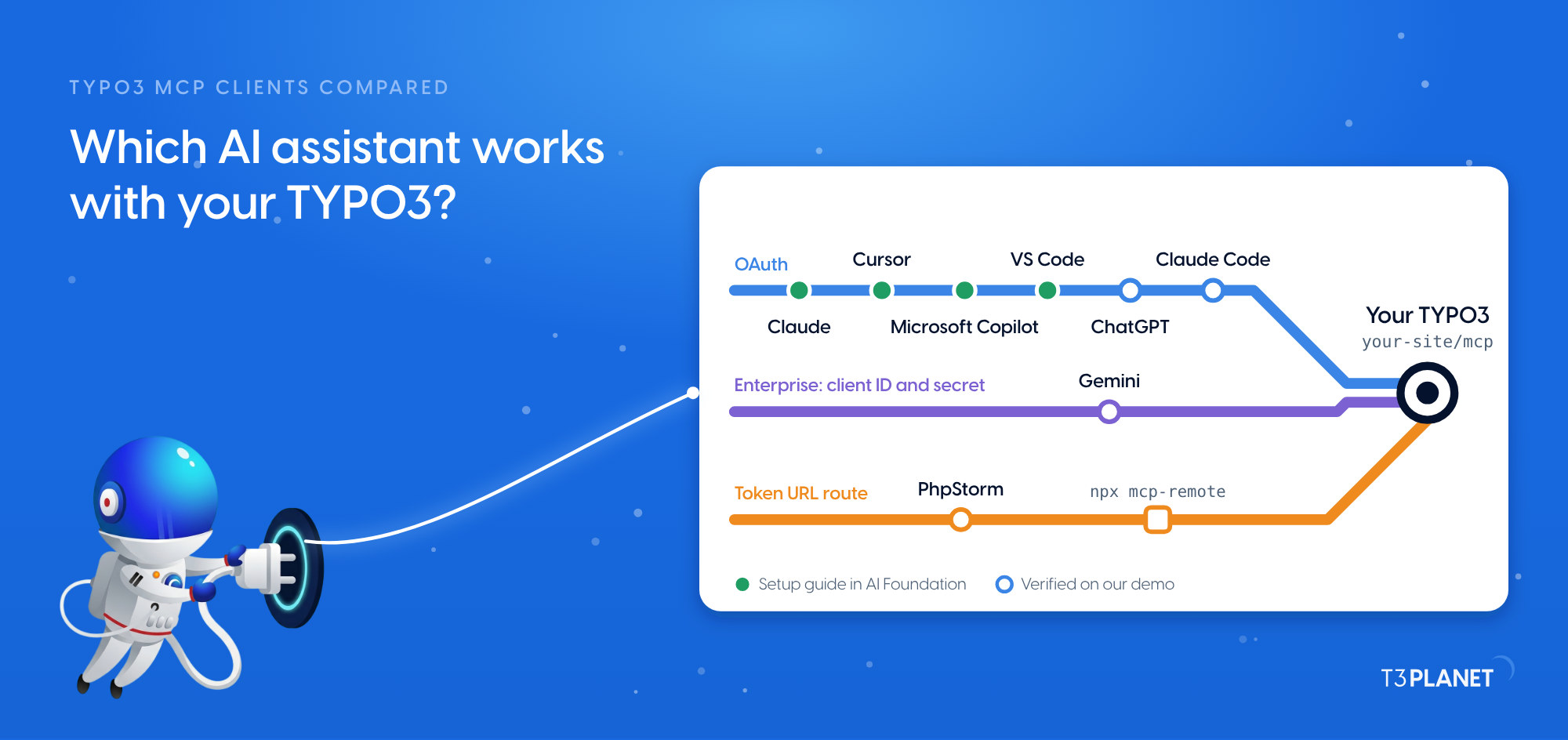
Eight AI assistants compared as TYPO3 MCP clients: the plan each vendor names, how it signs in, what your admin controls and its status with AI Foundation, dated. Setup guides for Claude, Microsoft Copilot, Cursor and VS Code; ChatGPT, Claude Code, Gemini and PhpStorm verified on our demo on 30 September 2026.
Transcript: every screen and subtitle
- 0:00MCP in Practice for TYPO3 · Episode 2: TYPO3 MCP clients compared: which AI assistant works with your TYPO3?
- 0:00Which AI assistant can talk to your TYPO3? One MCP server, many assistants.
- 0:03Eight AI assistants can connect to your TYPO3 through one MCP server.
- 0:08They all use one server URL, ending in /mcp.
- 0:11The assistant acts as the backend user who approved its sign-in.
- 0:14Two routes into the same server.
- 0:15Route 1, OAuth: Claude, ChatGPT, Gemini, Microsoft Copilot, Cursor, VS Code and Claude Code.
- 0:24Route 2, token URL: PhpStorm, because JetBrains documents no OAuth sign-in for MCP servers yet.
- 0:28With OAuth, the sign-in opens in your browser and you approve it in TYPO3.
- 0:32A token URL works like a password: keep it out of Git, screenshots and chats.
- 0:37In AI Foundation, the Connect tab shows the server URL and a setup guide per client.
- 0:43OAuth Tokens: one token per assistant. Revoke one, and the others keep working.
- 0:50Pick yours, connect in minutes, see our guides.
- 0:52Read the post: t3planet.de/en/blog/typo3-mcp-clients/
 TYPO3 MCP clients compared: which AI assistant works with your TYPO3?
Questions about this video
What does this video show?
How eight AI assistants connect to the one MCP server of AI Foundation in TYPO3: Claude, ChatGPT, Gemini, Microsoft Copilot, Cursor, VS Code and Claude Code sign in with OAuth, PhpStorm through a token URL.
Which plan do I need?
Which plan includes remote MCP servers is up to each vendor and changes often. Check your plan on the vendor's own page; the post lists what each vendor names, dated.
Is a token URL as safe as OAuth?
A token URL works like a password: keep it private and end it in AI Foundation when you no longer need it. Assistants that sign in with OAuth do not need one.
The other video of this episode
More videos
- MCP in Practice for TYPO3Episode323 Oct 2026TYPO3 content editing with AI: four everyday edits from chat