



TYPO3 AI Cost Tracking in 2026: How to Know What AI Actually Costs You
AI


T3AI Mass SEO helps you handle TYPO3 metadata without doing it all by hand. Here, you will learn what it is, why manual work stops working as your site gets bigger, and how the full process works in 7 easy steps – plus who should use it and when.
TYPO3 websites grow fast. A small site can turn into hundreds of pages, service pages, blog posts, and language versions.
Managing the SEO fields on each page by hand is slow. Pages get missed. Metadata ends up missing, outdated, or copied.
Google uses your page title as the link in search results. It may also show your meta description as the search snippet, but only when it clearly explains the page.
(Google Search Central - Control your title links and snippets)
Getting these two fields right helps pages appear well in search results.
T3AI Mass SEO solves this. You can update, add, or fix metadata for many pages in one run.
Pick the AI model, set your filters, choose the fields you want, and generate, for English, German, or any language version.
Mass SEO is a new T3AI feature that allows TYPO3 users to optimize SEO metadata for multiple website pages at once. Instead of editing each page manually, users can select pages, apply filters, choose SEO fields, and run bulk optimization directly or through the scheduler.
The tool lets you generate, improve, or fix five key fields: SEO title, meta description, keyword, OG title, and OG description.
The feature helps with:
Good metadata also controls how a page looks when someone shares it on social media. The OG title and OG description set the title and text shown in link previews.
TYPO3 websites grow over time. A site with 20 pages can become 200 or more. Each page needs good metadata to show up well in search and on social media.
The problem is not just writing the metadata once. Pages change. New pages go live. Campaigns end. Languages need their own text. Over time, many pages end up with:
Checking every page by hand is slow. For 50 pages, you can manage it. For 500, you cannot.
Mass SEO in T3AI follows a controlled workflow, so TYPO3 users can decide what to generate, which pages to optimize, and how the final SEO data should be applied.
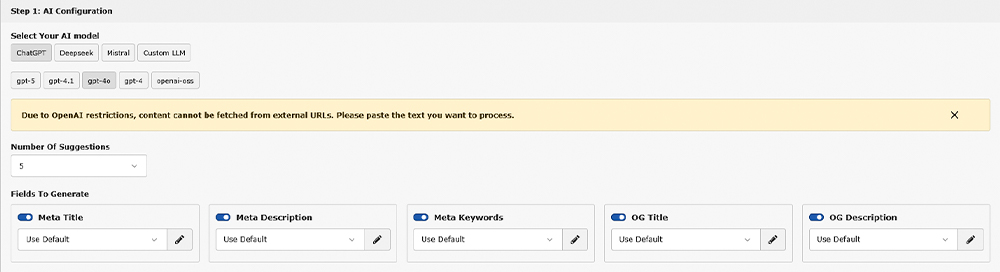
Select the AI model, choose the SEO fields to generate, and define how many SEO data suggestions should be created.
Supported fields include:
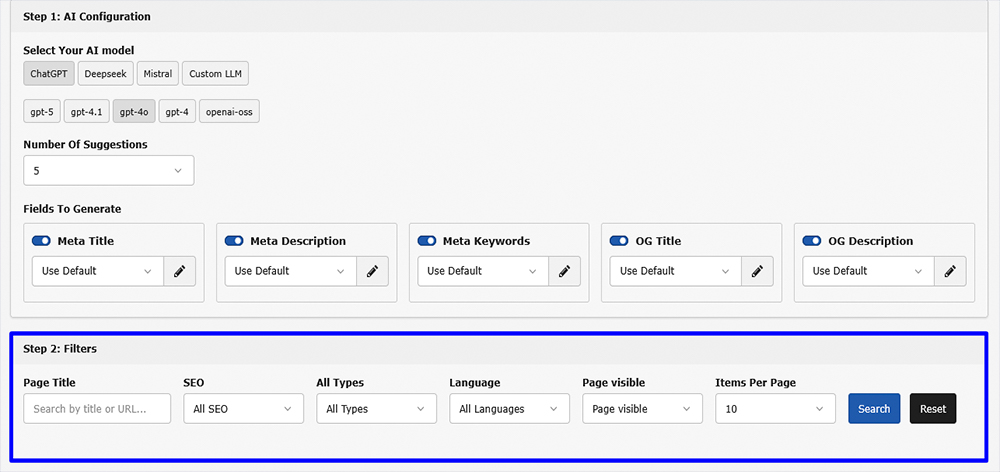
Use filters to find the right pages before running optimization.
Available filters include:
This keeps Mass SEO controlled and focused instead of applying changes randomly across the website.
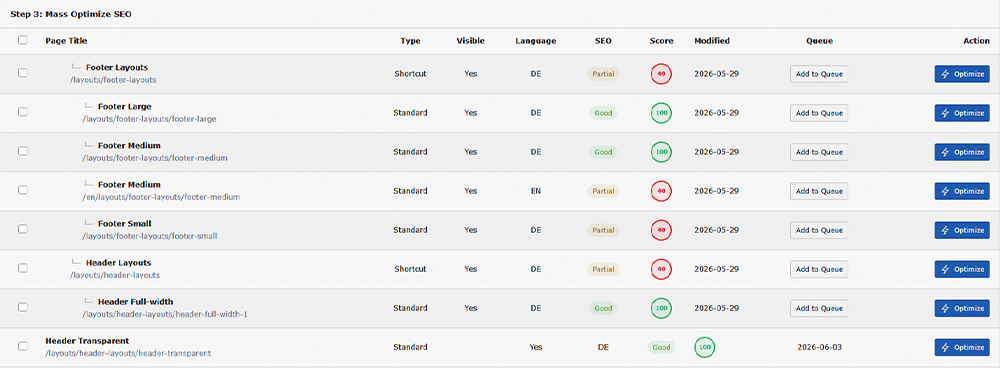
Choose the pages where SEO optimization should be applied.
Users can:
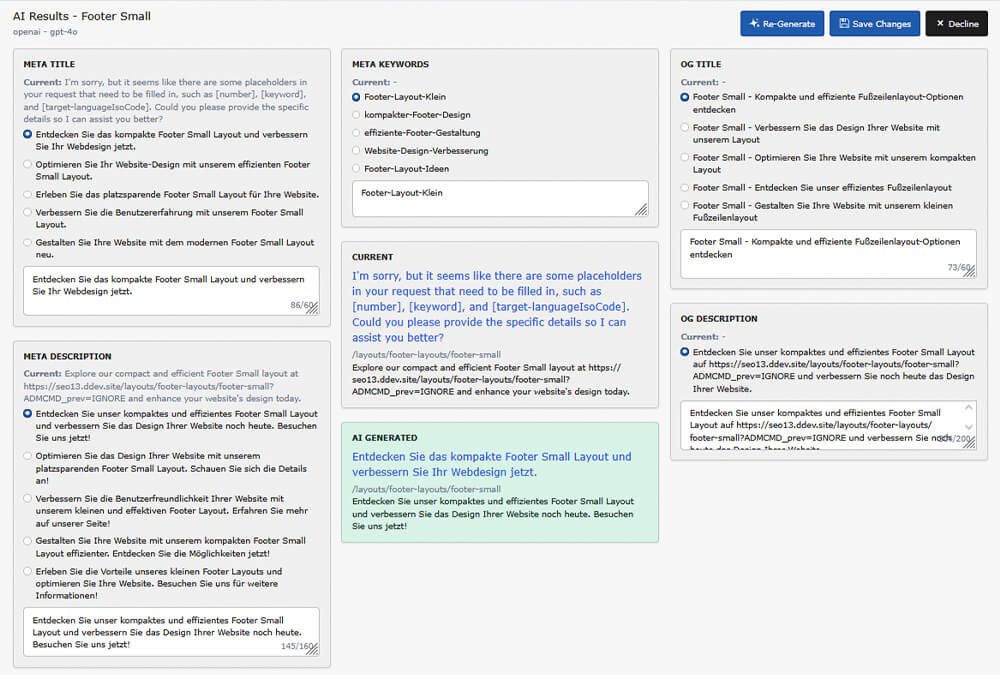
T3AI generates SEO data options for the selected fields. Users can review the suggestions and choose the preferred version.
If the output is not suitable, they can regenerate new SEO data before applying it.
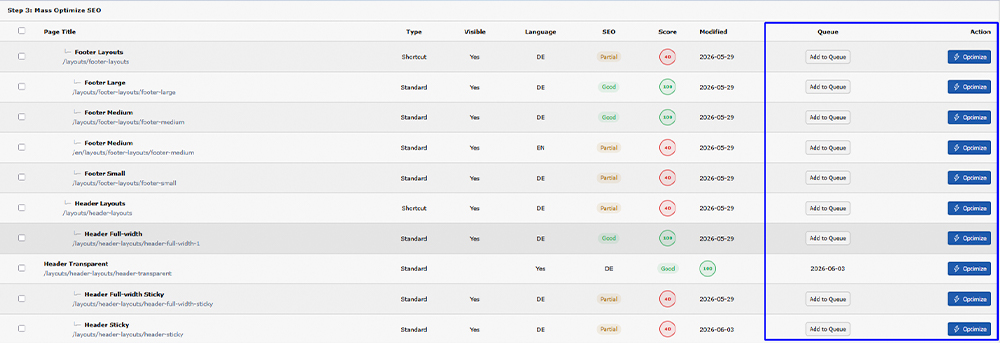
After you pick the metadata you want, apply it right away or save the pages to a queue. The queue is useful when you want to run updates at a set time.
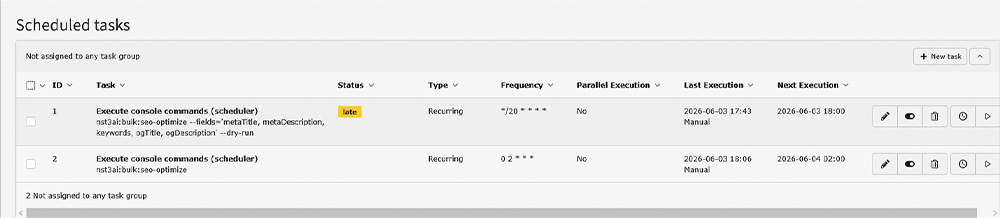
If pages are added to the queue, users can go to the TYPO3 scheduler, add the Mass SEO task, and run it at the desired date and time.
This is helpful for large websites where many pages need to be processed in a planned workflow.
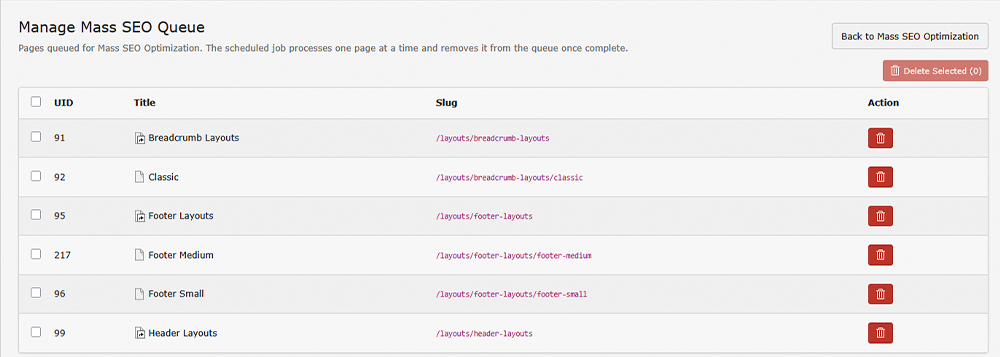
Come back to the Mass SEO dashboard anytime to see which pages are in the queue. The dashboard shows the page status, SEO score, and language for each page. You can also update a single page from the Action column when needed.
You can also start Mass SEO from a single page inside TYPO3. Open the page properties, select the page, and turn on Mass SEO.
Use the Recursive option to include all child pages under it, for example, a full blog category or a product section. Then add the pages to the queue and run them through the scheduler.
T3AI Mass SEO lets TYPO3 teams generate and apply SEO metadata across multiple pages in one workflow.
| Feature | What it does |
| Bulk page update | Update metadata on many pages at once, no manual editing |
| AI SEO titles | Generates clear page titles based on the page content |
| AI meta descriptions | Writes short descriptions that fit the search snippet limit |
| Keyword fields | Adds or improves the keyword field for each page |
| Open Graph fields | Generates the title and text shown when a page is shared |
| Page filters | Filter by ID, type, language, status, and visibility |
| Scheduler | Set a date and time for the update to run on its own |
| Recursive mode | Includes all child pages under the selected page |
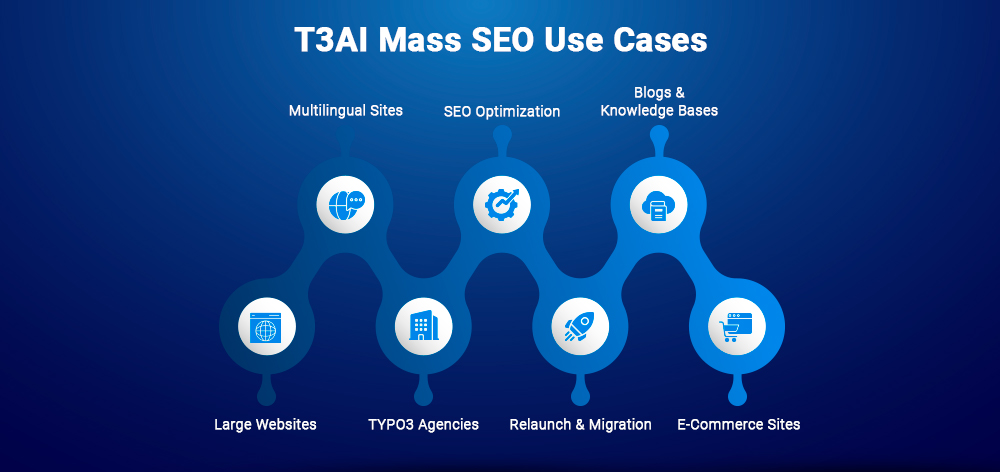
T3AI Mass SEO works best when many pages need metadata updates at once. Here are the most common situations:
Manual SEO works well when only a few TYPO3 pages need updates. But when a website has hundreds of pages, multiple languages, or missing metadata across different sections, manual work becomes slow and difficult to manage.
Mass SEO in T3AI makes the same process faster, more structured, and easier to scale.
| Task | Manual TYPO3 SEO | T3AI Mass SEO |
| Optimize one page | Easy to manage | Easy to manage |
| Optimize 100+ pages | Time-consuming and repetitive | Bulk optimization workflow |
| Fix missing metadata | Requires manual page checking | Filter pages and optimize in bulk |
| Multilingual SEO | Repetitive for each language version | Use language-based filtering |
| OG metadata | Often skipped or updated later | Included in the same workflow |
| Large page trees | Hard to manage page by page | Use recursive processing and scheduler |
| Review SEO data | Done individually for each page | Review generated options before applying |
| Scheduled optimization | Not practical manually | Add pages to queue and run scheduler |
| Team productivity | Slower and harder to scale | Faster, controlled, and scalable |
Writing metadata by hand for every page is one of the most repetitive tasks in TYPO3. For agencies that manage many client sites, it adds up fast.
T3AI puts all of this in one place. You filter, generate, review, and apply, without opening each page. The result: fewer missed fields, more consistent metadata, and more time for the work that needs a real decision.
For growing TYPO3 websites, this means faster updates, fewer missed fields, and more consistent SEO metadata across landing pages, service pages, blogs, and multilingual content.
T3AI Mass SEO works best for any TYPO3 team that manages more pages than one person can update by hand.
T3AI Mass SEO lets you update metadata across many TYPO3 pages without opening each one by hand. You set the filters, check the suggestions, and apply. That is the whole process.
For large websites, multilingual setups, and agency work, it saves real time and keeps your metadata consistent and up to date.
Try T3AI Mass SEO and optimize your TYPO3 website metadata faster, smarter, and at scale.
T3AI Mass SEO is a feature that lets you update SEO metadata, titles, descriptions, and Open Graph fields, for many TYPO3 pages at once. It uses AI to generate suggestions for each field. You review them, pick the one you want, and apply.
Yes. You can pick specific pages, select all pages that match your filters, or add them to a queue and run the scheduler at any time you choose.
T3AI Mass SEO can generate and update five fields: SEO title, meta description, keyword, OG title, and OG description.
Yes. After adding pages to the queue, you set the Mass SEO task in the TYPO3 scheduler to run at any date and time you choose. T3AI handles the rest on its own.
When you turn on Recursive, T3AI also includes all pages under the one you selected. For example: if you pick a blog category page, all blog posts inside it are included too. This is useful for updating full sections of a site at once.
Yes. The language filter lets you run Mass SEO on one language at a time. For example, you can update your German pages first, then your English pages, separately, without mixing them up.
T3AI Mass SEO works best for TYPO3 agencies, SEO teams, editors, and enterprise teams. If you manage more than 30–50 TYPO3 pages and update metadata regularly, this feature saves you real time.

Jürgen Pietschmann
AI Consultant for TYPO3Jürgen Pietschmann is a T3Planet Product Consultant at T3Planet Shop. He specialises in integrating AI into editorial workflows – from intelligent content creation and automated SEO to AI-powered search and chatbot solutions for TYPO3 sites. As a technical consultant for T3Planet AI Universe, he works closely with agencies and editorial teams on practical TYPO3 implementations. Jürgen has been writing the This Month in TYPO3 series since December 2025 and has spoken at T3CON25 and TYPO3 Developer Days 2026 (T3DD26), where he co-presented Content Editing Unlocked.
More From Author