

TYPO3 MCP: What Is the Model Context Protocol and How Do You Use It?
TYPO3 MCP
AI


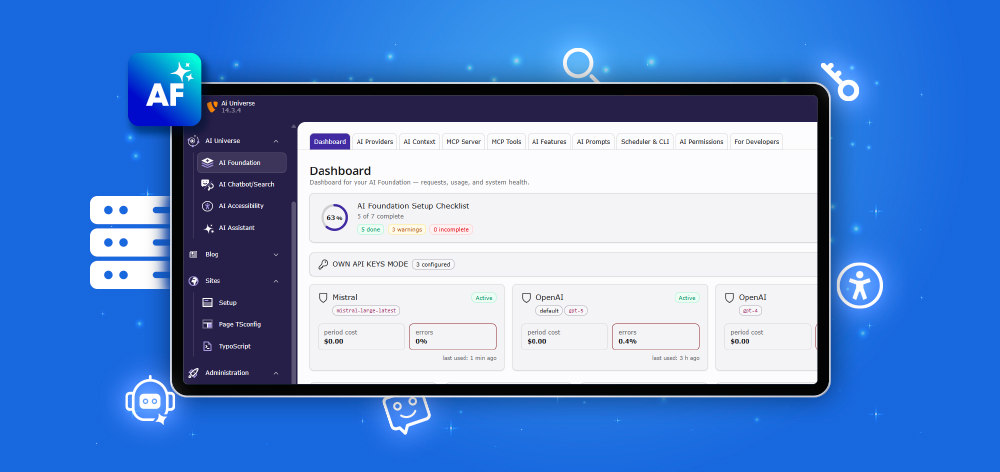
TYPO3 teams are using AI for content, search, chatbots, accessibility, localization, development, and automation. But when every AI feature has separate API keys, prompts, permissions, logs, and cost tracking, the setup becomes hard to manage.
T3AF, AI Foundation for TYPO3, is open source (GPL) and brings everything into one self-hosted TYPO3 backend module. It centralizes AI providers, brand context, prompts, permissions, budgets, usage tracking, logs, and MCP workflows.
T3AF is the AI Foundation for TYPO3. It gives TYPO3 a built-in MCP Server, 100+ AI Tools, Multi-LLM management, AI Context, prompts, roles, logs, scheduler, CLI, and bulk operations. It works standalone and also powers the complete T3Planet AI Universe. Use it to turn TYPO3 into an AI-ready platform.
T3AF means AI Foundation for TYPO3. It is the base Extension of the T3Planet AI Universe: open source (GPL), on the TER and GitHub, and self-hosted on your own server.
Instead of managing AI settings in different places, T3AF brings the main AI controls into one native TYPO3 backend module. It includes an MCP Server, 100+ AI Tools, Multi-LLM provider support, AI Context, prompts, permissions, usage tracking, logs, and governance features.
T3AF can be used in two ways:
| Use Case | Meaning |
| Standalone | Use T3AF as a complete AI foundation for TYPO3 with MCP, providers, prompts, tools, logs, and governance |
| As a Foundation | Use it as the base Extension that powers other T3Planet AI Universe Extensions |
In simple words, T3AF gives TYPO3 one central AI control system for connecting AI tools, managing providers, protecting permissions, tracking usage, and powering future AI workflows.
TYPO3 is a strong and flexible CMS for complex websites, enterprise projects, multilingual platforms, and custom digital workflows. As teams add more AI capabilities for content, SEO, search, chatbots, translation, accessibility, and automation, they also need a structured way to manage those AI workflows.
With T3AF, AI settings do not need to be managed separately across different tools or Extensions. Teams can configure providers once, reuse approved prompts, apply brand context across AI outputs, and manage permissions, usage, logs, and budgets from one native TYPO3 backend module.
| Team | How One AI Backbone Helps |
| Editors | Use shared prompts and brand context for consistent AI-assisted content |
| Admins | Manage providers, usage, logs, budgets, and permissions centrally |
| Agencies | Reuse a structured AI setup across multiple TYPO3 client projects |
| Enterprises | Support governance, auditability, privacy control, and cost visibility |
T3AF does not replace TYPO3’s strength. It extends TYPO3 with a governed AI foundation that keeps AI workflows organized, secure, and easier to scale.
T3AF follows a simple setup flow: connect, configure, and power everything from one TYPO3 backend foundation.
| Step | Explanation |
| Connect | Install T3AF and connect your own AI providers or MCP Mode. AI Credits are now available as an optional add-on for teams that prefer managed AI usage without handling API keys. |
| Configure | Set brand context, reusable prompts, user permissions, budgets, quotas, and limits centrally. |
| Power Everything | Use MCP workflows and let installed AI Universe Extensions inherit the same providers, rules, context, and cost controls. |
This gives TYPO3 teams a structured way to manage AI workflows while keeping control inside the TYPO3 backend.
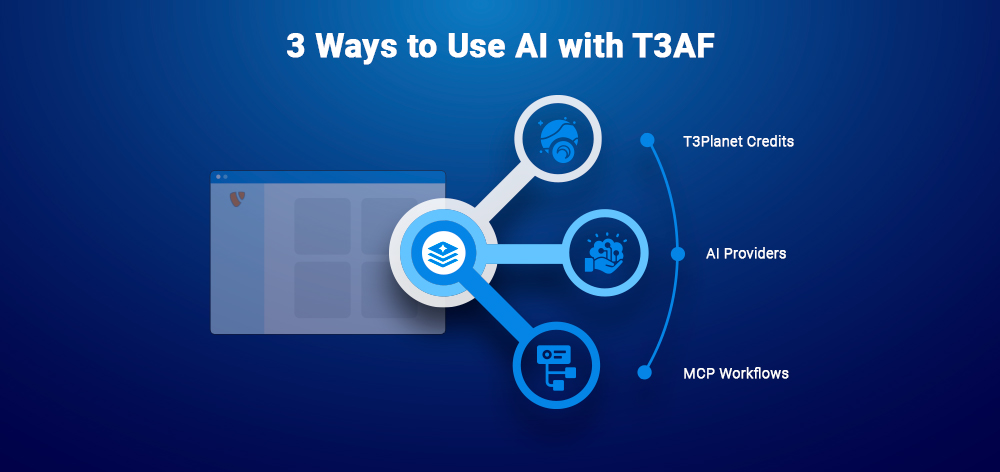
T3AF gives TYPO3 teams flexible options to use AI based on their setup, technical needs, and privacy requirements.
| Method | Best For |
| AI Credits | Fast onboarding without managing separate API keys |
| AI Providers | Teams that want to connect their own OpenAI, Anthropic, Gemini, Ollama, or custom LLM keys |
| MCP Mode | Advanced AI assistant workflows through Claude, Cursor, VS Code, n8n, and other MCP clients |
This means teams can start with a simple credit-based setup, connect their own AI providers for more control, or use MCP Mode for deeper AI workflows with external AI tools.
Note: AI Credits are now available as an optional add-on for teams that prefer managed AI usage without handling API keys.
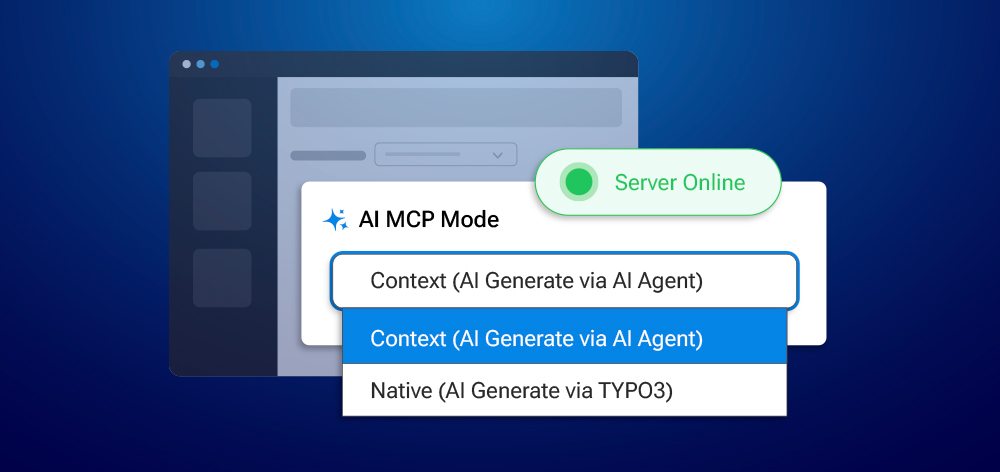
T3AF supports two MCP modes, giving teams more control over how AI interacts with TYPO3 content and workflows.
| Mode | Meaning | Best For |
| Context Mode | The connected AI agent uses website context to generate output with its own model | Flexible AI assistant workflows |
| Native Mode | The external AI agent only triggers actions, while generation happens inside TYPO3 through configured providers | Privacy-focused projects. Your GDPR posture depends on the models and providers you choose, T3AF gives you the architecture to control it. |
This is one of T3AF’s strongest differentiators for DACH and enterprise buyers. Context Mode is useful when teams want flexible AI assistance using prepared website context. Native Mode is useful when teams want more privacy-focused AI workflows where generation stays closer to their TYPO3-controlled setup.
MCP means Model Context Protocol. In simple words, it is a secure connection method that lets AI assistants work with real systems like TYPO3.
With T3AF, TYPO3 can act as an MCP Server. This means AI tools such as Claude, Cursor, VS Code, n8n, and other MCP clients can connect to TYPO3 and perform controlled actions based on the permissions you define.
For example, an AI assistant can help read page content, create drafts, manage files, or support workflows, but only through approved and secure access rules.
T3AF keeps this connection controlled with:
This makes MCP useful for teams that want AI assistants to work with TYPO3 while keeping access, permissions, and activity tracking under control.
T3AF includes 100+ MCP Tools that help AI assistants work with TYPO3 in a structured and permission-aware way.
These tools cover many TYPO3 workflows, including:
T3AF also includes 50+ TYPO3 Core tools, and every installed AI Universe Extension can register its own MCP tools. This means features from AI content, AI search, AI chatbot, accessibility, localization, and Extension generation can become part of the same AI workflow system.
With Table Discovery, custom TYPO3 data tables can also become AI-ready. Once enabled, tables can generate structured tools for actions such as creating, reading, updating, and managing records.
For advanced needs, teams can also build:
T3AF also provides a Playground and Skill Hub, so teams can test tools safely before using them in real workflows. This helps developers, agencies, and enterprises use AI with more confidence inside TYPO3.
T3AF helps teams connect TYPO3 with the AI tools they already use. Instead of moving work to a separate external dashboard, teams can connect popular AI assistants, IDEs, automation tools, and developer platforms through guided MCP client setup.
Supported MCP clients include Claude Desktop, Cursor, VS Code, Windsurf, Continue, JetBrains, n8n, Manus, Dify, LangChain, AutoGen, OpenAI Codex, OpenAI Custom GPTs, Copilot Studio, and MCP Inspector.
Once connected, these tools can work with TYPO3 through secure MCP workflows, authentication, and defined permissions. This helps editors, developers, agencies, and automation teams use AI inside their existing TYPO3 process.
T3AF gives TYPO3 teams one central place to manage AI providers and models. Instead of configuring providers separately for each Extension or workflow, admins can manage them once and reuse them across the AI setup.
Supported AI providers include:
T3AF also supports advanced provider control:
| Feature | What It Means |
| Separate chat and embedding models | Use different models for content, search, chatbot, and semantic tasks |
| Capability flags | Match providers with tasks such as chat, vision, embeddings, text-to-speech, or image generation |
| Provider priorities | Decide which provider should be used first |
| Smart routing | Send each AI task to the most suitable provider |
| Fallback chains | Continue with another provider if one fails |
| Cost governance | Track pricing, currency, budgets, quotas, and cost centers |
| Provider access control | Limit provider usage by backend groups or project rules |
| Encrypted API keys | Your keys stay on your server and connect directly to the provider you choose. They never pass through T3Planet. |
This gives teams flexibility to choose the right AI model for each task while keeping cost, access, and security under control.
AI output becomes more useful when it understands the brand, audience, tone, and content rules of the website. T3AF includes AI Context profiles so every AI generation can follow the same brand direction.
With AI Context, teams can define:
T3AF can also use auto-research from a website URL to help pre-fill the brand profile. Teams can upload documents such as PDF, DOCX, MD, TXT, CSV, and JSON, and their content can become part of the AI context.
Reusable placeholders like {brand_voice} and {content_rules} can be used inside prompt templates, so prompts stay consistent across AI modules.
For agencies, this is especially useful because they can create multiple AI Context profiles, such as one profile per client, and switch between them when needed.
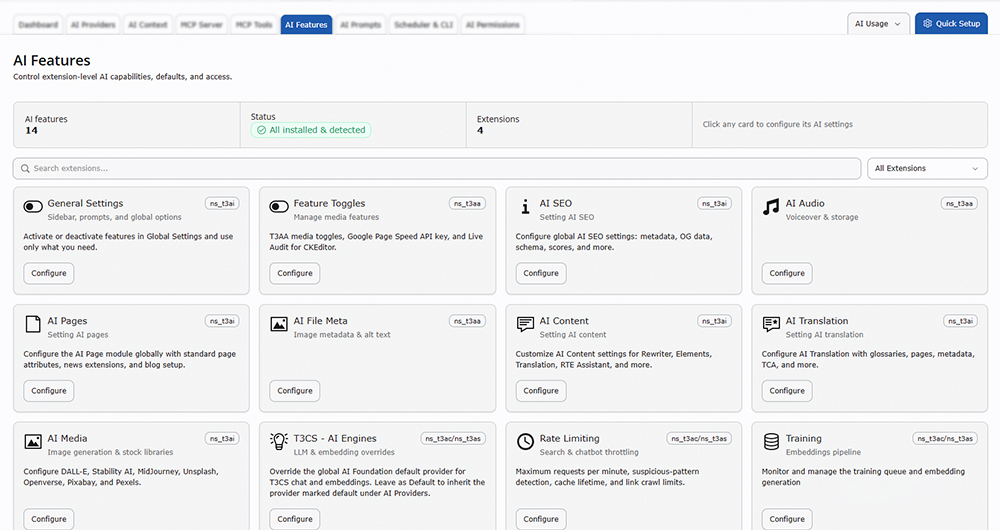
T3AF gives TYPO3 teams one central control panel for managing AI capabilities across installed AI Universe Extensions. It can detect installed AI Extensions and show their related settings in one place, so admins do not need to manage every AI feature separately.
Teams can control features such as:
T3AF also supports feature toggles per Extension, so teams can activate only the AI features needed for a project. Admins can also set per-extension provider overrides, meaning one AI Extension can use a different provider or model than another.
For safer and more stable usage, T3AF includes controls for rate limiting, crawl limits, training and embedding monitoring, and API quota alerts. This helps TYPO3 teams keep AI features organized, measurable, and easier to manage from one backend module.
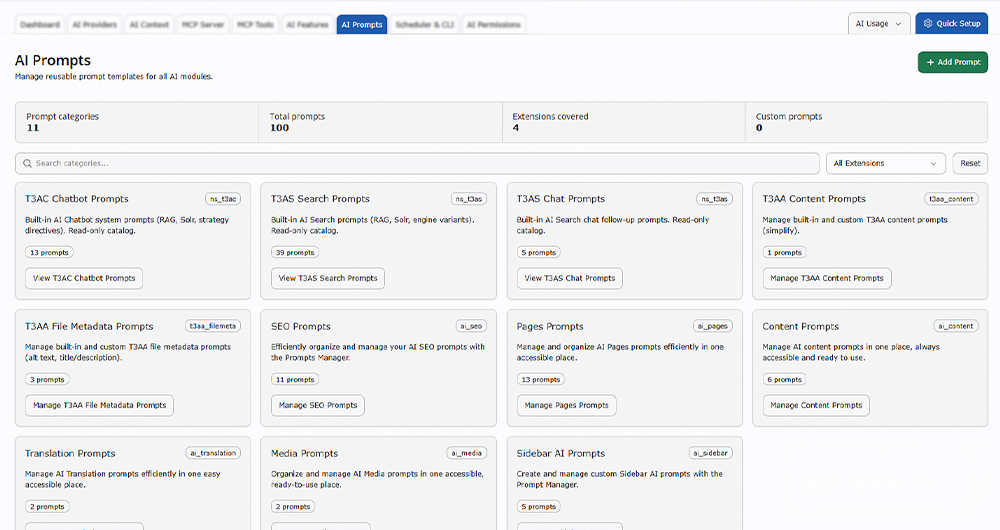
T3AF includes a reusable AI prompt library for TYPO3 teams. Instead of asking every editor, marketer, or developer to write prompts manually each time, teams can save approved prompt templates and reuse them across different AI workflows.
The prompt library can support:
Prompts can also be organized by category, making it easier for teams to find the right prompt for the right task. For example, an SEO team can keep prompts for meta titles and descriptions, while a translation team can keep prompts for multilingual content workflows.
T3AF also supports custom prompts with AI Context placeholders such as {brand_voice} and {content_rules}. This helps every AI output follow the same brand tone, content rules, and project context.
For teams working on large TYPO3 websites, reusable prompts improve consistency, reduce repeated work, and keep AI-assisted content aligned across editors, languages, and campaigns.
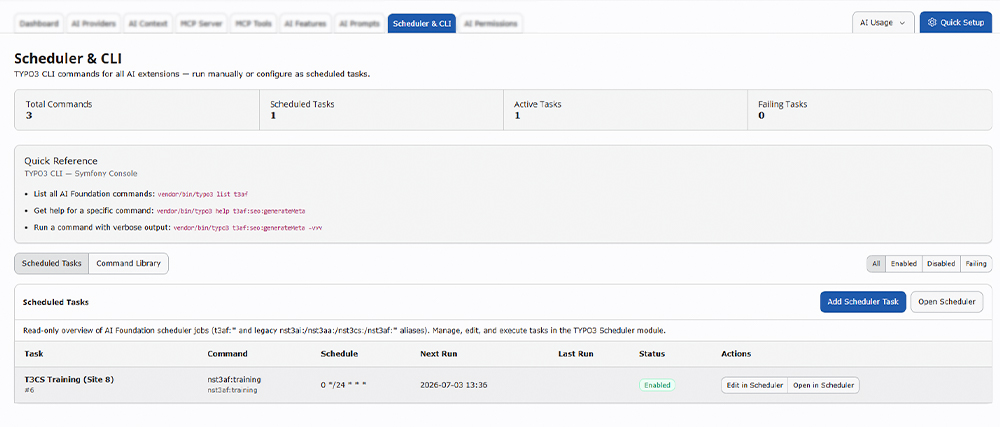
T3AF supports AI automation through TYPO3 Scheduler tasks and Symfony Console commands. This gives developers and admins a structured way to run AI workflows manually or automatically.
With Scheduler and CLI support, teams can run AI tasks with:
This is useful when AI work needs to run at scale or on a regular schedule. Instead of doing repeated AI tasks one by one, TYPO3 teams can automate them inside their existing TYPO3 workflow.
Example AI automation tasks include:
| Task | Example Use |
| Refresh AI context | Keep AI knowledge updated with the latest website content |
| Generate missing metadata | Create meta titles or descriptions for pages that need them |
| Process translation queues | Run AI-assisted translation tasks in batches |
| Rebuild AI search training | Keep AI Search updated with current content |
| Generate alt texts in batches | Improve accessibility for many images at once |
This makes T3AF useful not only for manual AI tasks, but also for ongoing AI maintenance, large content operations, and agency workflows.
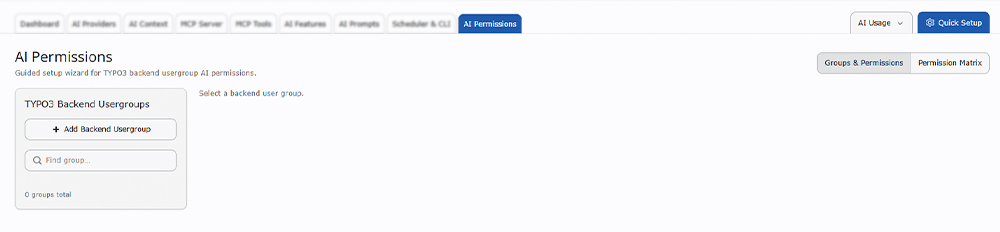
T3AF uses native TYPO3 backend groups to manage who can access AI features, tools, providers, prompts, context, scheduler tasks, usage data, and logs. This keeps AI governance aligned with TYPO3’s existing permission structure.
With the permission setup, admins can:
T3AF also includes a guided permission workflow, making it easier to control AI access for editors, developers, translators, SEO teams, agencies, and enterprise users. This helps teams use AI safely while keeping control inside the TYPO3 backend.
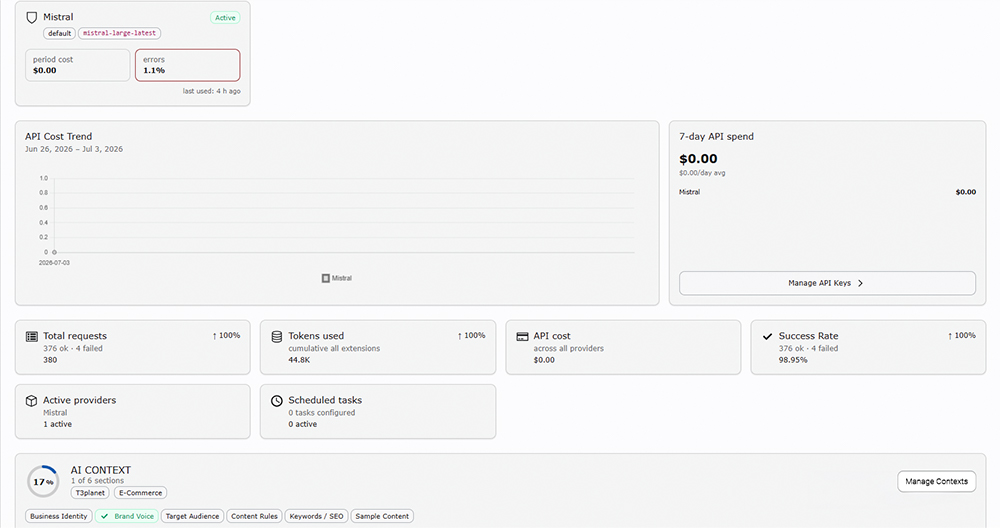
T3AF gives TYPO3 teams a clear AI dashboard to monitor activity, cost, performance, and system health. It works like an AI cockpit where admins can see how AI is being used across providers, users, modules, and Extensions.
The dashboard can show:
This is useful for agencies, enterprises, and finance teams that need visibility into AI costs. It also helps admins debug failed requests, check provider performance, review usage patterns, and support audit-friendly AI operations.
Large TYPO3 websites often need AI work at scale. T3AF supports bulk operations so teams can process many pages, records, files, or content tasks together instead of handling each item manually.
Bulk operations can support:
For example, an editor can generate missing meta descriptions for many pages, an accessibility team can create alt text for many images, or an agency can refresh AI Context across a client website. This helps TYPO3 teams save time while keeping AI workflows structured and repeatable.
T3AF is useful for TYPO3 teams that want a self-hosted, governed, and scalable AI foundation.
| Audience | Value |
| TYPO3 Agencies | Repeatable AI setup across client projects, brand context per client, cost centers, and safer client workflows |
| Enterprises | Self-hosted governance, OAuth 2.1 with PKCE, IP allowlists, logs, quotas, privacy control, and audit-ready AI usage |
| TYPO3 Developers | MCP tools, custom tools, CLI, scheduler, Table Discovery, and clean TYPO3-based AI architecture |
| AI Universe Users | Shared providers, context, prompts, permissions, logs, usage dashboard, and cost controls across all AI Extensions |
In short, T3AF is for teams that want AI inside TYPO3 with stronger control, clearer visibility, and a foundation that can support both current and future AI workflows.
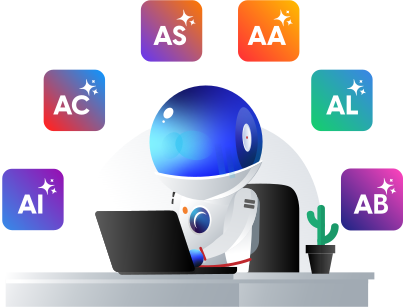
T3AF is the base Extension behind the T3Planet AI Universe. Once it is installed, other AI Universe Extensions can use the same providers, AI Context, prompts, permissions, usage tracking, logs, and cost controls from one shared foundation.
| Extension | What It Gains From T3AF |
| T3AI | Content, SEO, translation, media, and RTE AI support |
| T3AC | AI chatbot workflows with shared context and providers |
| T3AS | AI search, semantic search, and training workflows |
| T3AA | Alt text, accessibility checks, audit support, voice, and metadata generation |
| T3AL | AI XLIFF localization, Crowdin sync, and rollback support |
| T3AB | AI Extension generation, Content Blocks, TCA, and Templates |
This shared foundation helps TYPO3 teams avoid duplicate setup across AI Extensions. Providers, prompts, brand context, permissions, logs, and usage data can be managed once and reused across the AI Universe.
T3AF gives TYPO3 teams a more structured way to manage AI compared to separate AI configurations across different tools or Extensions.
| Without AI Foundation | With T3AF |
| API keys configured in many places | Providers configured once |
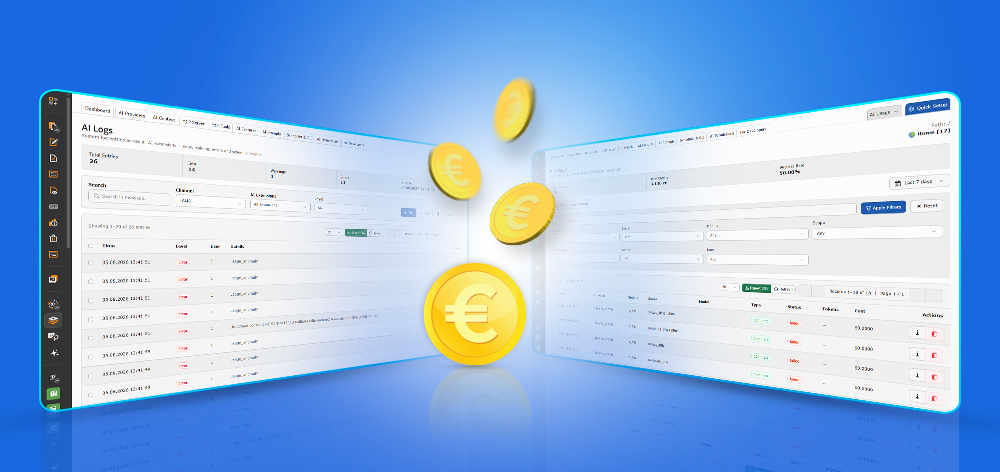
| No clear cost overview | Budgets, quotas, and per-request cost logging |
| Limited permission control | Role-based AI permissions |
| Generic AI output | Brand context in every generation |
| Limited audit trail | Full logs and usage monitoring |
| External dashboard dependency | Self-hosted TYPO3 backend control |
| Closed, black-box AI tools | Open source (GPL): read every line yourself |
With T3AF, AI workflows stay organized inside TYPO3. Teams can manage providers, permissions, prompts, usage, logs, and budgets from one native backend foundation.
T3AF is more than a single-purpose TYPO3 AI Extension. It works as the foundation that helps TYPO3 teams manage AI workflows in a scalable, secure, measurable, and governed way.
With T3AF, AI Foundation for TYPO3, teams can connect AI assistants, manage AI providers, control costs, protect data, standardize prompts, automate workflows, and power the complete T3Planet AI Universe from one self-hosted TYPO3 backend foundation.
Ready to make TYPO3 AI-ready?
Download T3AF Free Read the developer docs Talk to our AI consultant
T3AF is the AI Foundation for TYPO3. It provides an MCP Server, 100+ AI Tools, Multi-LLM provider management, AI Context, prompts, permissions, usage tracking, logs, scheduler, CLI, and bulk operations.
No. T3AF works as a standalone AI foundation for TYPO3 and also powers the other T3Planet AI Universe Extensions.
MCP, or Model Context Protocol, lets AI assistants connect with TYPO3 and perform controlled actions through defined tools, permissions, and secure authentication.
In Context Mode, the AI agent uses prepared website context and generates output with its own model. In Native Mode, the agent only triggers actions, while AI generation happens inside TYPO3 through configured providers.
T3AF supports OpenAI, Anthropic, Google Gemini, Ollama, ElevenLabs, AltText.ai, and custom LLM endpoints.
Yes. T3AF includes budgets, quotas, cost centers, token tracking, provider usage, per-request logs, and dashboard reporting to help teams monitor and control AI costs.
T3AF is completely free and open-source software. There is no commercial licence, subscription, or licence key required. You can use it without any domain restrictions.
No licence verification request is required. T3AF does not send licence keys or domain information for validation. Your data flow depends on the AI provider configuration you choose.
T3AF gives you audit logs, human-approval workspaces and self-hosted data governance ahead of the Article 50 transparency rules that apply from 2 August 2026. This is compliance-ready tooling, not a compliance guarantee, how you configure and oversee AI stays your responsibility.

Jürgen Pietschmann is a T3Planet Product Consultant at T3Planet Shop. He specialises in integrating AI into editorial workflows – from intelligent content creation and automated SEO to AI-powered search and chatbot solutions for TYPO3 sites. As a technical consultant for T3Planet AI Universe, he works closely with agencies and editorial teams on practical TYPO3 implementations. Jürgen has been writing the This Month in TYPO3 series since December 2025 and has spoken at T3CON25 and TYPO3 Developer Days 2026 (T3DD26), where he co-presented Content Editing Unlocked.
物語の中心にあるのは、光と闇を象徴する二つの勢力による永遠の戦い、そして謎に包まれたバラウルの存在です。Aion 2では、これらのテーマをさらに掘り下げ、新たな展開やキャラクターを加えることで、より奥深いストーリーを展開しています。ストーリークエストを進めることで、プレイヤーは物語の核心に近づきながら、アトレイアの世界について詳しく知ることができます。
前作をプレイしたことがなく、Aionシリーズのロアを知らないプレイヤーでも、Aion 2には問題なく入り込めます。ストーリーは分かりやすく展開されており、初心者でも世界観を理解しやすい構成になっています。一方で、より深く物語を楽しみたいプレイヤーにとっては、クエストやキャラクターとの会話に多くの背景情報が用意されています。さらに、世界を探索しながら AION 2 キナ 購入を稼ぐこともでき、冒険とゲーム内経済を同時に楽しめます。
Aion 2のロアを知る重要性
Aion 2のロアは、単なる背景設定ではありません。ゲーム内のさまざまな要素を理解するうえでも重要な役割を果たしています。アビスをはじめとするコンテンツや、エリュシオンとアスモディアンの対立など、多くのゲーム要素はストーリーを知ることで、より深い意味を持つようになります。
なぜ特定の戦いが起きているのか、各勢力が何を求めているのか、そしてアトレイアの未来に何が懸かっているのかを理解すれば、ゲーム内での自分の行動にもより大きな意味を感じられるでしょう。
また、Aion 2のロアを理解することは、コミュニティでの交流にも役立ちます。プレイヤー同士でストーリーについて語り合ったり、キャラクターの行動や今後の展開についてさまざまな考察を共有したりすることも、MMORPGの楽しみの一つです。
まとめ
Aion 2のロアは、アトレイアの世界をより生き生きと感じさせてくれる重要な要素です。ストーリークエストやキャラクターとの会話を通して物語を追いながら、世界の歴史や勢力間の対立を理解していきましょう。冒険を楽しみながら Aion 2 キナ 販売を集め、キャラクターの成長やゲーム内での活動に活用することで、Aion 2の世界をより深く楽しめます。
物語を知れば知るほど、アトレイアで起こる出来事への理解も深まり、単なる戦闘やクエスト以上の魅力を感じられるはずです。MMOEXPは、ゲーム通貨やアイテム、AION 2 キナ 購入、アカウントなどを購入するための、信頼性の高いサービスの一つです。現在、限定割引コード「cake」を利用すると、8%オフで購入できます。
https://www.mmoexp.com/ja/Aion-2/Kinah.html
في مسيرة اللاعب تتحكم بلاعب واحد في FC 27. يعتمد تطورك على مستواك داخل الملعب والقرارات التي تتخذها.
تطوير اللاعب
تدرّب باستمرار وقدم أداءً جيدًا لتطوير مهاراتك. الأداء القوي خلال المباريات يساعد على تسريع تقدمك.
اختيار النادي الصحيح
اختر نادياً يمنحك فرصاً كافية للمشاركة. الحصول على دقائق لعب منتظمة مهم للغاية لتطوير مستواك.
تحقيق الأهداف
أنجز أهداف النادي والأهداف الشخصية باستمرار. يساعد ذلك في تعزيز فرصك في التشكيلة ورفع قيمتك.
السعي للقمة
مع مرور الوقت، حاول الانتقال إلى أندية أكبر. اختيار الانتقالات المناسبة يمكن أن يدفع مسيرتك إلى الأمام.
ابنِ فريق أحلامك
موهبتك تستحق فريقاً يناسب مستواها. في Ultimate Team، ابنِ تشكيلة قوية ونافس بأفضل اللاعبين لتحقيق أهدافك.
استمر في التطور، فالموهبة والعمل الجاد يقودانك نحو القمة.
الأسئلة الشائعة
كيف أنمو أسرع؟
قدّم أداءً جيداً، وتدرّب بانتظام، واختر أندية تمنحك فرصاً حقيقية للعب.
هل الانتقالات مهمة؟
نعم، الانتقال إلى نادٍ أكبر في الوقت المناسب يمكن أن يدعم تطور مسيرتك.
هل ألعب في مراكز متعددة؟
يعتمد ذلك على اللاعب، لكن التركيز على مركز أساسي يساعدك على تطوير مهاراتك بشكل أفضل.https://www.mmoexp.com/ar/Fc-27/Coins.html?fsid=052736
EA Sports FC 27 steht vor dem Start und bringt zahlreiche Neuerungen für Fans der beliebten Fußballsimulation. Von überarbeiteten Spielmechaniken bis hin zu neuen Inhalten für Ultimate Team gibt es bereits viele bestätigte Details. Wer seine Mannschaft früh aufbauen möchte, sollte auch die Bedeutung von FC 27 Münzen für Transfers, Spieler und weitere Inhalte im Blick behalten.
Release und Editionen
EA Sports FC 27 erscheint offiziell am 25. September 2026. Besitzer der Ultimate Edition erhalten bereits ab dem 18. September Zugang zum Spiel. Damit bietet EA erneut einen mehrtägigen Vorabzugang für Spieler, die möglichst früh in die neue Saison starten möchten.
Auch die Web App und Companion App spielen wieder eine wichtige Rolle. Sie ermöglichen es Ultimate-Team-Spielern, bereits vor dem vollständigen Spielstart Transfers zu verwalten, Mannschaften anzupassen und den Markt zu beobachten.
Ultimate Team mit neuen Möglichkeiten
Ultimate Team bleibt einer der wichtigsten Spielmodi in FC 27. EA setzt dabei auf verschiedene neue Systeme und Inhalte, die den Aufbau eines Teams abwechslungsreicher gestalten sollen.
Zu den interessanten Neuerungen gehört die Hall of FUT. Über Gallery Sets können Spieler Gallery Tokens sammeln und damit besondere Karten freischalten. Zu den ersten bekannten Namen gehören unter anderem Akinfenwa, Giovani dos Santos, Loic Remy, Fellaini und Eljero Elia.
Auch neue Icon-Inhalte wurden angekündigt. Die Class of 27 erweitert das bekannte Icon-System, während Legenden wie Pele weiterhin eine zentrale Rolle bei den besonders starken Karten spielen.
Überarbeitete Spielmechaniken
EA Sports FC 27 soll sich auf dem Platz kontrollierter und realistischer anfühlen. Manuelle Verteidigung und präziseres Passspiel erhalten mehr Bedeutung, während bestimmte PlayStyles angepasst beziehungsweise abgeschwächt werden.
Dadurch müssen Spieler ihre Aktionen stärker an die jeweilige Spielsituation anpassen. Besonders erfahrene Spieler könnten von den Änderungen profitieren, während Neueinsteiger etwas Zeit benötigen dürften, um sich an das neue Spielgefühl zu gewöhnen.
Karrieremodus und weitere Inhalte
Neben Ultimate Team bleibt auch der Karrieremodus ein wichtiger Bestandteil von FC 27. Spieler können weiterhin ihre eigene Mannschaft aufbauen, Transfers durchführen und langfristige Ziele verfolgen.
Darüber hinaus bietet das Spiel eine große Auswahl an Vereinen, Nationalmannschaften, Ligen und Stadien. Die Datenbank umfasst mehr als 21.000 Spieler, über 800 Vereine und Nationalmannschaften sowie mehr als 35 Ligen. Auch die Auswahl an Stadien wurde weiter ausgebaut.
Fazit
EA Sports FC 27 entwickelt sich zu einem umfangreichen Nachfolger mit zahlreichen Veränderungen bei Gameplay, Ultimate Team und langfristiger Teamplanung. Wer früh in Ultimate Team einsteigen möchte, sollte seine Ressourcen sorgfältig verwalten und den Transfermarkt beobachten. Für zusätzliche Möglichkeiten können Spieler die Handelsplattform MMOExp besuchen und dort mit dem Rabattcode east einen Nachlass von 8 Prozent erhalten. Wer seine Mannschaft schneller verstärken möchte, kann außerdem Kaufe FC 27 Münzen in Betracht ziehen. https://www.mmoexp.com/de/Fc-27/Coins.html?fsid=610207&cy=USD