

TYPO3 in the AI Era: How Intelligent Tools Enhance Enterprise CMS Workflows
AI


On many websites, around 43% of users use the search bar immediately after landing, especially when content and navigation are complex. This behavior signals clear intent, not impatience.
Internal search is often treated as a simple utility. Once it works, it is rarely reviewed. This is a missed opportunity. Search queries form one of the most honest feedback loops on a website, showing what users expect, what they cannot find, and where structure or language breaks down.
When search is optimized, these high-intent users are guided faster to the right content, which typically leads to 2–4× higher conversion rates compared to passive browsing.
This post explains how to analyze and interpret internal search behavior and how this insight can be used to optimize content and structure based on real user intent.
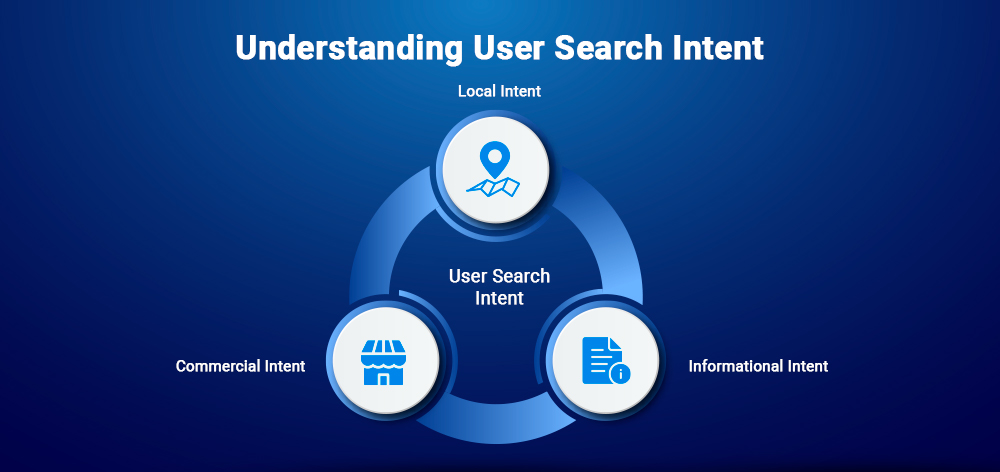
Understanding why users search helps bridge the gap between their expectations and your content. Most queries fall into three distinct categories of intent.
Users want to find the answer or the document. This is usually an indication that the information is available but it is not easily found or it uses terms that are not familiar to the user.
These users are crystal clear about their needs and take speed over exploration as a priority. They regard search as a quick route to skip landing pages and reach the end of the line directly.
Users searching for basic logistics usually point out a structural gap. The "quick-fix" answers are often absent in the global header or footer where users expect to find them.
To improve user experience, you must first understand the data flowing through your search bar. However, capturing this information in a meaningful way remains a common challenge.
While TYPO3 efficiently processes search requests, it does not store these queries in a usable format by default. Without a dedicated tracking mechanism, editors remain blind to the specific terms and phrases users are typing every day.
TYPO3 has the capacity to manage search requests swiftly, nevertheless it does not keep these queries in a valid format by default. In the absence of a specific tracking tool, the editors do not have any idea of the particular words and expressions that the users are entering every day.
GA4 and other similar tools can know that a search was performed by monitoring the query parameters. But this information is usually not linked to the CMS:
The actionable insights are derived from the spotting of certain patterns rather than only the total volume. By concentrating on these essential indicators, one can resort to data-based decisions:
In 2026, user expectations for search have shifted from "basic utility" to "intelligent assistant." To keep users engaged, your TYPO3 search must be both discoverable and resilient.
Search should be the first thing users see and placed where they expect it (usually the upper right corner of the header). It is vital that the search area does not move or disappear on the following pages; if it does, users will be uncertain about the site's reliability and would hence trust less.
Modern search should work implicitly and totally for the user. The introduction of features that lessen “search friction” guarantees that users will get what they want on their first try.
A “no results” page must never be a dead end but rather a vital feedback loop. Offer a way out instead of a blank screen so that the user does not have to leave the site completely.
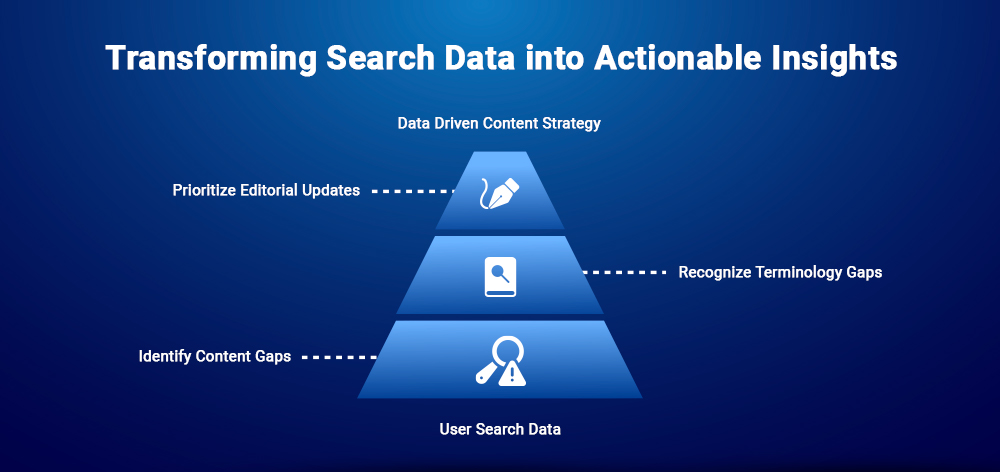
Analyzing search behavior shifts the perspective from what editors think is important to what users actually need. These observations are common across large-scale TYPO3 projects.
Data from search has been a kind of "wish list" for your users. If a topic keeps being searched by users but does not show any result, it indicates that your content strategy has a gap in that exact point or that the information is very deep and hard to find.
Professional terms and user vocabulary are often very far apart. Search history brings to light these "terminology gaps," indicating when editors rely on technical terms and the readers look for simple and common language.
Support by solid evidence, teams are no longer in doubt about which pages need optimization next. Search history allows for data-driven decision-making:
To turn search into a strategic asset, the data must be accessible to the people managing the content. T3AS - AI Search bridges this gap by bringing user insights directly into the editorial workflow.
The majority of CMS platforms consider search as a "black box," however, keeping history in the backend is a significant factor for the agile content management:
Editors Empowerment: Content teams want to have search trend access without depending on IT or analytics experts from outside.
The T3AS extension functions as a connect between user actions and editorial moves, thus treating search history as a recognized part of the backend:
A major difference is in the way data is processed. T3AS is designed for ethical analysis:
Managing search data is not just about gaining insights; it is about maintaining a relationship of trust with your users. In the context of GDPR and TYPO3, data responsibility must be built into the system by design.
Determining user intent does not mean personal profiling. TYPO3 teams that take their responsibilities seriously put data minimization first so that search can still be a useful tool and not become a tracking device:
Search data is sometimes very sensitive, and as such, it should be protected with the same strictness as any other backend record.
Internal search is more than a utility; it is a direct feedback loop from your visitors. Ignoring this data means missing vital signals about content gaps and language mismatches that your navigation might overlook.
By using tools like T3AS, you can make this behavior visible directly within the TYPO3 backend. This empowers your team to make data-driven decisions and build a site that truly speaks your users' language.
Internal search helps users find content quickly when navigation is complex or unfamiliar, especially on large TYPO3 websites.
Search queries reveal user intent, missing content, and language mismatches that are not visible through navigation analytics alone.
No. TYPO3 processes searches but does not store queries in a usable format without an additional extension or tracking setup.
Yes. Repeated queries and “no result” searches highlight where content should be added, renamed, or made more visible.
Yes, if data is aggregated, anonymized, and stored with defined retention rules, without tracking individual users.
T3AS makes internal search history visible in the TYPO3 backend, allowing editors to analyze user intent directly and improve content decisions.


Jürgen Pietschmann
TYPO3 AI ConsultantJürgen is a TYPO3 AI Consultant at AI Universe. He helps businesses make the most of their TYPO3 websites by integrating AI-powered solutions. From smart content creation and automated SEO improvements to seamless chatbot…
More From Author